
 **Professional VFX, HDR color science, review, and DCC handoff for ComfyUI.**
[](https://github.com/fxtd-studios/radiance)
[](LICENSE)
[](#node-map)
[](https://registry.comfy.org/nodes/radiance)
[](https://huggingface.co/fxtdstudios/RUDRA)
Radiance is a production-grade node pack for ComfyUI built around 32-bit float and HDR/ACES image pipelines. It brings VFX plate prep, color management, review tooling, in-canvas studio dashboards, and Nuke / DaVinci Resolve handoff into one coherent toolkit, so you can take a shot from generation through finishing without leaving the graph.
Artists get 32-bit, HDR, and ACES image tools, professional viewers, and VFX nodes. Supervisors and coordinators get project, shot, asset, and workflow management built directly into the canvas.
[Install](#installation) · [Quick start](#quick-start) · [Models](#models-rudra-sdr--hdr) · [What it does](#what-it-does) · [Node map](#node-map) · [Settings](#settings) · [Troubleshooting](#troubleshooting) · [Known limitations](#known-limitations) · [Docs](#documentation)
**Professional VFX, HDR color science, review, and DCC handoff for ComfyUI.**
[](https://github.com/fxtd-studios/radiance)
[](LICENSE)
[](#node-map)
[](https://registry.comfy.org/nodes/radiance)
[](https://huggingface.co/fxtdstudios/RUDRA)
Radiance is a production-grade node pack for ComfyUI built around 32-bit float and HDR/ACES image pipelines. It brings VFX plate prep, color management, review tooling, in-canvas studio dashboards, and Nuke / DaVinci Resolve handoff into one coherent toolkit, so you can take a shot from generation through finishing without leaving the graph.
Artists get 32-bit, HDR, and ACES image tools, professional viewers, and VFX nodes. Supervisors and coordinators get project, shot, asset, and workflow management built directly into the canvas.
[Install](#installation) · [Quick start](#quick-start) · [Models](#models-rudra-sdr--hdr) · [What it does](#what-it-does) · [Node map](#node-map) · [Settings](#settings) · [Troubleshooting](#troubleshooting) · [Known limitations](#known-limitations) · [Docs](#documentation)
Overview
- 32-bit float and EXR workflows for VFX and finishing, with lossless scene-linear round-trips.
- ACES, OCIO, log curves, LUTs, CDL, scopes, QC, and grade-transfer tools.
- VFX utilities for plate prep, masks, depth, camera and optics, motion, multipass, real AOV ingestion, and relighting.
- Video and temporal workflow nodes for loading, routing, conditioning, sampling, and delivery.
- In-canvas studio dashboards (Project Manager, Workflow Library, Assets) rendered over the ComfyUI graph, never in a separate browser tab.
- Radiance Sampler, a preset-driven sampler that hides irrelevant parameters and adapts to the selected model.
- One Viewer with a Simple mode (picture, compare, playback) and an Advanced mode (scopes, grade, inspector, timeline tools), and keyboard shortcuts.
- HDR VAE Encode / Decode that carry values above 1.0 through the model's VAE, learned SDR → HDR recovery (RUDRA), and HDR LoRA tooling for scene-linear generation.
- Dynamic Gizmos: collapse any group of nodes into a single reusable custom node.
- Secure-by-default handoff to Nuke and DaVinci Resolve.
In action
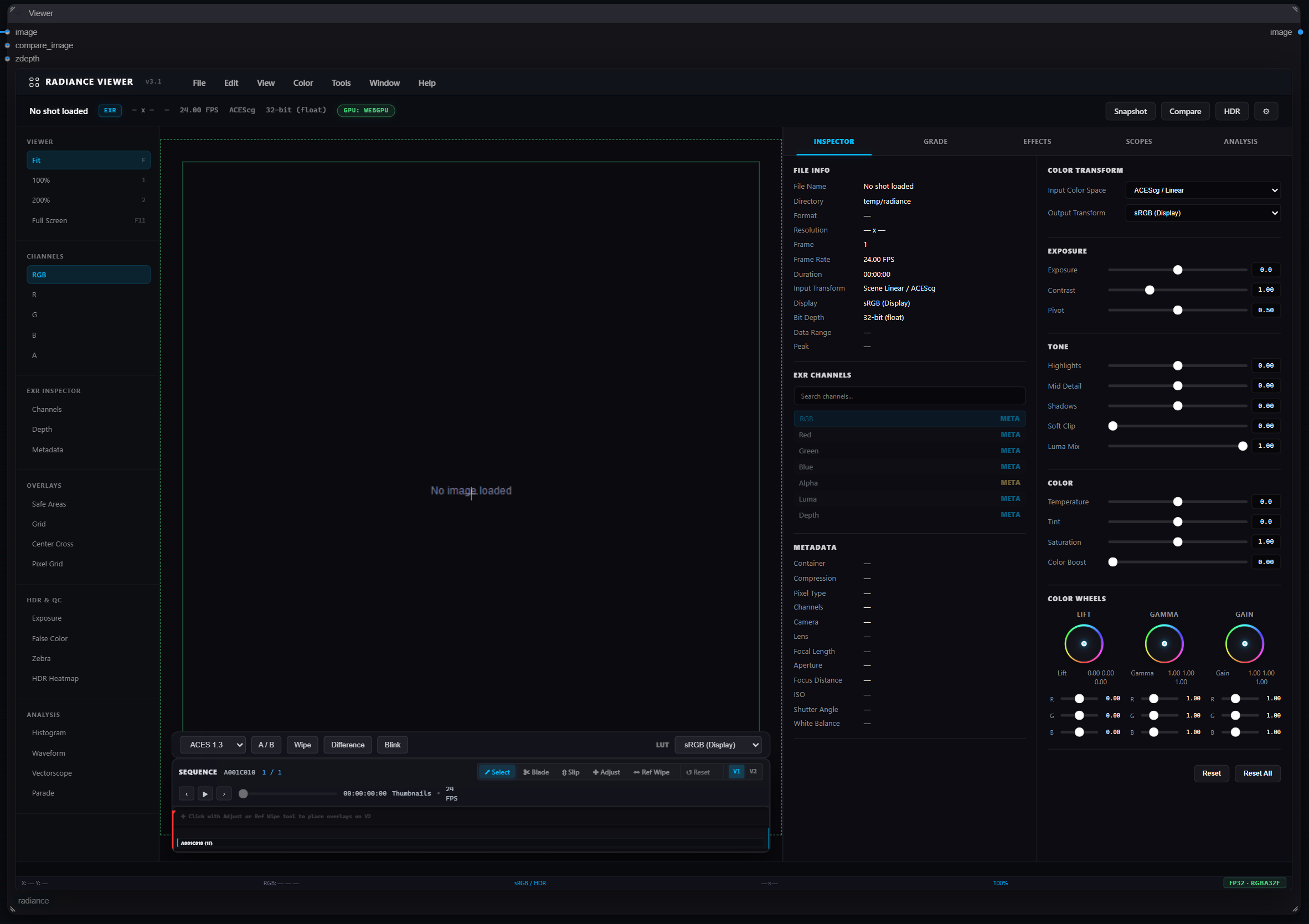
The Radiance Viewer: WebGPU-accelerated review at FP32/RGBA32F end to end: EXR channel and layer inspection, OpenColorIO 2.5 (load a show's config and the Display and View menus come from it, applied through OCIO's own GPU path), with a built-in ACES 1.3 pipeline as the fallback, exposure/tone/colour controls with lift-gamma-gain wheels, scopes (histogram, waveform, vectorscope, parade) with selectable scales (10-bit and 12-bit code value, percent, mV, and nits for ST.2084 and HLG), data or video levels, and a switch for whether they measure before or after the viewer colour transforms, a pixel probe with per-region min/max/mean/median and NaN/Inf reporting, false colour, zebra, a nit-accurate HDR heatmap anchored to BT.2408 reference white, safe areas labelled with the standard they come from (SMPTE ST 2046-1 / EBU R 95), aspect-ratio mattes, nearest-neighbour magnification on N, timecode, A/B compare with wipe, difference and blink, and a sequence timeline with per-frame thumbnails.
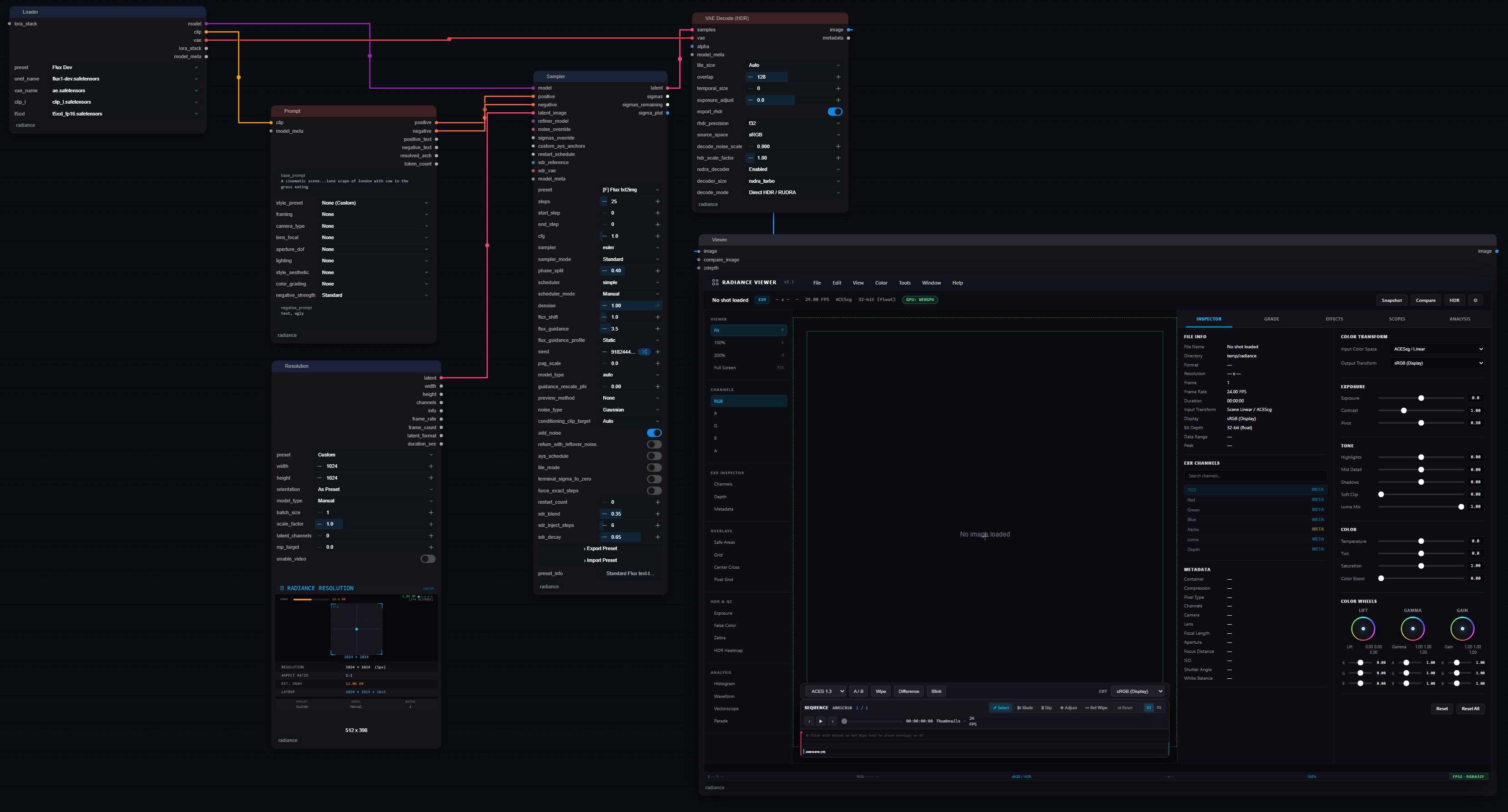
A generation-to-review graph: Loader → Prompt → Resolution → Sampler → VAE Decode (HDR) in Direct HDR mode → Viewer. The decode stays scene-linear the whole way; the Viewer applies the display transform, so what you grade is what the file actually contains.
Installation
ComfyUI Manager / Comfy Registry
Search for Radiance in ComfyUI Manager, or install it from the Comfy Registry. Nothing else needs doing:
- Dependencies install from
requirements.txt(OpenColorIO, OpenEXR, OpenImageIO, OpenCV and the rest; all ship as wheels for Python 3.9 to 3.13). On Python 3.14, which has no OpenEXR wheel yet, OpenEXR is skipped and EXR goes through OpenImageIO. - OCIO configures itself at startup: your
$OCIOif you have one, otherwise OpenColorIO's built-in ACES studio config. No files to download. - The RUDRA SDR → HDR model downloads the first time a graph needs it (about 5 MB, see Models).
- The Multipass Estimate models (MoGe-2 and Marigold IID, about 4.9 GB)
download the first time that node runs, unless its
download_missing_modelsswitch is off (see Multipass Estimate).
Checked on a clean ComfyUI 0.32 with Python 3.13: the registry package installs, all 156 nodes load, OCIO is configured, and the first SDR → HDR run fetches the model and applies it.
Requirements
Install into the same Python environment as ComfyUI. Radiance relies on ComfyUI's existing PyTorch. Dependencies are pure Python (no CUDA toolkit or compiler required). Use the requirements file that matches your platform, shown below.
Windows
cd ComfyUI\custom_nodes
git clone https://github.com/fxtd-studios/radiance.git
cd radiance
pip install -r requirements_windows.txt
Ubuntu / Linux
Install the system libraries OpenCV needs (OpenEXR and OCIO ship as self-contained wheels):
sudo apt update
sudo apt install -y git python3-venv build-essential libgl1 libglib2.0-0 ffmpeg
On Ubuntu 22.04 the package is
libgl1-mesa-glx; on 24.04+ it'slibgl1.
Then, inside ComfyUI's environment:
cd ComfyUI/custom_nodes
git clone https://github.com/fxtd-studios/radiance.git
cd radiance
pip install -r requirements_linux.txt
WSL (Ubuntu on Windows)
WSL2 is Ubuntu with GPU passthrough, so follow the Ubuntu steps above (including requirements_linux.txt), plus:
- Install the NVIDIA driver on the Windows host only, never a Linux NVIDIA driver inside WSL. Verify with
nvidia-smiinside WSL. - No CUDA Toolkit needed: PyTorch's bundled CUDA runtime handles the GPU.
- Keep ComfyUI on the Linux filesystem (
~/ComfyUI), not/mnt/c/..., for speed; open the UI from Windows athttp://localhost:8188.
macOS (Apple Silicon)
cd ComfyUI/custom_nodes
git clone https://github.com/fxtd-studios/radiance.git
cd radiance
pip install -r requirements_mac_silicon.txt
Verify
Start ComfyUI and look for Radiance: successfully loaded 156 nodes (v3.5.0) in the log.
A lower count means a node module failed to import, usually a missing optional
dependency; the Environment Guard table printed at startup shows which.
For a full machine-level check (every node executed on your GPU, VRAM peaks, and the RUDRA SDR → HDR pixel model benchmarked and scored), run the acceptance tool. It ships with a git install, not with the registry package:
cd ComfyUI
python custom_nodes\radiance\tools\gpu_acceptance.py
It writes gpu_acceptance_report.md next to the script, and names any nodes
missing on your install.
Updating
- ComfyUI Manager / Registry: use Update on Radiance in the Manager, then restart ComfyUI.
- Git install:
git pullinComfyUI/custom_nodes/radiance, run the samepip install -r ...line as above, then restart ComfyUI.
The startup log prints the installed version:
Radiance: successfully loaded 156 nodes (v3.5.0).
Upgrading from 2.x or 3.4
3.5.0 is a large release; the full list is in the changelog. What affects an existing graph:
- Check widget values once on HDR VAE Decode, SDR → HDR Universal, SDR → HDR Recover and NDI Sender. Inputs were removed from them, and ComfyUI stores widget values by position.
- HDR is measured one way everywhere: linear 1.0 = reference white, 203 nits by default (ITU-R BT.2408). Universal and Recover output that used 1.0 = 100 nits is now 2.03x smaller in value and identical in nits.
- Learned SDR → HDR is one pixel model that downloads itself; the older
latent decoders (
rudra_turbo_decoder_*,rudra_full_decoder_*) are no longer read and can be deleted frommodels/radiance. - Multipass Relight reads
aothe way renderers write it: 1 = open. It used to read the pass as an occlusion amount, which inverted real AO loaded through Read AOVs. A hand-made occlusion mask needs inverting once. - Thirteen bug fixes change some outputs: Video HDR Decode (white on
peak_nits, a real SDR preview), Video Batch Decode (no secondlatent_scale), HDR Color Pipeline (every primaries pair, corrected D60 matrices), Multipass Relight's point light with a depth pass, Digital Cinema Read (a video's first frame), EXR MultiPart (every frame). The changelog's upgrade note lists them.
Models (RUDRA SDR → HDR)
Learned SDR → HDR recovery uses the RUDRA pixel model: a compact network that takes decoded 8-bit SDR pixels and returns scene-linear HDR, recovering clipped highlights and crushed shadows. It works on any image or frame batch and needs no VAE, so it applies equally to generated frames and to footage. The weights are published on Hugging Face, fxtdstudios/RUDRA.
The RUDRA weights are licensed for non-commercial use only, unlike Radiance's code (GPL-3.0) and RUDRA's code (Apache 2.0). One training source (HdM-HDR-2014 / HdM-HFR-2017) is free for academic use only, and FXTD Studios cannot waive that term. Research, evaluation, teaching and personal projects are fine; commercial production, client deliverables and paid services need a commercial licence from FXTD Studios. The full terms are in the weights' licence. Expand mode uses no weights and has no such restriction.
It downloads automatically. The first time SDR → HDR Universal or
SDR → HDR Recover needs the model and none is installed, Radiance fetches
RUDRA's shipped model, sdr2hdr_shadow_v1 (about 5 MB), into your ComfyUI
models folder:
ComfyUI/models/radiance/sdr2hdr_shadow_v1.safetensors
The download is pinned to a fixed Hugging Face commit and checked by size and
SHA-256 before it is used; a file that does not match is discarded. It happens
once, and the console shows [Radiance] Installed ... when it is done. Leave
the node's pixel_checkpoint field empty to use it.
To install it by hand instead (offline or air-gapped machines), download
sdr2hdr_shadow_v1.safetensors
and put it at the path above, creating the radiance folder if needed. To turn
automatic downloads off, set any of these in the ComfyUI launch environment:
| Variable | Effect |
|---|---|
RADIANCE_ALLOW_DOWNLOADS=0 |
never download any Radiance model |
HF_HUB_OFFLINE=1 or TRANSFORMERS_OFFLINE=1 |
treat the machine as offline |
Radiance registers models/radiance with ComfyUI, so a radiance: entry in
extra_model_paths.yaml works too, and RADIANCE_SDR2HDR_PIXEL can point at
a file anywhere. Every RUDRA image checkpoint loads, as Hugging Face publishes
it (.safetensors, flat in the folder or under the sdr2hdr/ subfolder
hf download creates) or as the training scripts write it (.pt); each file
carries its own architecture, so the shadow-gated and ungated models both
build correctly. When several are present sdr2hdr_shadow_v1 wins, then the
other shadow seeds, then sdr2hdr_image_v5, then older .pt files.
sdr2hdr_temporal_v1 is not an image model and is refused with a message
saying so.
| File | Used by | Link |
|---|---|---|
sdr2hdr_shadow_v1.safetensors |
SDR → HDR Universal (Recover / Hybrid) and SDR → HDR Recover, stills and frame batches | download (auto) |
sdr2hdr_shadow_s2 / _s3, sdr2hdr_image_v5 / _v6 |
alternatives: other seeds of the shipped recipe, and the backbone without the shadow gate | RUDRA/sdr2hdr |
temporal_rudra_residual_ema.safetensors |
the motion-aligned temporal model for ordered video (optional) | not yet published |
If the model can't be found or downloaded, Universal falls back to
deterministic expansion and says so in its report output; Recover raises
rather than silently expanding.
What the model recovers, and what it doesn't. In clipped highlights the
network supplies brightness; the colour stays the source's. A clipped channel
carries no information about its own value, and the released checkpoints were
trained on renders that almost never clipped, so their per-channel guesses in
blown areas are not reliable colour: letting them through drew false-colour
rings round a clipped sun and cast white areas red. The learned lift fades in
as the source goes to white (two or more channels near clip), is never darker
than the deterministic expansion, and no channel of it exceeds peak_nits,
so an HDR10 encode cannot clip it per channel. The model runs on the whole
frame when it fits in memory; pixel_tile_size only applies when it does
not, because the network normalises over its input and tiles shift the
result.
Models every other node downloads
Every node that needs a model downloads it the first time it runs. Each file
is pinned (a fixed Hugging Face commit or the original release file) and its
SHA-256 is checked before it is installed; a file that does not match is
deleted. Downloads go to a .part file and resume after an interruption, and
ComfyUI's progress bar shows them.
| Node | Model | Size | From | Installed to |
|---|---|---|---|---|
| Upscale Image / Video, Tier 1 | Real-ESRGAN x4+, x2+, x4+ anime | 18-67 MB | xinntao/Real-ESRGAN | models/upscale_models/ |
| Upscale Image / Video, Tier 2 | SwinIR-L x4 real-world GAN | 142 MB | JingyunLiang/SwinIR | models/upscale_models/ |
| Upscale Image / Video, Tier 3 | SD x4 upscaler (diffusers) | 3.5 GB | stabilityai/stable-diffusion-x4-upscaler | Hugging Face cache |
| Upscale Face Restore | CodeFormer, GFPGAN 1.4, RetinaFace | 110-377 MB | original GitHub releases | models/facerestore_models/, models/facedetection/ |
| AI Upscale | SUPIR v0F / v0Q (fp16), Real-ESRGAN | 2.7 GB each | Kijai/SUPIR_pruned | models/upscale_models/ |
| Depth Map Generator | Depth Anything V2 Small / Base / Large | 99 MB-1.3 GB | depth-anything | Hugging Face cache |
Read Models (auto_download) |
the 60 checkpoints, text encoders and VAEs in its presets (FLUX.1 / FLUX.2 / klein, SDXL, LTX-2.3 / 2.5, MiniMax-H3) | 4 MB-66 GB | pinned Hugging Face commits | the matching models/ folder |
Gated repositories. FLUX.2-dev, FLUX.2-klein 9B and LTX-2.5 require
accepting their licence on Hugging Face. Accept it on the model page, set
HF_TOKEN to a read token (or run huggingface-cli login) and restart
ComfyUI; the download then runs automatically. Without the token the node
stops with a message giving both steps.
Installed by hand. HAT-L (Upscale Tier 2) is published only on Google
Drive, so there is no pinned download: get it from the
HAT page and save it as
models/upscale_models/HAT_L_x4.pth / HAT_L_x2.pth. Until then Tier 2
uses SwinIR-L at 4x and Real-ESRGAN at 2x. SeedVR2 needs the
ComfyUI-SeedVR2_VideoUpscaler node pack, which fetches its own weights.
The latent-space RUDRA decoders that earlier releases loaded inside HDR VAE
Decode (rudra_turbo_decoder_* / rudra_full_decoder_*) were retired in
3.5.0; see the changelog. The files can be deleted from models/radiance.
Models (Multipass Estimate)
Multipass Estimate turns a plate into render-style passes using trained models only; every pass is a prediction of that quantity or is computed from one. It downloads its weights the first time it runs, pinned to fixed Hugging Face commits:
| Model | Passes | Size | Licence | Installed to |
|---|---|---|---|---|
| MoGe-2 ViT-L (Microsoft) | depth (metres), world position, normals; AO and curvature computed from them | 662 MB | MIT | models/geometry_estimation/moge_2_vitl_normal_fp16.safetensors |
| Marigold IID Appearance v1.1 (ETH Zurich) | albedo, roughness, metallic | 2.5 GB | OpenRAIL++-M | models/radiance/marigold/iid-appearance-v1-1/ |
| Marigold IID Lighting v1.1 | diffuse and specular lighting | 1.7 GB | OpenRAIL++-M | models/radiance/marigold/iid-lighting-v1-1/ |
MoGe-2 runs through ComfyUI's native MoGe support, so it needs a ComfyUI that
has the MoGe nodes; a model from Load MoGe Model can also be connected.
The Marigold licence allows commercial use with the use restrictions in its
licence.
To install by hand, download the files into the folders above. Set the node's
download_missing_models off, or RADIANCE_ALLOW_DOWNLOADS=0, to stop the
download.
What the passes are, and what they are not:
- Geometry is metric but estimated. Depth and position are in metres in
camera space (OpenGL axes, the camera looks down -z), with the field of view
recovered from the image unless you give it. Scale is the model's estimate,
usually within about 10 to 20 percent indoors. Sky and other pixels without
a surface are 0 in depth and position and 0 in
geometry_mask. - AO and curvature are computed, not guessed. AO is the GTAO integral (cosine-weighted, radius in metres) over the estimated geometry, 1 = open. Curvature is mean curvature in 1/metre, convex positive.
- Materials and lighting are learned decompositions. Diffuse and specular
lighting are scaled to the plate by a least-squares fit per frame, and the
node's
infooutput reports how closely they add back up to the beauty (about 10 percent RMS on an indoor photo). Every colour pass is scene-linear. - Motion vectors are measured with DIS optical flow: backward, in pixels, +y up.
- Video is per frame. The models see one frame at a time; a fixed seed limits flicker but does not remove it.
- Speed and memory. On a CPU a 640 px frame takes about two minutes for materials and three for geometry plus lighting, and the node needs about 8 GB of free RAM (one model is held at a time). GPU timing is still to be measured on the RTX 4080.
Example workflows
Seven workflows ship in the package's workflows folder. The first five
appear in ComfyUI's Templates browser under Radiance; any of them can also
be dragged onto the canvas. Each one was run on a clean install before release.
Pick your own file in the Read node; outputs go to
ComfyUI/output/radiance_examples/.
| Workflow | What it does | Models it needs |
|---|---|---|
sdr_to_hdr |
An 8-bit image or video to scene-linear HDR with SDR → HDR Universal, checked in the Viewer and saved as a 32-bit EXR. | The RUDRA model downloads itself (about 5 MB). |
hdr_vae_encode_decode |
Carries a linear HDR plate through a VAE with VAE Encode (HDR) and VAE Decode (HDR), and compares the result with the original in the Viewer. | The VAE your model uses, in models/vae. |
multipass_relight |
Multipass Estimate to a multilayer EXR of passes, and a point-light relight of the plate. | MoGe-2 and Marigold IID download themselves on first run (about 4.9 GB). |
colour_grade |
White Balance, Grade and an ASC CDL, checked in the Viewer and saved as a 16-bit TIFF. | None. |
hdr_delivery |
One scene-linear master to an EXR archive, a tagged HDR10 (PQ, Rec.2020) H.265 file and an ACES 2.0 SDR H.264 file. | None. |
workflows/start.json |
The quick start: Radiance Loader, Cinematic Prompt, Resolution, Sampler Pro, HDR VAE Decode and the viewers wired end to end for FLUX.1-dev. | flux1-dev.safetensors and ae.safetensors from the same page (accept the licence first) in models/diffusion_models and models/vae; clip_l.safetensors and t5xxl_fp16.safetensors in models/text_encoders |
workflows/official/wan22_t2v_hdr_universal.json |
Wan 2.2 text-to-video through SDR → HDR Universal to an HDR master with HDR Encode and Write. | wan2.2_t2v_high_noise_14B_fp8_scaled and wan2.2_t2v_low_noise_14B_fp8_scaled in models/diffusion_models; umt5_xxl_fp8_e4m3fn_scaled in models/text_encoders; wan_2.1_vae in models/vae. The RUDRA model downloads itself. |
Quick start
Generate in HDR. Drag workflows/start.json onto
the canvas, pick your FLUX.1-dev files in the Loader (see
Example workflows for the downloads), and queue. VAE
Decode (HDR) is in Direct HDR mode, so the Viewer shows a scene-linear HDR
frame; save it with Write as EXR.
Turn an existing image or video into HDR.
- Read your image, video or sequence.
- Add SDR → HDR Universal. The defaults are a sensible HDR10 master:
Hybrid, 1,000-nit peak, 203-nit reference white. The first run downloads the RUDRA model (about 5 MB). - For an EXR, leave
output_encodingonLinearand Write EXR. For HDR10 delivery, set it toPQ (HDR10)and Write a 10-bit or higher format. - Wire the
reportoutput to a preview to see what ran, including whether learned recovery was applied.
Look at HDR properly. Feed any image into the Viewer. It knows what the pixels are (scene-linear, sRGB, PQ, log) and applies the display transform, so nothing is clipped or double-converted on screen.
What it does
Reading and writing
Read opens images, EXRs, video and numbered sequences from any absolute path, including UNC and mapped drives. It works out what a path is from the extension and the pattern, so /renders/shot.%04d.exr, /frames/####.png and a bare directory all resolve to a sequence. Open one frame of a sequence and it offers you the whole range.
Video decodes through a single raw ffmpeg pipe at the source's own bit depth. 10, 12 and 16-bit survive. ProRes 4444 alpha comes out on the mask output, frame ranges are exact rather than approximate, and the container's colour tags are read instead of assumed. The info output is a JSON wire carrying resolution, frame count and range, bit depth, codec, EXR layers and windows, colour tags and timecode. Nuke's metadata tab, as something you can plug into.
Write covers PNG 8 and 16-bit, JPEG, TIFF 16 and 32-float, DPX, WebP, Radiance HDR, EXR half and float, H.264, H.265 10-bit, ProRes 422 and 4444, DNxHR, and numbered sequences of any of the still formats. It shows you the path that will actually land on disk before you run it, assembled by the same code that does the writing. overwrite is off by default; an existing file gets a unique suffix rather than being replaced.
Colour
Load a show's OCIO config and the Display and View menus come from it. Nothing is re-implemented: the transform is OCIO's own, applied through its generated GPU shader in the Viewer. With no config loaded, the built-in ACES 1.3 pipeline runs as before. OCIO is a capability here, not a dependency.
The grading nodes are the ones you would expect from a compositing package. Grade, Grade Match, CDL, Curves, Hue Curves, White Balance, LUT Apply and Blend, Colour Space Convert, and a QC pass. Sixteen colour spaces, including the camera logs (ARRI LogC3 and LogC4, Sony S-Log3, Panasonic V-Log, Canon Log 3, RED Log3G10, DaVinci Intermediate), plus PQ, HLG, ACEScg and ACEScct.
Both ACES 2.0 tone scales are implemented against the published Output Transform table.
HDR
Log encoding happens before the VAE, not after it, and the Compress Log profiles are clamp-free from decode through to the file. Highlights above 1.0 reach disk. That is the claim the package is built on and there is a test that writes negatives and values up to 64.0 through EXR and TIFF and requires them back exactly.
VAE Encode (HDR) and VAE Decode (HDR) are a pair. Encode log-codes a scene-linear image and stamps the latent; Decode in Auto inverts that exactly, so values above 1.0 survive the VAE (measured through the SD VAE: highlights within 0.03 stops, 97% of the range above 1.0 kept). A latent a sampler has touched is decoded sampler-safe, identical to ComfyUI's own VAE Decode, and Direct HDR on it reconstructs clipped highlights with the RUDRA model. Learned recovery of clipped highlights and crushed shadows is the job of SDR → HDR Universal and SDR → HDR Recover, which run the RUDRA pixel model on any image or frame batch, no VAE required; the weights download on first use (see Models above).
There is also HDR LoRA loading and application, a LoRA stack with per-LoRA model and CLIP strengths, tone mapping, HDR synthesis, and relighting.
The Viewer
FP32 and RGBA32F end to end, on WebGL2.
A switch in the Viewer's title bar picks Simple or Advanced. Simple is the picture, a transport and compare, nothing else. Advanced adds the menus, tool rail, scopes, grade, inspector and timeline tools. A new Viewer opens in Simple; the choice is saved with the node, and a graph saved before the switch existed opens in Advanced, as it looked.
Compare works the same in both modes: A, B, Wipe (drag the line), Diff (|A − B| × 4) and Blink (flips A and B twice a second). B is the node's compare_image, following the playhead. With nothing connected, Pin A as B keeps the current frame as B, and it stays through new runs: pin, change the graph, queue, compare. Release B goes back to the input.
Scopes: histogram, waveform, vectorscope and parade. You pick the scale (10 or 12-bit code value, percent, millivolts, or nits for ST.2084 and HLG) and data or video levels, and whether the scopes measure before or after the viewer's colour transforms. Every graticule line carries its number.
The pixel probe samples a cursor, a region or the whole frame, and reports RGBA, luminance, EV, cd/m², HSV and hex, with min, max, mean and median per channel. NaN, Inf and negative counts are excluded from the statistics and reported separately, because a mean that quietly includes a NaN is worse than no mean.
Then the things you reach for while looking: false colour, zebra, a nit-accurate HDR heatmap anchored to BT.2408 reference white, safe areas labelled with the standard they come from, aspect-ratio mattes, nearest-neighbour magnification, timecode, A/B compare with wipe, difference and blink, EXR channel and layer inspection, focus peaking, and a sequence timeline with per-frame thumbnails.
The Lite Viewer node is gone: Simple mode does its job. A graph saved with a Lite Viewer opens with a Viewer in its place, in Simple mode, with the same connections and input_space / fps.
| Key | Action |
|---|---|
| Space | Play / pause |
| Left / Right | Previous / next frame |
| F | Fit to view |
| 1 | 1:1 pixels |
| J / K / L | Play backwards / stop / play forwards |
| I / O | In / out point (Alt+X clears) |
| C / R / G / B / Y / A | Colour, red, green, blue, luma, alpha |
| W | Waveform |
| V | Vectorscope |
| X | Wipe compare on / off |
| N | Nearest-neighbour / linear |
VFX
Plate prep, masks, depth, optics, motion, and multipass. Motion estimation is DIS optical flow, which stays dense out to about 20 px of movement; the older Lucas–Kanade solver is still selectable. Multipass Estimate predicts passes from a plate with trained models (MoGe-2 geometry, Marigold materials and lighting); when you have real AOVs, the Multipass AOV Reader takes a multilayer EXR. Relighting works off either.
Video
Loader, prompt builder, sampler, text-to-video, image-to-video, routing, batch decode and export. Upscaling is available for stills and for video, with HDR and colour-encoding options so scene-linear input survives a backend that works in display space.
Studio dashboards
Three of them, opened from the Project Manager node. They render over the ComfyUI graph rather than in another tab, and close with Esc.
| Dashboard | What it holds |
|---|---|
| Project Manager | Shows, sequences and shots, with a WIP / Review / Approved / Retake pipeline, version history, a shot panel, project storage and recent outputs, read from your saved workflows. |
| Workflow Library | Search, preview and load saved workflows back into the canvas, organised into bins. |
| Assets | Scans the ComfyUI input and output folders, sorts images, video and sequences (grouped by frame range), and gives you bins, filters, search, drag-and-drop import and a detail panel. |
Things that make the graph easier to live with
The Sampler shows nothing until you pick a preset, everything in Custom, and only the parameters that matter to the model you named. Read plays MP4, MOV and WebM on the node with scrubbing, and falls back to a first-frame poster for codecs the browser cannot decode. Group nodes get a tinted backdrop keyed to category instead of a near-invisible panel. And any selection of nodes can be collapsed into a Gizmo: one node, saved and reloaded like any other.
Node map
Everything lives under one menu.
FXTD STUDIOS/Radiance
├─ Core
├─ Load & Save
├─ Generate
├─ Color
├─ HDR
├─ VFX
├─ Video
├─ Upscale
├─ Review
└─ Pipeline
Compositing nodes use compositing names (Grade, CDL, OCIO ColorSpace, Defocus, Viewer, Read, Write), so they read the way they do in Nuke or Flame. The diffusion layer keeps a Radiance prefix, so Radiance Sampler and Radiance VAE Decode are obviously the AI ones. Typing "radiance" in the search still finds everything.
| Section | Nodes | What's in it |
|---|---|---|
| Core | 1 | Resolution and everyday utilities |
| Load & Save | 5 | Read, Write, Write EXR, DPX read and write |
| Generate | 13 | Loader, Sampler, VAE Encode (HDR), VAE Decode (HDR), prompts, LoRA, regional conditioning, denoise |
| Color | 18 | White Balance, Grade, Grade Match, CDL, curves, LUTs, OCIO, colour-space conversion |
| HDR | 36 | SDR → HDR, ACES 2.0, tone mapping, analysis, encoding, HDR synthesis |
| VFX | 31 | Plate prep, masks, inpaint, depth, optics, motion, Multipass Estimate, AOV reader, relight |
| Video | 15 | Text-to-video, image-to-video, video sampler, video HDR, batch decode, export |
| Upscale | 10 | Image and video upscale, tiling, face restoration |
| Review | 11 | Viewer, scopes, false colour, QC, Policy Guard, contact sheets, flipbook |
| Pipeline | 7 | Send to Nuke, DaVinci Resolve handoff, metadata, audio, studio integration |
The node reference lists every node with every input (type, default, range and what it does) and every output. It is generated from the nodes themselves, and ComfyUI shows the same text on hover.
DCC Handoff
Nuke
Send to Nuke writes EXR frames and a .nk Read node next to them. With
push_to_nuke on it also creates (or updates) that Read node in a running
Nuke and shows it in the Viewer. Start the listener once per Nuke session, in
the Script Editor:
exec(open("/path/to/ComfyUI/custom_nodes/radiance/scripts/start_nuke_server.py").read())
It adds a Radiance menu (Start / Stop Bridge, Queue Last Run, Cinematic
Encoder). The listener binds to 127.0.0.1 and accepts only signed,
structured actions. The signing key is found the same way on both sides:
RADIANCE_DCC_AUTH_TOKEN if set, otherwise ~/.radiance/dcc_token, created
automatically the first time either side needs it, so on one machine nothing
has to be configured. For Nuke on another machine, copy that file there (or
set the variable on both) and set RADIANCE_NUKE_BIND_HOST in Nuke and
RADIANCE_NUKE_HOST in ComfyUI.
DaVinci Resolve
Send to DaVinci Resolve writes 16-bit TIFF, 8-bit PNG or EXR into a folder.
With import_to_media_pool on it also imports them into the open project's
Media Pool (a numbered batch comes in as one clip), through Resolve's own
scripting API: Resolve must be running on the same machine with Preferences >
System > General > External scripting using set to Local. Resolve's scripting
module is found at its standard install path, or through RESOLVE_SCRIPT_API.
Both nodes have an input_space setting: EXR is written scene-linear and TIFF
/ PNG as sRGB display images, converting what comes in. As is (the default)
writes the values unchanged.
Settings
Radiance works with no configuration. These environment variables change its behaviour; set them where you start ComfyUI and restart it.
| Variable | What it does |
|---|---|
RADIANCE_ALLOW_DOWNLOADS |
Models download on first use by default. 0 never downloads any model; a missing one stops the node with the file name, size and folder to install it by hand. |
HF_TOKEN |
Hugging Face read token, used for the gated repositories (FLUX.2-dev, FLUX.2-klein 9B, LTX-2.5) once their licence is accepted. huggingface-cli login works too. |
HF_HUB_OFFLINE, TRANSFORMERS_OFFLINE |
1 treats the machine as offline; nothing is downloaded. |
RADIANCE_SDR2HDR_PIXEL |
Path to a specific RUDRA SDR → HDR checkpoint. |
RADIANCE_TEMPORAL_RUDRA |
Path to a temporal RUDRA checkpoint for ordered video. |
OCIO |
Your studio's OpenColorIO config. Without it Radiance uses OpenColorIO's built-in ACES studio config. |
RADIANCE_OCIO_ROOTS |
Extra folders the OCIO nodes may load configs and LUTs from (; on Windows, : elsewhere). |
RADIANCE_READ_ROOTS |
Extra folders the Read node may preview from, such as a NAS or UNC share. Reading any path works without it. |
RADIANCE_FFMPEG |
Path to the ffmpeg to use. Otherwise the one on PATH, then the bundled imageio-ffmpeg. |
RADIANCE_LOG_LEVEL |
DEBUG for full tracebacks in the console when something fails. |
RADIANCE_DCC_AUTH_TOKEN |
Shared key for the Nuke connection. Unset: both sides use ~/.radiance/dcc_token, created automatically. |
Models go in ComfyUI/models/radiance (MoGe in models/geometry_estimation); a radiance: entry in
extra_model_paths.yaml adds more folders.
Troubleshooting
- The log says fewer than 156 nodes loaded. A module failed to import. The
lines above it name the module and the error, and the Environment Guard
table shows which package is missing. Reinstall the requirements into
ComfyUI's own Python (for the Windows portable build:
python_embeded\python.exe -m pip install -r ComfyUI\custom_nodes\radiance\requirements.txt). - SDR → HDR says "learned recovery: NOT APPLIED". The model is not
installed and could not be downloaded (offline,
RADIANCE_ALLOW_DOWNLOADS=0, or no write access tomodels/radiance). The console gives the direct download link; put the file inComfyUI/models/radiance/. The node still outputs a correct deterministic HDR expansion meanwhile. - HDR looks clipped or washed out in a normal image preview. Standard preview nodes show values above 1.0 as white. Use the Viewer, or write an EXR / PQ file and check it in an HDR-aware application.
- An EXR will not read or write. Check the Environment Guard table for OpenEXR and OpenImageIO. On Python 3.14 OpenEXR is not installed yet and OpenImageIO is used instead.
- Colours look different after upgrading from ≤ 3.2.0. See Notes & Tips; older versions skipped some colour-space conversions.
- Anything else: open an issue with the startup log (from the Radiance
Environment Guard table down) and the node's
reportormetadataoutput.
Known limitations
Kept here rather than in a tracker, because a control that quietly does nothing is worse than one that says so. Full detail in the changelog.
- The ACES 2.0 tone scale is not the Daniele Evo curve. It is a log-space contrast of 1.55 with a tanh shoulder, so 18% grey sits about 0.84 stop above the ACES 2.0 reference on SDR, and HLG diffuse white lands at signal 0.915 rather than 0.75. The normalisation defects around it were fixed in 3.2.0; the curve itself has not been replaced yet. Grade by eye against a reference, not by trusting the label.
blend_mode = "laplacian_pyramid"falls back to the Gaussian feather."linear"and"gaussian_feather"are genuinely different.chromatic_adaptationhas no effect. The white-point adaptation is baked into the precomputed conversion matrices.-
Optical flow holds to about 20 px of motion per frame. Beyond roughly 28 px every solver here loses the correspondence. The Lucas–Kanade fallback degrades earlier (well before 20 px on fine detail); prefer the default DIS solver. Measurements are in KNOWN_ISSUES.md.
- Upscale
confidenceis a tile weight. It is 1 at tile centres and lower toward tile edges; no backend reports per-pixel hallucination. - Multipass Estimate is an estimate. Its passes come from models trained to predict them, but they are predictions from one image: metric scale is approximate, materials are what the model infers, and video is estimated per frame, so expect some flicker. Details in KNOWN_ISSUES.md.
- CFG schedules are static. The video pipelines use the first value of
cfg_schedule_jsonas the CFG; it does not vary per step.
Notes & Tips
- Estimated VFX passes. Multipass Estimate predicts passes from a single image with trained models, handy for 2D and generated footage, but not a substitute for true render passes. For ground-truth passes, feed a multilayer EXR through the Multipass AOV Reader.
- Super-resolution and color. Upscale backends work in display-referred space. For scene-linear input, use the upscaler's HDR and color-encoding options to preserve your values.
- Previews from a NAS or server path. The Read node opens any absolute path (local, mapped drive, UNC), but its inline preview/info widgets are served over unauthenticated HTTP routes restricted to ComfyUI's own folders. To preview media elsewhere, allow those roots explicitly (
;-separated on Windows) and restart ComfyUI:
bat
  setx RADIANCE_READ_ROOTS "Z:\renders;\\server\share\plates"
- Upgrading from ≤ 3.2.0: re-check graded masters.
RadianceColorSpaceConvertpreviously performed no conversion at all for 10 of its 16 spaces (all camera-log and ACES working spaces) whenever no OCIO config was loaded, which is the default install. Anything that passed through those conversions was graded on unconverted pixels. Details in the changelog.
Documentation
- In ComfyUI: hover a node for its description and an input for what it does, its units and its range. Every node and every input is documented.
- Node reference: the same text as pages, one per menu section, generated from the nodes.
- Example workflows: seven graphs, also in ComfyUI's Templates browser.
- Changelog and known issues.
- Development record: what has been verified and how, and what is open, for contributors and reviewers.
- Website and documentation: Radiance for ComfyUI.
Support
- Issues: GitHub Issues
- Documentation: node reference and this README
- Studio: www.fxtdstudios.com
License
Radiance is released under the GPL-3.0 license. The RUDRA model weights that SDR → HDR Universal and Recover download are a separate work under their own non-commercial licence; see Models.