Video nodes
Text-to-video, image-to-video, temporal generation, and video HDR.
15 nodes. All sections
- I2V Pipeline
- T2V Pipeline
- Video Assembler
- Video Batch Decode
- Video Cond Merge
- Video Export
- Video Frame Router
- Video HDR Conditioner
- Video HDR Decode
- Video Latent Noise
- Video Loader
- Video Mask Propagator
- Video Model Info
- Video Prompt Builder
- Video Sampler
I2V Pipeline
RadianceI2VPipeline
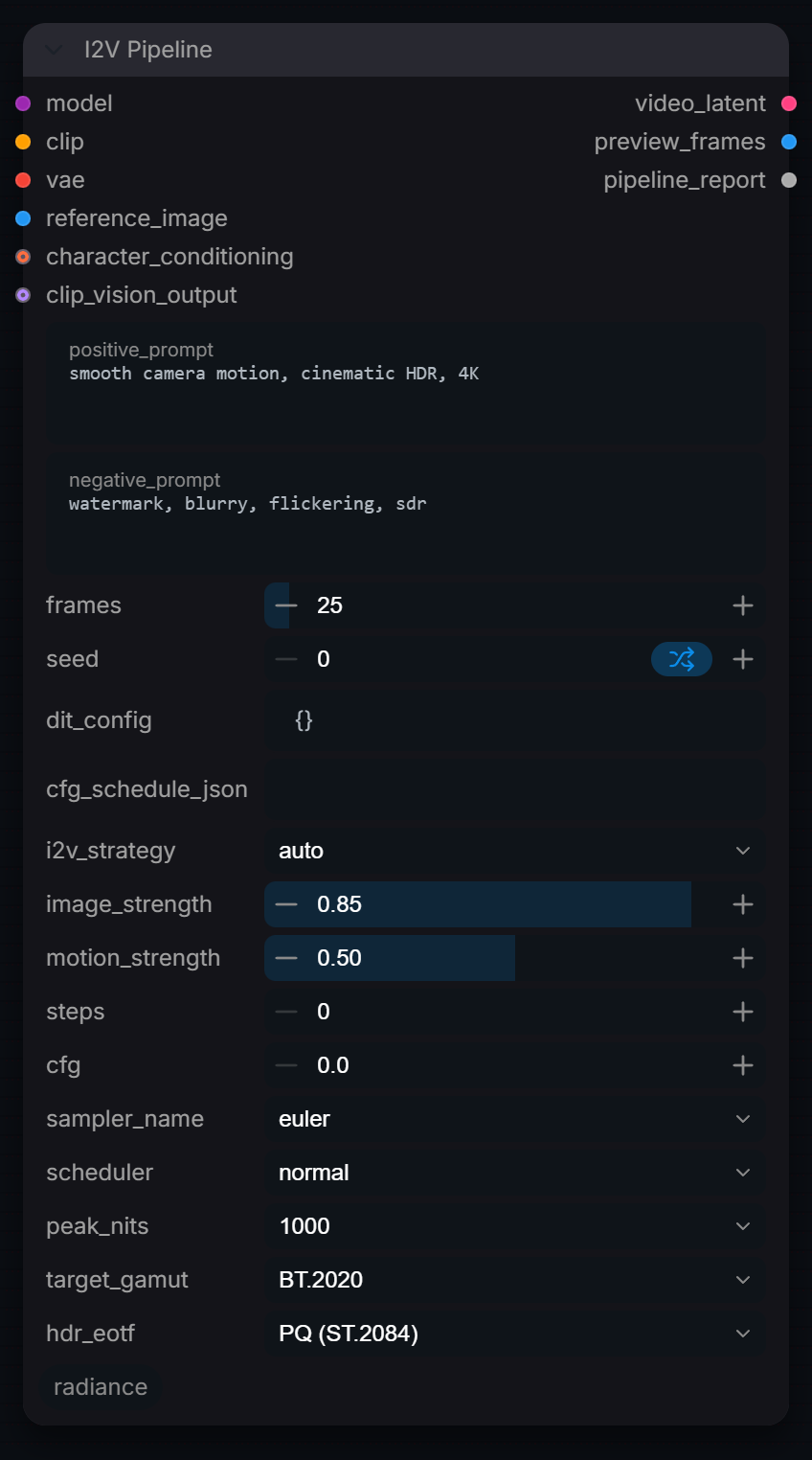
End-to-end image-to-video generation pipeline with motion control.
Inputs
| Input | Type | Default | Range or choices | What it does |
|---|---|---|---|---|
model |
MODEL | Video diffusion model. Image models are rejected; a model with an image-concat input (Wan I2V) enables concat_channels. | ||
clip |
CLIP | Text encoder matching the model, used for both prompts. | ||
vae |
VAE | VAE matching the model. Encodes the reference image, sets the latent shape and decodes preview_frames. | ||
reference_image |
IMAGE | Start frame (display-referred sRGB, one image). Its width and height set the video size, rounded down to the VAE's spatial compression. | ||
positive_prompt |
string | smooth camera motion, cinematic HDR, 4K |
multi-line text | What should happen in the shot. ', |
negative_prompt |
string | watermark, blurry, flickering, sdr |
multi-line text | What to steer away from, encoded with the same text encoder. |
frames |
int | 25 | 1 to 512 | Requested frames. The latent holds ceil(frames / temporal compression) frames; use a multiple of the compression plus 1 (e.g. 25, 49, 81) to get exactly this count back. |
seed |
int | 0 | 0 to 2147483648 | Seed for the initial noise and the sampler. |
dit_config (optional) |
string | {} |
JSON from RadianceVideoModelInfo. When it carries a model_name, that model's defaults replace steps, cfg, sampler_name and scheduler. | |
character_conditioning (optional) |
CONDITIONING | Optional conditioning whose tokens are appended to the positive prompt at weight 0.75. Skipped if its embedding width differs. | ||
cfg_schedule_json (optional) |
string | JSON float array. Only the first value is used, as a static CFG override; CFG does not vary per step. | ||
i2v_strategy (optional) |
choice | auto |
auto, first_frame_lock, concat_channels, clip_vision_inject, prepend_latent |
auto: concat_channels when the model has an image-concat input (Wan 2.1 I2V, Wan 2.2 I2V 14B), else first_frame_lock. clip_vision_inject needs clip_vision_output connected. |
clip_vision_output (optional) |
CLIP_VISION_OUTPUT | From CLIP Vision Encode. Added to both conditionings as clip_vision_output, which Wan 2.1 I2V reads (clip_fea). | ||
image_strength (optional) |
float | 0.85 | 0 to 1, step 0.01 | first_frame_lock and prepend_latent only: blend weight of the image latent into the first latent frame; also lowers denoise to 1 - 0.4 x strength. Ignored by concat_channels and clip_vision_inject. |
motion_strength (optional) |
float | 0.5 | 0 to 1, step 0.01 | first_frame_lock and prepend_latent only: scales the starting noise to 0.2 + 0.8 x strength of its unit amplitude. Ignored by concat_channels and clip_vision_inject. |
steps (optional) |
int | 0 | 0 to 200 | Sampling steps. 0 uses the model default (the LTX-Video preset's 25 when no dit_config is connected). Ignored when dit_config carries a model_name. |
cfg (optional) |
float | 0 | 0 to 30, step 0.1 | Guidance scale. 0 uses the model default (the LTX-Video preset's 3.5 when no dit_config is connected). cfg_schedule_json overrides it. |
sampler_name (optional) |
choice | euler |
ComfyUI's samplers | ComfyUI sampler. Ignored when dit_config carries a model_name. |
scheduler (optional) |
choice | normal |
ComfyUI's schedulers | ComfyUI sigma scheduler. Ignored when dit_config carries a model_name. |
peak_nits (optional) |
choice | 1000 |
100, 203, 400, 600, 1000, 4000, 10000 |
Adds the selected peak brightness to the prompt; 100 requests an SDR look. No pixel change. |
target_gamut (optional) |
choice | BT.2020 |
BT.2020, P3-D65, P3-DCI, BT.709, ACEScg |
Adds the selected gamut descriptor to the prompt at every peak brightness. No pixel conversion. |
hdr_eotf (optional) |
choice | PQ (ST.2084) |
PQ (ST.2084), HLG (BT.2100), Linear, sRGB / BT.1886 |
Adds the selected transfer-function descriptor to the prompt. No pixel encoding. |
Outputs
| Output | Type |
|---|---|
video_latent |
LATENT |
preview_frames |
IMAGE |
pipeline_report |
STRING |
T2V Pipeline
RadianceT2VPipeline
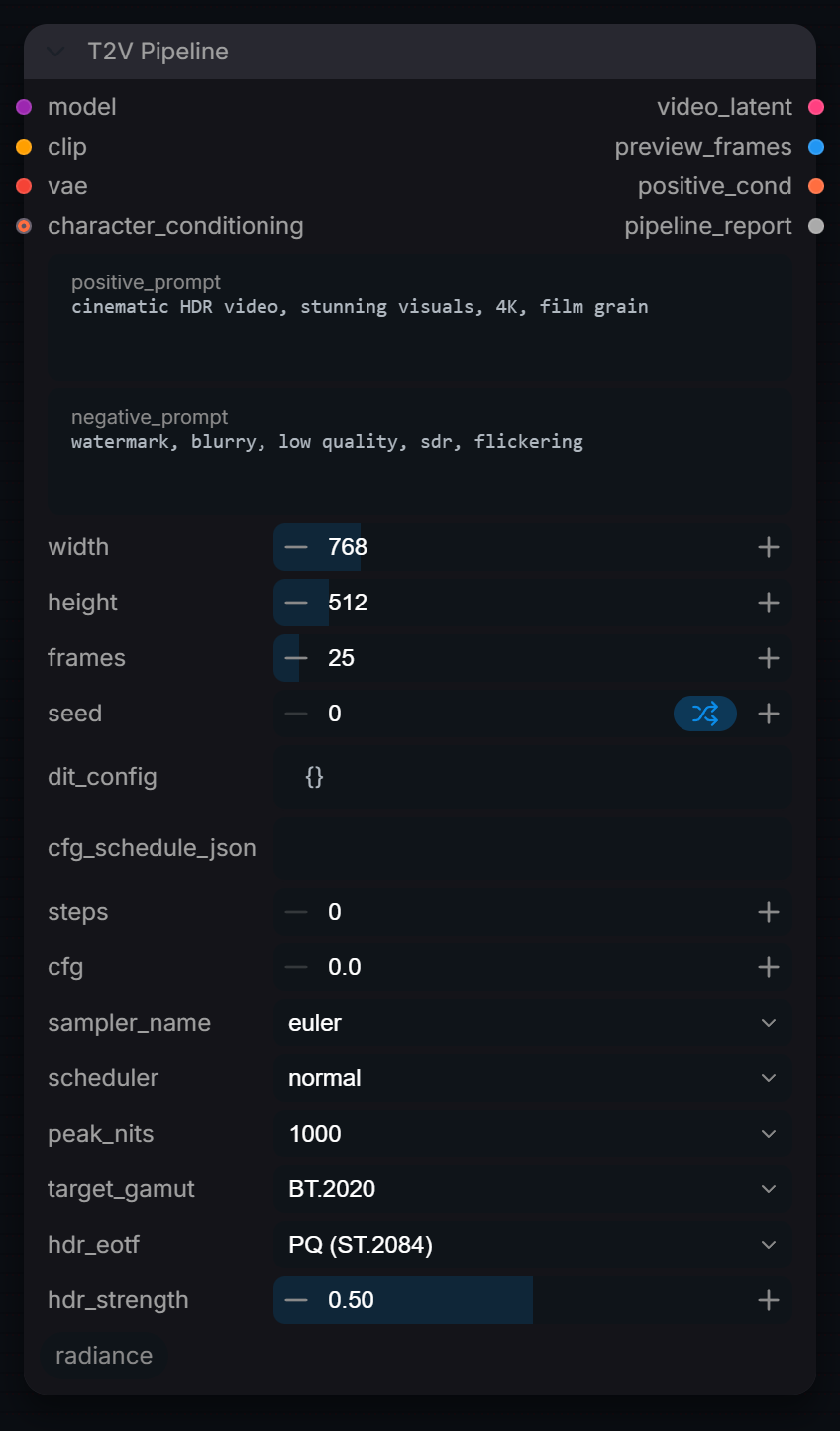
End-to-end text-to-video generation pipeline with HDR support.
Inputs
| Input | Type | Default | Range or choices | What it does |
|---|---|---|---|---|
model |
MODEL | Video diffusion model. Image models (2-D latents) are rejected. | ||
clip |
CLIP | Text encoder matching the model, used for both prompts. | ||
vae |
VAE | VAE matching the model. Its compression sets the latent shape and it decodes preview_frames. | ||
positive_prompt |
string | cinematic HDR video, stunning visuals, 4K, film grain |
multi-line text | What to generate. HDR descriptors from peak_nits, target_gamut and hdr_eotf are appended unless hdr_strength is 0. |
negative_prompt |
string | watermark, blurry, low quality, sdr, flickering |
multi-line text | What to steer away from, encoded with the same text encoder. |
width |
int | 768 | 64 to 4096, step 8 | Output width in pixels, rounded down to a multiple of the VAE's spatial compression. |
height |
int | 512 | 64 to 4096, step 8 | Output height in pixels, rounded down to a multiple of the VAE's spatial compression. |
frames |
int | 25 | 1 to 512 | Requested frames. The latent holds ceil(frames / temporal compression) frames; use a multiple of the compression plus 1 (e.g. 25, 49, 81) to get exactly this count back. |
seed |
int | 0 | 0 to 2147483648 | Seed for the initial noise and the sampler. |
dit_config (optional) |
string | {} |
JSON from RadianceVideoModelInfo. When it carries a model_name, that model's defaults replace steps, cfg, sampler_name and scheduler. | |
character_conditioning (optional) |
CONDITIONING | Optional conditioning whose tokens are appended to the positive prompt at weight 0.75. Skipped if its embedding width differs. | ||
cfg_schedule_json (optional) |
string | JSON float array from RadianceAudioCFGSchedule. Only the first value is used, as a static CFG override; CFG does not vary per step. | ||
steps (optional) |
int | 0 | 0 to 200 | Sampling steps. 0 uses the model default (the LTX-Video preset's 25 when no dit_config is connected). Ignored when dit_config carries a model_name. |
cfg (optional) |
float | 0 | 0 to 30, step 0.1 | Guidance scale. 0 uses the model default (the LTX-Video preset's 3.5 when no dit_config is connected). cfg_schedule_json overrides it. |
sampler_name (optional) |
choice | euler |
ComfyUI's samplers | ComfyUI sampler. Ignored when dit_config carries a model_name. |
scheduler (optional) |
choice | normal |
ComfyUI's schedulers | ComfyUI sigma scheduler. Ignored when dit_config carries a model_name. |
peak_nits (optional) |
choice | 1000 |
100, 203, 400, 600, 1000, 4000, 10000 |
Adds ' |
target_gamut (optional) |
choice | BT.2020 |
BT.2020, P3-D65, P3-DCI, BT.709, ACEScg |
Adds the selected gamut descriptor to the prompt. Prompt text only, no pixel conversion. |
hdr_eotf (optional) |
choice | PQ (ST.2084) |
PQ (ST.2084), HLG (BT.2100), Linear, sRGB / BT.1886 |
Adds a transfer-function descriptor to the prompt. Prompt text only, no pixel encoding. |
hdr_strength (optional) |
float | 0.5 | 0 to 1, step 0.05 | Prompt weight of the appended HDR descriptors (gamut, EOTF, peak nits), as (text:weight) with weight = 2 x strength: 0.5 is neutral, 1.0 doubles their emphasis, 0 leaves them out. |
Outputs
| Output | Type |
|---|---|
video_latent |
LATENT |
preview_frames |
IMAGE |
positive_cond |
CONDITIONING |
pipeline_report |
STRING |
Video Assembler
RadianceVideoAssembler
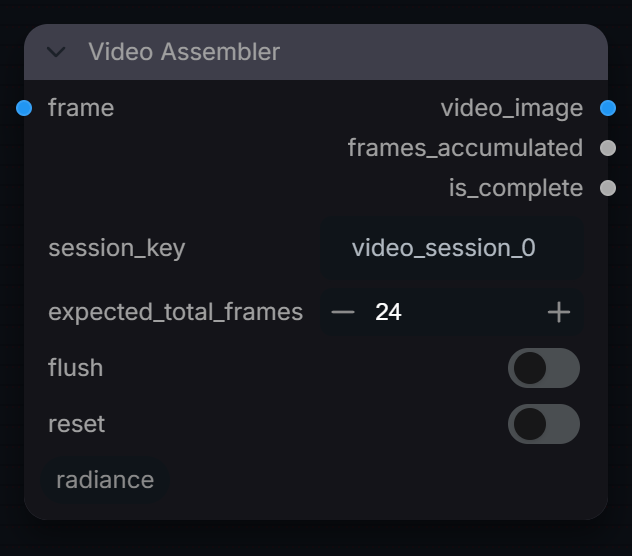
Assemble processed video frames back into a temporal sequence.
Inputs
| Input | Type | Default | Range or choices | What it does |
|---|---|---|---|---|
frame |
IMAGE | Frame (or batch) to append to this session's buffer. Buffers live in memory and are lost on restart. | ||
session_key |
string | video_session_0 |
Name of the accumulation buffer. Use a different key per clip being assembled in parallel. | |
expected_total_frames |
int | 24 | Output is complete, and the buffer cleared, once this many inputs have arrived. Counts executions, not images, if frame is a batch. | |
flush (optional) |
boolean | off | Force output of accumulated frames now, even if incomplete | |
reset (optional) |
boolean | off | Clear accumulated frames for this session key |
Outputs
| Output | Type |
|---|---|
video_image |
IMAGE |
frames_accumulated |
INT |
is_complete |
BOOLEAN |
Video Batch Decode
RadianceVideoBatchDecode
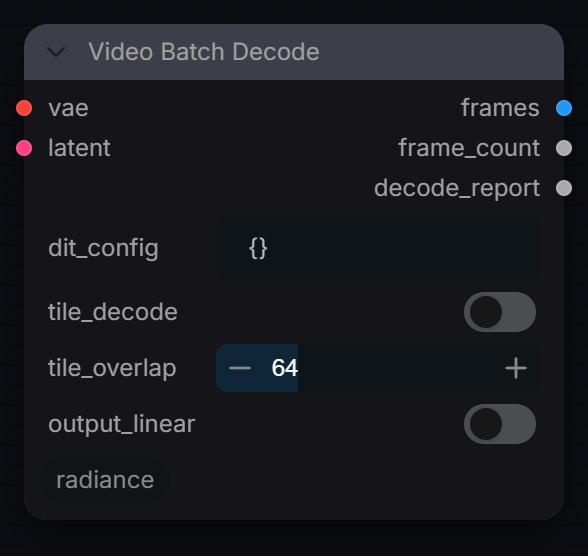
Batch-decode video latents to pixel frames with memory management.
Inputs
| Input | Type | Default | Range or choices | What it does |
|---|---|---|---|---|
vae |
VAE | VAE matching the model that produced the latent. | ||
latent |
LATENT | Video latent from a sampler or pipeline. A 5-D latent is decoded through the VAE's temporal path. | ||
dit_config (optional) |
string | {} |
JSON from RadianceVideoModelInfo. Its compression values are used only if the VAE does not report its own. Its latent_scale is not applied: a ComfyUI sampler already returns the latent in VAE space. | |
tile_decode (optional) |
boolean | off | Route the decode through the VAE's own tiled entry point (comfy.sd.VAE.decode_tiled) to cut peak VRAM on large videos. Leave off: an untiled decode already falls back to tiling by itself when it runs out of memory. | |
tile_overlap (optional) |
int | 64 | 0 to 256 | Pixel overlap between spatial tiles (higher = smoother seams). Only read when tile_decode is on. |
output_linear (optional) |
boolean | off | Convert the VAE's display-referred sRGB frames to scene-linear (inverse sRGB transfer). Off: sRGB clamped to [0, 1], as VAE Decode. |
Outputs
| Output | Type |
|---|---|
frames |
IMAGE |
frame_count |
INT |
decode_report |
STRING |
Video Cond Merge
RadianceVideoCondMerge
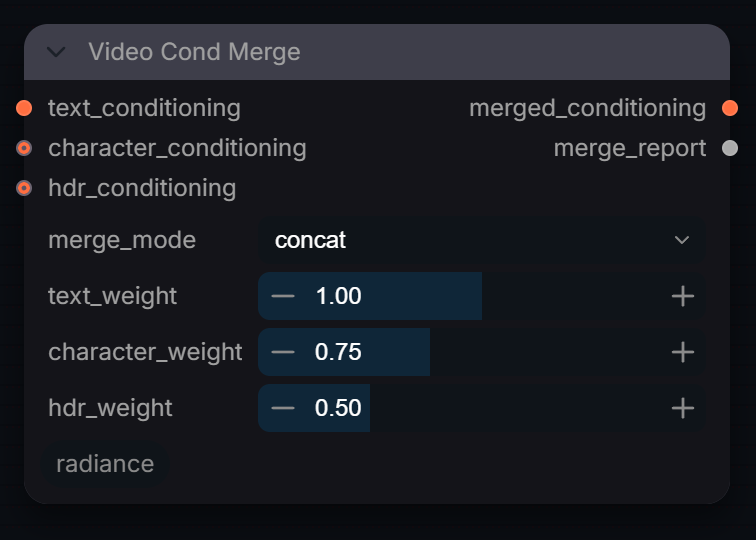
Merge multiple video conditioning signals into a unified tensor.
Inputs
| Input | Type | Default | Range or choices | What it does |
|---|---|---|---|---|
text_conditioning |
CONDITIONING | Base conditioning, usually the encoded prompt. The output keeps its entries; the other inputs are merged into them. | ||
merge_mode |
choice | concat |
concat, weighted, priority |
concat: append the other inputs' tokens (times their weights) after the text tokens. weighted: weighted average of the token tensors. priority: keep the text tokens, only copy missing dict keys from the others. |
character_conditioning (optional) |
CONDITIONING | Optional conditioning (e.g. a character or identity embedding) merged per merge_mode. | ||
hdr_conditioning (optional) |
CONDITIONING | Optional conditioning (e.g. from RadianceVideoHDRConditioner) merged per merge_mode. | ||
text_weight (optional) |
float | 1 | 0 to 2, step 0.05 | Weight of text_conditioning in weighted mode. concat and priority keep the text tokens unscaled. |
character_weight (optional) |
float | 0.75 | 0 to 2, step 0.05 | Multiplier on the character tokens in concat and weighted modes. Ignored in priority mode. |
hdr_weight (optional) |
float | 0.5 | 0 to 2, step 0.05 | Multiplier on the HDR tokens in concat and weighted modes. Ignored in priority mode. |
Outputs
| Output | Type |
|---|---|
merged_conditioning |
CONDITIONING |
merge_report |
STRING |
Video Export
RadianceVideoExport
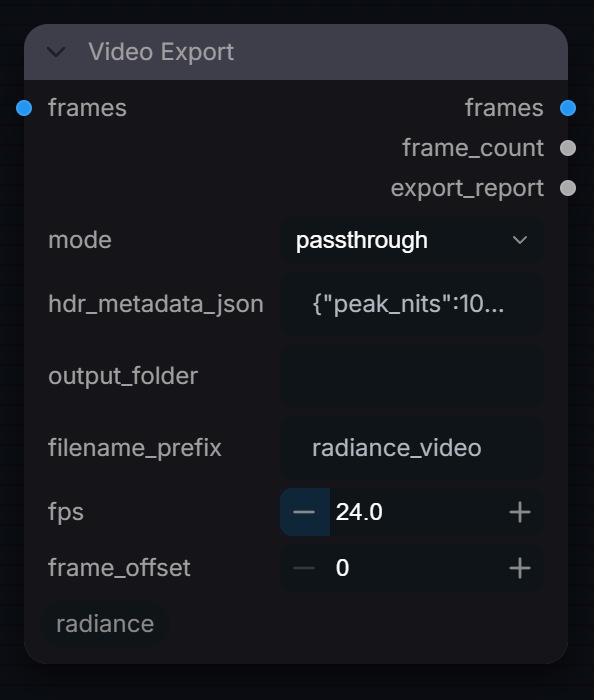
Pass decoded video frames through, HDR-encode them, or write them as a 32-bit float EXR sequence or a small GIF preview. No movie codecs: use a video writer node.
Inputs
| Input | Type | Default | Range or choices | What it does |
|---|---|---|---|---|
frames |
IMAGE | Decoded frames. EXR writes the values unchanged as 32-bit float; the GIF clamps to [0, 1] display-referred. | ||
mode |
choice | passthrough |
passthrough, hdr_decode, exr_sequence, preview_gif |
passthrough: return frames. hdr_decode: run RadianceVideoHDRDecode (Reinhard, PQ out) and return the HDR signal. exr_sequence / preview_gif: also write files. Only the last two write to disk. |
hdr_metadata_json (optional) |
string | {"peak_nits":1000,"eotf":"PQ (ST.2084)"} |
hdr_decode only. Its peak_nits and gamut (BT.2020 if absent) are used; the eotf key is ignored, output is always PQ. | |
output_folder (optional) |
string | Empty: ComfyUI's output folder. | ||
filename_prefix (optional) |
string | radiance_video |
File name start: |
|
fps (optional) |
float | 24 | 1 to 120 | GIF playback rate (frame duration 1000 / fps ms). preview_gif only. |
frame_offset (optional) |
int | 0 | Added to the frame number in EXR file names. exr_sequence only. |
Outputs
| Output | Type |
|---|---|
frames |
IMAGE |
frame_count |
INT |
export_report |
STRING |
Video Frame Router
RadianceVideoFrameRouter
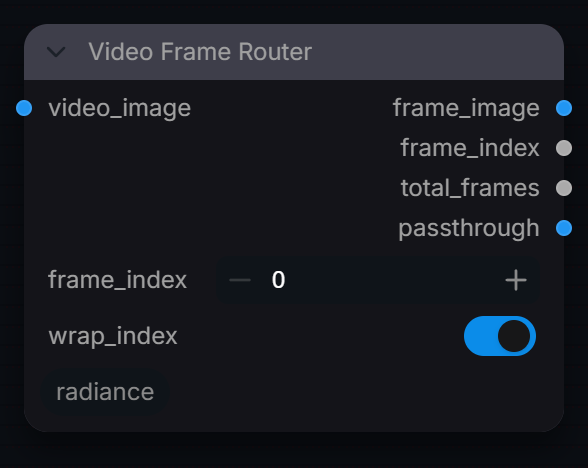
Route individual video frames to different processing branches.
Inputs
| Input | Type | Default | Range or choices | What it does |
|---|---|---|---|---|
video_image |
IMAGE | Frame batch to pick from. Also returned unchanged on passthrough. | ||
frame_index |
int | 0 | 0 to 4096 | 0-based frame to extract. Past the end it wraps or clamps to the last frame, per wrap_index. |
wrap_index (optional) |
boolean | on | If frame_index >= total_frames, wrap around (modulo). Off: clamp to the last frame. |
Outputs
| Output | Type |
|---|---|
frame_image |
IMAGE |
frame_index |
INT |
total_frames |
INT |
passthrough |
IMAGE |
Video HDR Conditioner
RadianceVideoHDRConditioner
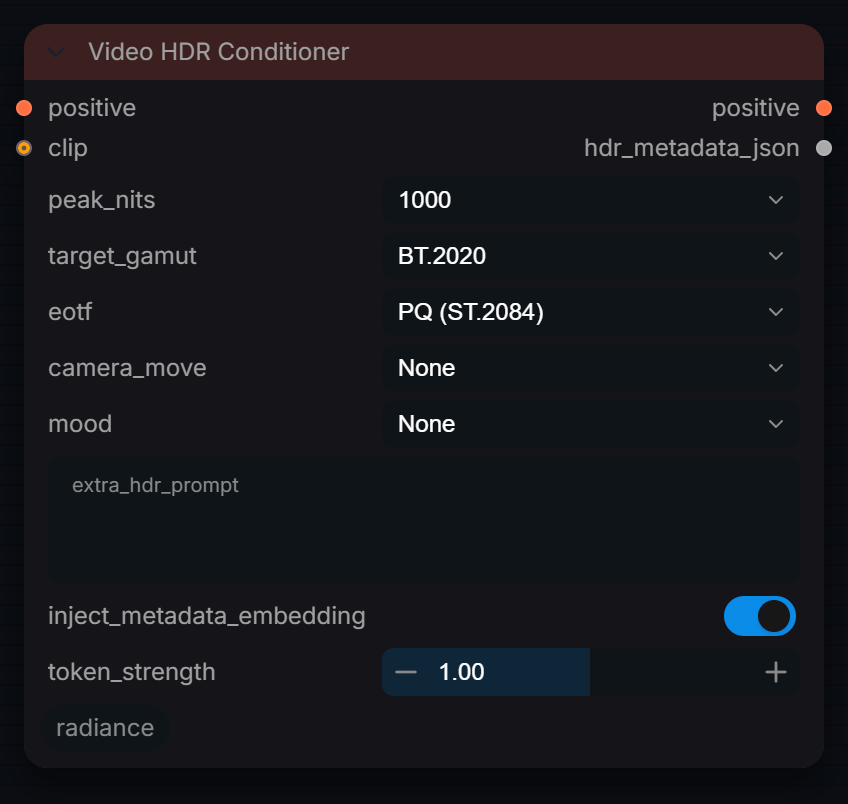
Condition a video model on HDR metadata for luminance-aware sampling.
Inputs
| Input | Type | Default | Range or choices | What it does |
|---|---|---|---|---|
positive |
CONDITIONING | Encoded positive prompt. The HDR descriptor embeddings are concatenated onto each entry (needs clip). | ||
peak_nits |
choice | 1000 |
100, 203, 400, 600, 1000, 4000, 10000 |
Mastering peak in nits: adds a luminance descriptor to the tokens and is stored as peak_nits in hdr_metadata_json for RadianceVideoHDRDecode. |
target_gamut |
choice | BT.2020 |
BT.2020, P3-D65, P3-DCI, BT.709, ACEScg, ACES2065-1 |
Adds a gamut descriptor to the tokens and is stored as gamut in hdr_metadata_json (RadianceVideoHDRDecode converts to it). |
eotf |
choice | PQ (ST.2084) |
PQ (ST.2084), HLG (BT.2100), Linear, sRGB / BT.1886 |
Adds a transfer-function descriptor to the tokens and is stored in hdr_metadata_json. RadianceVideoHDRDecode uses its own output_eotf. |
clip (optional) |
CLIP | Text encoder used for positive. Required for the descriptors to reach the model. | ||
camera_move (optional) |
choice | None |
Handheld documentary, Locked off cinematic, Slow push-in, Drone aerial, Tracking shot, Static time-lapse, None |
Adds camera-movement words to the descriptor tokens. None adds nothing. |
mood (optional) |
choice | None |
Golden hour, Blue hour / dusk, Night, Overcast flat, High contrast, Neon / cyberpunk, Natural daylight, None |
Adds lighting-mood words to the descriptor tokens. None adds nothing. |
extra_hdr_prompt (optional) |
string | multi-line text | Additional HDR descriptors appended to conditioning tokens | |
inject_metadata_embedding (optional) |
boolean | on | Store the HDR metadata in the conditioning for Radiance nodes. No ComfyUI model reads it. | |
token_strength (optional) |
float | 1 | 0 to 2, step 0.05 | Scale of the concatenated descriptor embeddings (1.0 = as encoded). Needs clip. |
Outputs
| Output | Type |
|---|---|
positive |
CONDITIONING |
hdr_metadata_json |
STRING |
Video HDR Decode
RadianceVideoHDRDecode
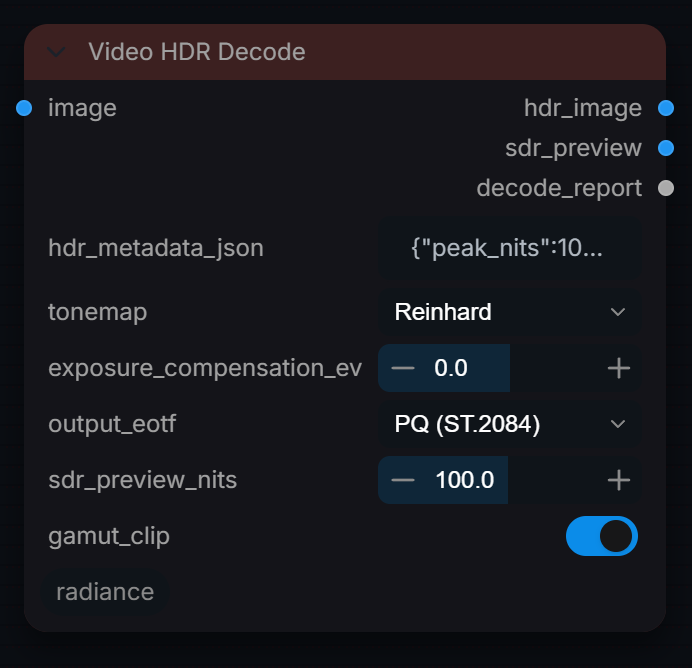
Encode decoded sRGB video frames (IMAGE, not latents) to an HDR signal at the metadata's peak nits and gamut, with PQ or HLG output and an SDR preview.
Inputs
| Input | Type | Default | Range or choices | What it does |
|---|---|---|---|---|
image |
IMAGE | Decoded video frames, display-referred sRGB Rec.709 in [0, 1]. Linearised with a pure 2.2 gamma; 1.0 is mapped to peak_nits. | ||
hdr_metadata_json |
string | {"peak_nits":1000,"gamut":"BT.2020","eotf":"PQ (ST.2084)"} |
JSON from RadianceVideoHDRConditioner or manually entered | |
tonemap |
choice | Reinhard |
Reinhard, Linear clip, Pass-through |
Reinhard: extended Reinhard whose white point is the brightest input (1.0 lifted by a positive exposure_compensation_ev), so that value lands exactly on peak_nits and the highlights above it roll off; at 0 EV or less there is nothing to compress. Linear clip: clamp at 10,000 nits. Pass-through: no curve (clamped at 10,000 nits by the encode). |
exposure_compensation_ev (optional) |
float | 0 | -6 to 6, step 0.1 | EV adjustment before tone-mapping |
output_eotf (optional) |
choice | PQ (ST.2084) |
PQ (ST.2084), HLG (BT.2100), Linear, sRGB / BT.1886 |
Encoding of hdr_image. PQ: ST 2084 code values (1.0 = 10,000 nits). HLG: BT.2100 OETF. Linear: clamped linear light normalised to 10,000 nits. sRGB / BT.1886: the sRGB curve on light relative to peak_nits (1.0 = peak), an SDR signal. |
sdr_preview_nits (optional) |
float | 100 | 1 to 203 | Nits shown as white-ish mid-range in sdr_preview: light is measured in units of this value and rolled off with extended Reinhard so the brightest input reaches display white (1.0). Lower = brighter preview. |
gamut_clip (optional) |
boolean | on | Clamp to [0, 1] of the encode container after the primaries conversion (negatives from out-of-gamut colours, values above peak) |
Outputs
| Output | Type |
|---|---|
hdr_image |
IMAGE |
sdr_preview |
IMAGE |
decode_report |
STRING |
Video Latent Noise
RadianceVideoLatentNoise
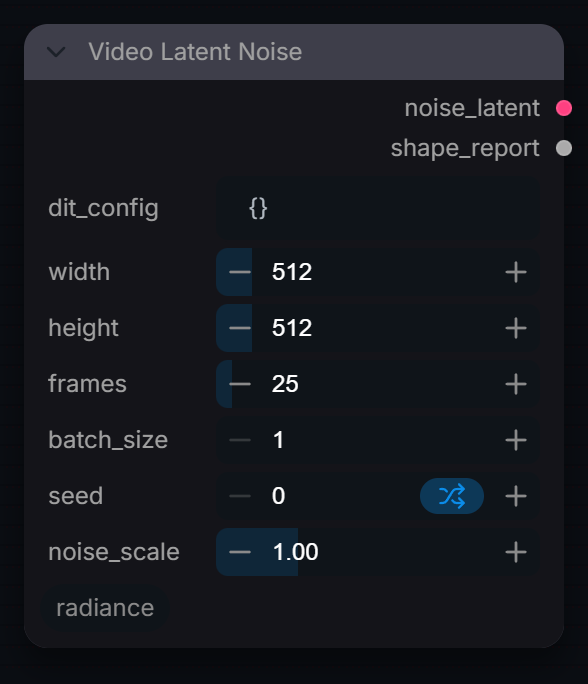
Correctly shaped, seeded i.i.d. Gaussian latent noise for a video model (independent per frame, as every video sampler expects).
Inputs
| Input | Type | Default | Range or choices | What it does |
|---|---|---|---|---|
dit_config |
string | {} |
JSON from RadianceVideoModelInfo | |
width |
int | 512 | 64 to 4096, step 8 | Target frame width in pixels. Divided (rounded down) by the spec's spatial compression to size the latent. |
height |
int | 512 | 64 to 4096, step 8 | Target frame height in pixels. Divided (rounded down) by the spec's spatial compression to size the latent. |
frames |
int | 25 | 1 to 512 | Target pixel frames. The latent gets ceil(frames / temporal compression) frames; use a multiple of the compression plus 1 (e.g. 25, 49) to decode back to exactly this count. |
batch_size |
int | 1 | 1 to 16 | Number of independent noise samples in the batch. |
seed |
int | 0 | 0 to 2147483648 | Seed for the CPU noise generator; the same seed and shape give identical noise. |
noise_scale (optional) |
float | 1 | 0.01 to 4, step 0.01 | Multiply noise standard deviation (1.0 = unit Gaussian) |
Outputs
| Output | Type |
|---|---|
noise_latent |
LATENT |
shape_report |
STRING |
Video Loader
RadianceVideoLoader
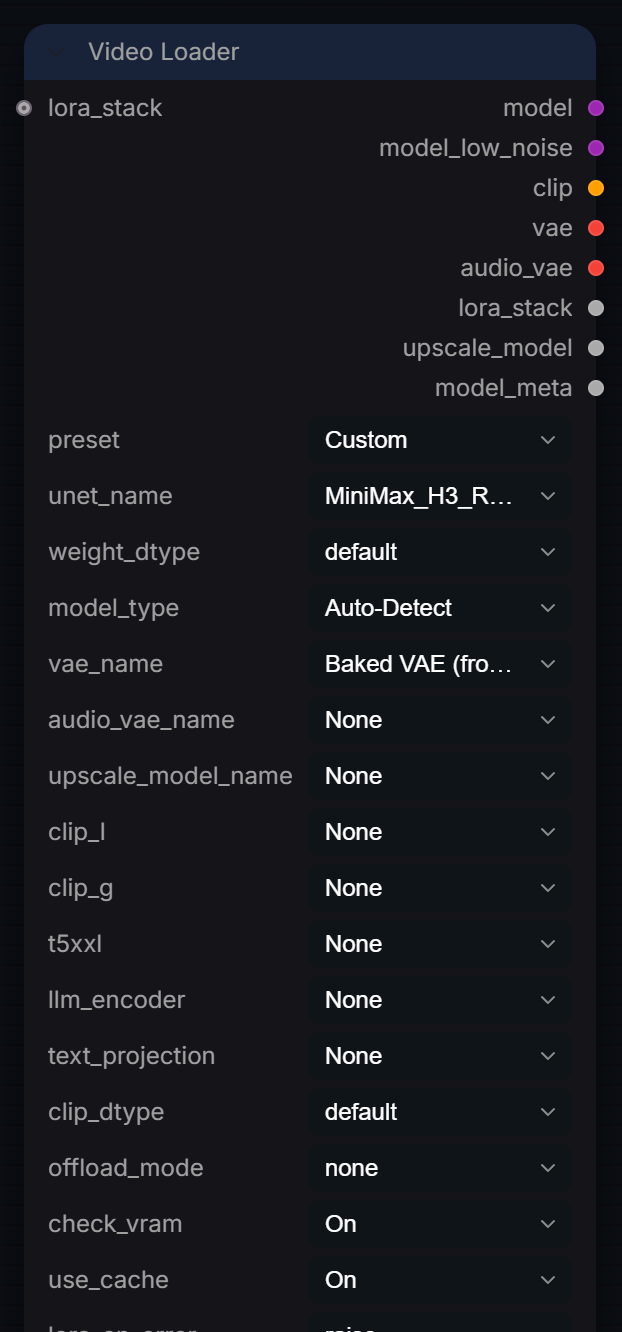
Video loader v3.3 — for LTX 2.3, Wan, HunyuanVideo, etc. Supports Baked/standalone VAE, optional Audio VAE, and optional latent upscale model, on top of the universal loader features.
Inputs
| Input | Type | Default | Range or choices | What it does |
|---|---|---|---|---|
preset |
choice | Custom |
Custom, CogVideoX, Cosmos World, HunyuanVideo, LTX Video, LTX Video (Low VRAM), LTX Video 2.3, LTX Video 2.3 (Low VRAM), LTX Video 2.5, LTX Video 2.5 (Low VRAM), and 8 more |
Quick-configure for common architectures. Overrides model_type, dtypes, offload_mode, and hints which CLIP slots are needed. |
unet_name |
choice | files found in the matching models or input folder | Main diffusion model (UNET / DiT / Transformer). For WAN 2.2, select either the high_noise or low_noise file — the companion expert is detected automatically. The 'model' output always carries the high_noise expert and 'model_low_noise' always carries the low_noise expert, regardless of which file is selected. | |
weight_dtype |
choice | default |
default, fp8_e4m3fn, fp8_e5m2, fp16, bf16, fp32 |
UNET weight precision. fp8_e4m3fn saves ~40% VRAM vs fp16. |
model_type |
choice | Auto-Detect |
Auto-Detect, hunyuan_video, wan, ltxv, ltxav, wan_ti2v, cosmos, cogvideox, mochi, minimax, and 2 more |
'Auto-Detect' reads the checkpoint's key names to determine architecture. Override manually if detection fails. |
vae_name |
choice | Baked VAE (from UNET) |
Baked VAE (from UNET) |
VAE for encoding/decoding latents. 'Baked VAE (from UNET)' extracts it from the checkpoint. |
audio_vae_name (optional) |
choice | None |
None, Baked Audio VAE (from UNET) |
Audio VAE for LTX 2.3. Choose 'Baked' or a standalone safetensors file. |
upscale_model_name (optional) |
choice | None |
None |
Latent Upscale Model (e.g. for LTX 2.3 or HunyuanVideo). |
clip_l (optional) |
choice | None |
None |
CLIP-L (text encoder). Used by: SD1.5, SDXL, Flux, SD3. |
clip_g (optional) |
choice | None |
None |
CLIP-G (text encoder). Used by: SDXL, SD3, SD3.5. |
t5xxl (optional) |
choice | None |
None, Baked (from UNET) |
T5-XXL (text encoder). Used by: Flux, SD3, SD3.5, Wan, PixArt, LTX (pre-2.3). 'Baked (from UNET)' loads it from the main checkpoint -- AuraFlow ships no standalone text encoder file. |
llm_encoder (optional) |
choice | None |
None |
LLM encoder. Used by: HunyuanVideo (Llava-Llama3), LTX 2.3 (Gemma 3), Lumina2 (Gemma-2), Z-Image (Qwen3), Flux.2 (Mistral-3/Qwen3). |
text_projection (optional) |
choice | None |
None, Baked (from UNET) |
Text projection matrix. Used by: LTX 2.3 (with Gemma 3 llm_encoder). 'Baked (from UNET)' loads it from the main LTX 2.3 checkpoint, like the native LTXV Audio Text Encoder Loader. |
clip_dtype (optional) |
choice | default |
default, fp16, bf16, fp8_e4m3fn, fp32 |
CLIP weight precision. Independent from UNET. For Flux T5XXL: fp8 saves ~4.7 GB vs fp16. |
offload_mode (optional) |
choice | none |
none, cpu_offload, sequential |
none = GPU only. cpu_offload = CLIP loaded to CPU RAM. sequential = enable ComfyUI sequential CPU offload (8–12 GB GPUs). |
lora_stack (optional) |
LORA_STACK | Accept a LORA_STACK from RadianceLoraStack node. | ||
check_vram (optional) |
choice | On |
On, Off |
Estimate VRAM before load and warn if tight. |
use_cache (optional) |
choice | On |
On, Off |
Cache loaded models. Skips disk I/O when re-running with the same files. Cache auto-invalidates if files change. |
lora_on_error (optional) |
choice | raise |
warn, raise |
'warn' skips failed LoRA and continues. 'raise' stops execution. |
auto_download (optional) |
boolean | on | If a selected model is missing and is one Radiance knows, download it on first run from its pinned Hugging Face source, checked against its SHA-256 before it is installed (large: 4 to 60 GB). Gated repositories (FLUX.2-dev, FLUX.2-klein 9B, LTX-2.5) need their licence accepted on Hugging Face and HF_TOKEN set. RADIANCE_ALLOW_DOWNLOADS=0 always stops downloads. |
Outputs
| Output | Type |
|---|---|
model |
MODEL |
model_low_noise |
MODEL |
clip |
CLIP |
vae |
VAE |
audio_vae |
VAE |
lora_stack |
LORA_STACK |
upscale_model |
LATENT_UPSCALE_MODEL |
model_meta |
STRING |
Video Mask Propagator
RadianceVideoMaskPropagator
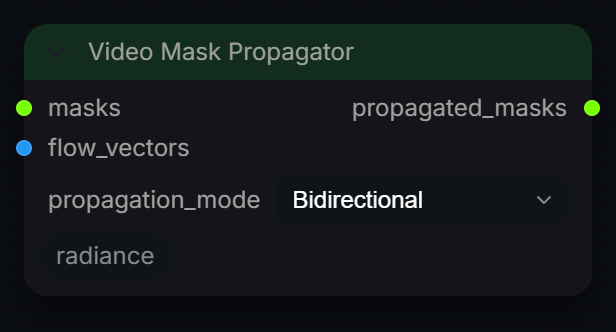
Fill empty frames of a mask sequence by warping neighbouring keyframe masks along optical flow. Frames that already contain a mask are kept as keyframes.
Inputs
| Input | Type | Default | Range or choices | What it does |
|---|---|---|---|---|
masks |
MASK | Mask sequence, one per frame. Frames with any mask content are keyframes; empty frames are filled by propagation. | ||
flow_vectors |
IMAGE | 32-bit flow vectors from Radiance Optical Flow. | ||
propagation_mode |
choice | Bidirectional |
Forward, Backward, Bidirectional |
Forward carries masks from earlier frames, Backward from later frames. Bidirectional runs both and keeps the union (maximum) on filled frames. |
Outputs
| Output | Type |
|---|---|
propagated_masks |
MASK |
Video Model Info
RadianceVideoModelInfo
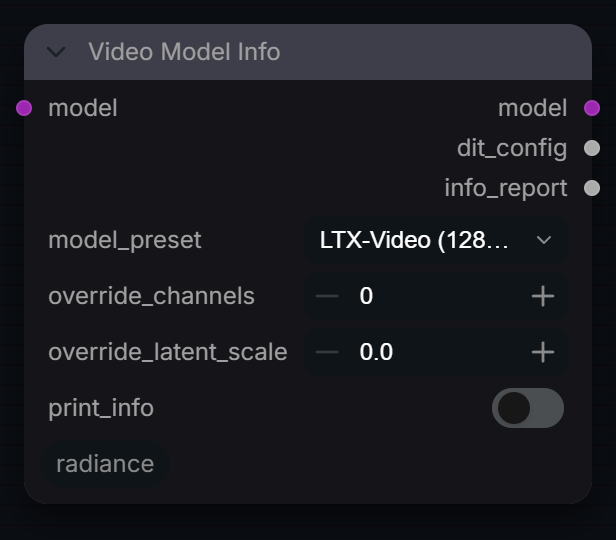
Display configuration and parameter info for a loaded video model.
Inputs
| Input | Type | Default | Range or choices | What it does |
|---|---|---|---|---|
model |
MODEL | Video diffusion model to inspect. It is passed through unchanged on the model output. | ||
model_preset |
choice | LTX-Video (128ch) |
SD-VAE (4ch), SDXL-VAE (4ch), LTX-Video (128ch), HunyuanVideo (16ch), Wan2.1 (16ch), Wan2.2-T2V-14B (16ch), Wan2.2-I2V-14B (16ch), Wan2.2-TI2V-5B (48ch), HunyuanVideo-1.5 (32ch), CogVideoX (16ch), and 1 more |
Latent spec used when auto-detection finds nothing. Detection reads the model class name (ltx, hunyuan, wan, cogvideo, mochi) and the latent channel count the model reports. A preset from the detected family that matches the channels is kept; otherwise the matching one is used. |
override_channels (optional) |
int | 0 | 0 to 512 | Replace the latent channel count written to dit_config. 0 keeps the preset's value. |
override_latent_scale (optional) |
float | 0 | 0 to 10 | Replace the preset's latent_scale in dit_config. Reported for reference; Video Batch Decode does not apply it, since sampler output is already in VAE space. 0 keeps the preset's value. |
print_info (optional) |
boolean | off | Also write the info report to the ComfyUI console log. |
Outputs
| Output | Type |
|---|---|
model |
MODEL |
dit_config |
STRING |
info_report |
STRING |
Video Prompt Builder
RadianceVideoPromptBuilder
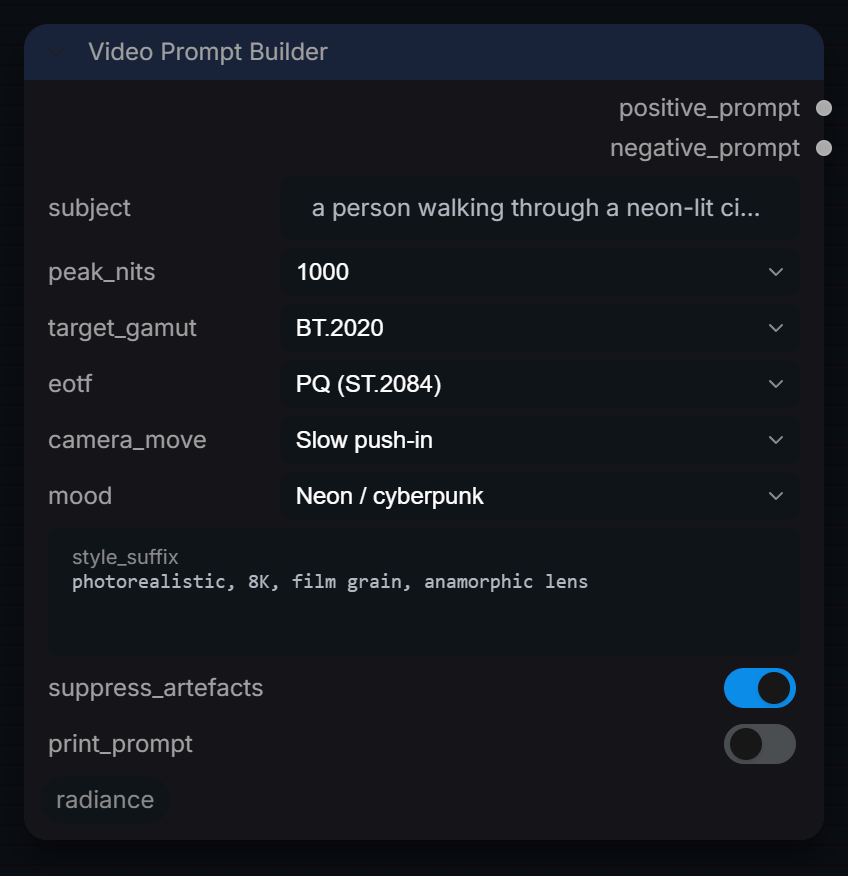
Build structured video prompts combining text, style, and motion cues.
Inputs
| Input | Type | Default | Range or choices | What it does |
|---|---|---|---|---|
subject |
string | a person walking through a neon-lit cityscape |
Main subject and action. Placed first in the positive prompt. | |
peak_nits |
choice | 1000 |
100, 203, 400, 600, 1000, 4000, 10000 |
Adds a peak-luminance descriptor (e.g. '1000 nits HDR10 ...') to the prompt. Prompt text only. |
target_gamut |
choice | BT.2020 |
BT.2020, P3-D65, P3-DCI, BT.709, ACEScg, ACES2065-1 |
Adds a gamut descriptor to the prompt. Prompt text only. |
eotf |
choice | PQ (ST.2084) |
PQ (ST.2084), HLG (BT.2100), Linear, sRGB / BT.1886 |
Adds a transfer-function descriptor to the prompt. Prompt text only. |
camera_move (optional) |
choice | Slow push-in |
Handheld documentary, Locked off cinematic, Slow push-in, Drone aerial, Tracking shot, Static time-lapse, None |
Adds camera-movement words after the mood words. None adds nothing. |
mood (optional) |
choice | Neon / cyberpunk |
Golden hour, Blue hour / dusk, Night, Overcast flat, High contrast, Neon / cyberpunk, Natural daylight, None |
Adds lighting-mood words right after the subject. None adds nothing. |
style_suffix (optional) |
string | photorealistic, 8K, film grain, anamorphic lens |
multi-line text | Free text appended at the end of the positive prompt. |
suppress_artefacts (optional) |
boolean | on | On: negative_prompt is a fixed list of common video artefacts. Off: negative_prompt is empty. | |
print_prompt (optional) |
boolean | off | Also write both prompts to the ComfyUI console log. |
Outputs
| Output | Type |
|---|---|
positive_prompt |
STRING |
negative_prompt |
STRING |
Video Sampler
RadianceVideoSampler
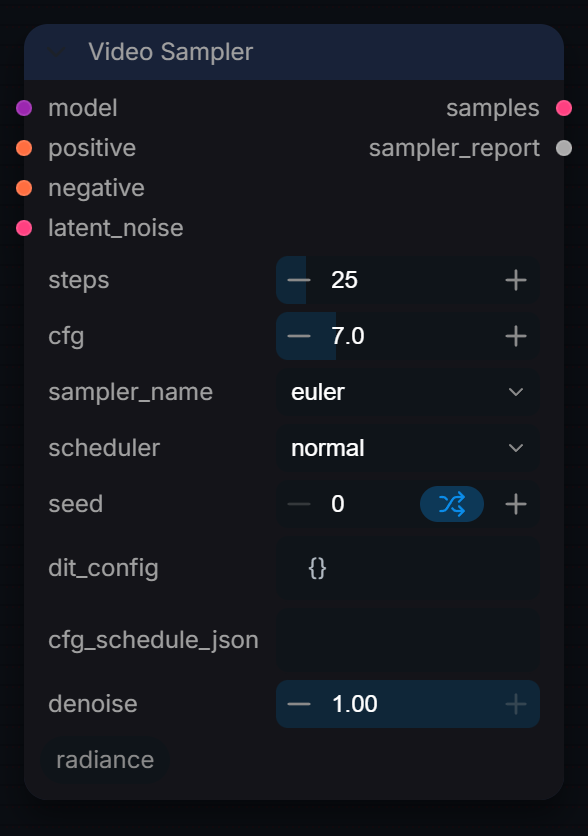
Run the diffusion sampler to generate video latents from pre-built noise and conditioning.
Inputs
| Input | Type | Default | Range or choices | What it does |
|---|---|---|---|---|
model |
MODEL | Video diffusion model to sample with. | ||
positive |
CONDITIONING | Positive (prompt) conditioning. | ||
negative |
CONDITIONING | Negative conditioning, used by classifier-free guidance. | ||
latent_noise |
LATENT | Noise latent, e.g. from RadianceVideoLatentNoise. It is used as both the noise and the start latent, so its shape must match the model. | ||
steps |
int | 25 | 1 to 200 | Sampling steps. Ignored when dit_config carries a model_name. |
cfg |
float | 7 | 0 to 30, step 0.1 | Classifier-free guidance scale. Replaced by the model default when dit_config carries a model_name, then by the first value of cfg_schedule_json. |
sampler_name |
choice | euler |
ComfyUI's samplers | ComfyUI sampler. Ignored when dit_config carries a model_name. |
scheduler |
choice | normal |
ComfyUI's schedulers | ComfyUI sigma scheduler. Ignored when dit_config carries a model_name. |
seed |
int | 0 | 0 to 2147483648 | Seed for the sampler's own noise (ancestral and SDE samplers). The initial noise comes from latent_noise. |
dit_config (optional) |
string | {} |
JSON from RadianceVideoModelInfo — when connected, overrides steps/cfg/sampler/scheduler with model-specific defaults. | |
cfg_schedule_json (optional) |
string | JSON float array from RadianceAudioCFGSchedule — first value overrides CFG | ||
denoise (optional) |
float | 1 | 0 to 1, step 0.01 | Fraction of the noise schedule to run (1.0 = full). The start latent is latent_noise itself, so below 1.0 this is not a video-to-video strength. |
Outputs
| Output | Type |
|---|---|
samples |
LATENT |
sampler_report |
STRING |