Generate nodes
Samplers, loaders, prompts, LoRA, regional conditioning, and denoise.
13 nodes. All sections
- Camera & Lens Prompt
- ControlNet
- Denoise
- Energy Mask
- Loader
- LoRA Stack
- Prompt
- Regional Grid
- Regional Prompt
- Resolution
- Sampler
- VAE Decode (HDR)
- VAE Encode (HDR)
Camera & Lens Prompt
RadianceCinemaStudio
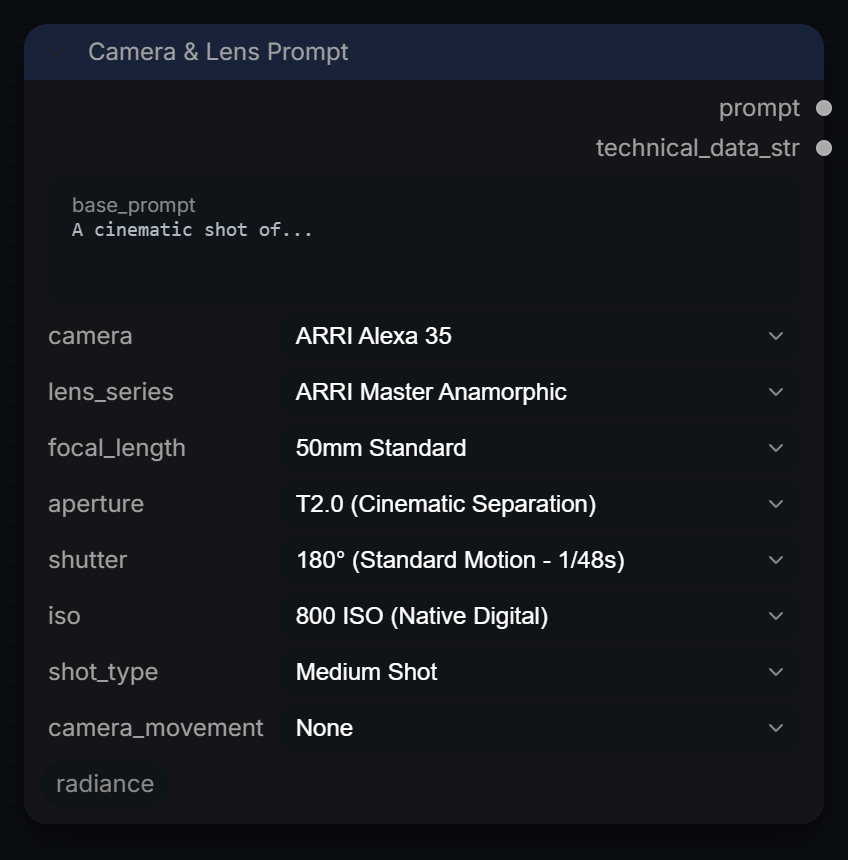
Build a text prompt from camera, lens, exposure and framing choices using real-world camera and lens names. Outputs the prompt plus a plain-text technical report; it does not process images.
Inputs
| Input | Type | Default | Range or choices | What it does |
|---|---|---|---|---|
base_prompt |
string | A cinematic shot of... |
multi-line text | Subject and scene description. It opens the prompt (after the shot type, if set) and gets a closing full stop if it has none. |
camera |
choice | ARRI Alexa 35 |
None, ARRI Alexa 35, ARRI Alexa 65 (IMAX), ARRI Alexa LF, ARRI Alexa Mini LF, ARRI Amira, Blackmagic Cinema Camera 6K, Blackmagic URSA Mini Pro 12K, IMAX IMAX MKIV (15/70mm Film), Panavision Millennium DXL2, and 10 more |
Camera body named in the prompt as 'Shot on |
lens_series |
choice | ARRI Master Anamorphic |
None, ARRI Master Anamorphic, ARRI Master Primes, ARRI Signature Primes, ARRI Ultra Primes, Angenieux EZ Series, Angenieux Optimo Ultra 12x, Canon K-35 (Vintage), Cooke Anamorphic /i, Cooke Panchro/i Classic, and 8 more |
Lens set named in the prompt as 'using |
focal_length |
choice | 50mm Standard |
Variable / Zoom, 8mm Fisheye, 12mm Ultra-Wide, 14mm Ultra-Wide, 16mm Wide, 18mm Wide, 21mm Wide, 24mm Wide, 28mm Wide, 32mm Wide, and 12 more |
Focal length added as 'at |
aperture |
choice | T2.0 (Cinematic Separation) |
T0.95 (Dreamy / Razor Thin), T1.3 (Master Prime Open), T1.4 (Very Shallow), T1.8 (Standard Fast Prime), T2.0 (Cinematic Separation), T2.8 (Standard Open), T4.0 (Balanced), T5.6 (Deep Focus), T8.0 (Sharp Landscape), T11 (Diffraction Limit), and 2 more |
T-stop written into the prompt as 'aperture T |
shutter |
choice | 180° (Standard Motion - 1/48s) |
180° (Standard Motion - 1/48s), 90° (Action / Staccato - 1/96s), 45° (Saving Private Ryan - 1/192s), 270° (Dreamy Blur - 1/32s), 360° (Maximum Blur - 1/24s), 172.8° (1/50s Flicker Free), 144° (1/60s Flicker Free) |
Shutter angle written as 'shutter |
iso |
choice | 800 ISO (Native Digital) |
50 ISO (Fine Grain), 100 ISO (Clean Daylight), 200 ISO (Standard Day), 400 ISO (Standard), 800 ISO (Native Digital), 1600 ISO (Low Light), 3200 ISO (High Sensitivity), 6400 ISO (Grainy / Noise), 12800 ISO (Night Vision) |
ISO written as 'ISO |
shot_type (optional) |
choice | Medium Shot |
None, Extreme Wide Shot, Wide Shot, Full Shot, Medium Wide Shot, Medium Shot, Medium Close-Up, Close-Up, Extreme Close-Up, Macro Detail |
Framing prefixed to the prompt as ' |
camera_movement (optional) |
choice | None |
None, Static Tripod, Handheld Shake, Steadicam Smooth, Dolly In, Dolly Out, Truck Left, Truck Right, Crane Up, Crane Down, and 2 more |
Camera move added as its own sentence after the subject. None omits it. |
Outputs
| Output | Type |
|---|---|
prompt |
STRING |
technical_data_str |
STRING |
ControlNet
RadianceControlNetApply
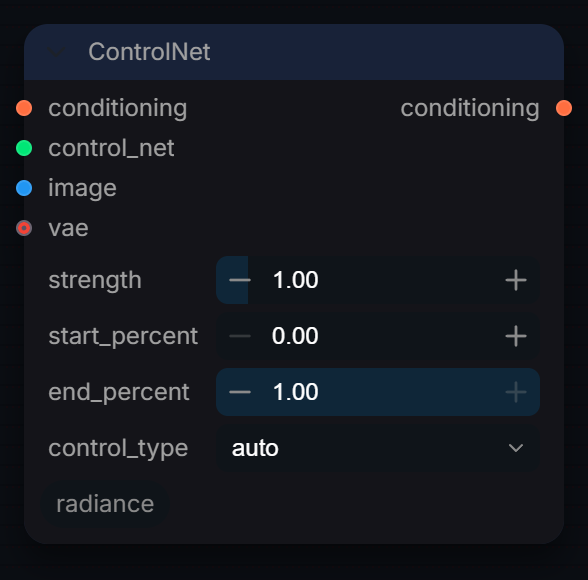
Apply a ControlNet conditioning signal to the Radiance sampler.
Inputs
| Input | Type | Default | Range or choices | What it does |
|---|---|---|---|---|
conditioning |
CONDITIONING | Conditioning to attach the ControlNet to (usually the positive). An existing ControlNet on it is chained, not replaced. | ||
control_net |
CONTROL_NET | ControlNet model from a ControlNet loader. Strength 0 returns the conditioning unchanged. | ||
image |
IMAGE | Control hint image (edges, depth, pose and so on) in display-referred 0-1 values. | ||
strength |
float | 1 | 0 to 10, step 0.05 | Global strength of the control effect. |
start_percent |
float | 0 | 0 to 1, step 0.01 | Percentage of the generation where control starts (0.0 = beginning). |
end_percent |
float | 1 | 0 to 1, step 0.01 | Percentage of the generation where control ends (1.0 = end). |
control_type |
choice | auto |
auto, or one of ComfyUI's Union ControlNet types |
For Union ControlNets (like Flux), select the specific control mode (Canny, Depth, etc.). |
vae (optional) |
VAE | The model's VAE. Needed by ControlNets that take a VAE-encoded hint (SD3, Flux and other DiT ControlNets); leave unconnected for SD1.5 / SDXL ones. |
Outputs
| Output | Type |
|---|---|
conditioning |
CONDITIONING |
Denoise
RadianceDenoise
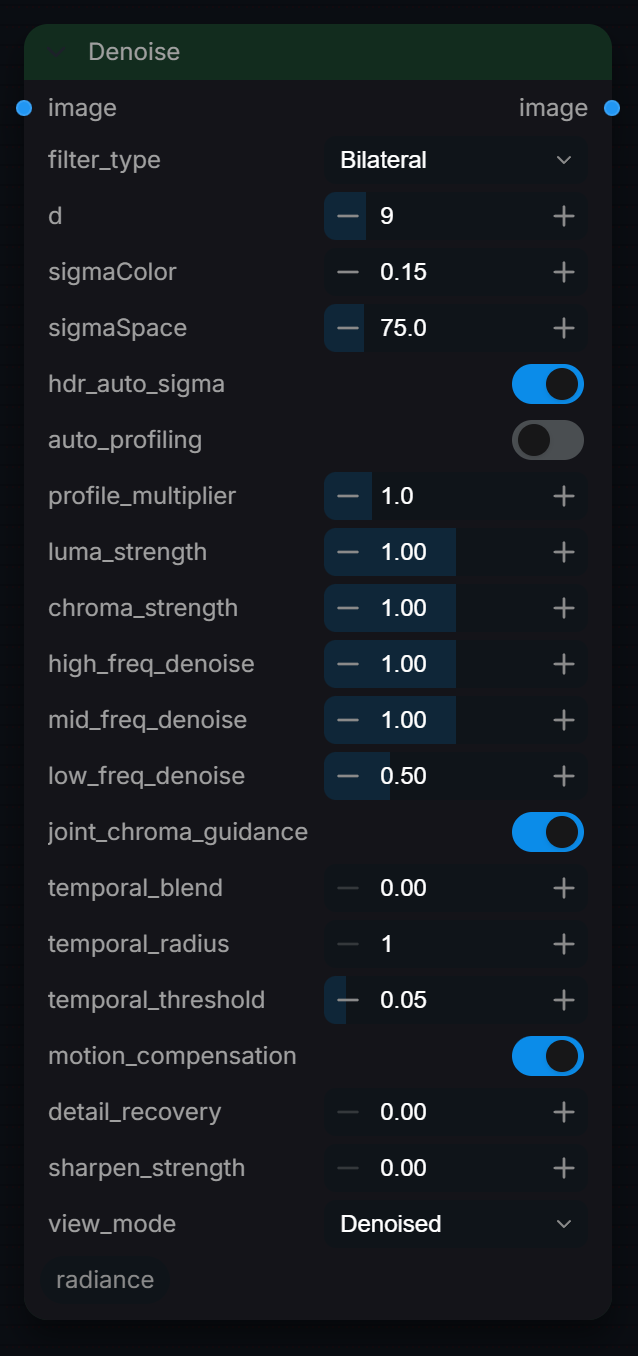
Ultimate professional-grade 32-bit float spatial-temporal denoising node. Splits Luma and Chroma, offers automatic hands-free noise profiling, applies 3-band multiscale frequency decomposition, provides joint guided chroma filtering, and implements multi-frame block-matching motion-compensated temporal stabilization.
Inputs
| Input | Type | Default | Range or choices | What it does |
|---|---|---|---|---|
image |
IMAGE | Image or frame batch to denoise, float32 in any encoding (scene-linear HDR above 1.0 is kept). A batch of more than one frame enables the temporal options. | ||
filter_type |
choice | Bilateral |
Bilateral, Guided |
The core spatial denoising algorithm. Bilateral preserves edges; Guided runs faster, preserves finer detail, and avoids halos. |
d |
int | 9 | 1 to 50 | Base filter radius in pixels. It sets the band split (d/2 and 1.5 x d box blurs) and the per-band filter radius (d/4, d/2, d); Bilateral caps each radius at 8 px. |
sigmaColor |
float | 0.15 | 0 to 10, step 0.01 | Color similarity threshold. High = smoother, but can lose edge detail. For HDR images, scale is auto-adjusted if hdr_auto_sigma is ON. This is bypassed if auto_profiling is enabled. |
sigmaSpace |
float | 75 | 0.1 to 500, step 0.5 | Gaussian spatial falloff in pixels for Bilateral weights and Guided local statistics. Higher values give flatter weights within the filter radius. |
hdr_auto_sigma |
boolean | on | Multiplies the colour threshold by the peak value of the whole batch when that peak exceeds 1.01, so HDR input gets a proportionally wider threshold. No effect on 0-1 images. | |
auto_profiling |
boolean | off | Replaces sigmaColor with a measured noise level: the lowest luma standard deviation among 32 px patches, times profile_multiplier. Other settings are unchanged. | |
profile_multiplier |
float | 1 | 0.1 to 5, step 0.1 | Adjusts the strength of the automatically profiled noise signature. Raise if noise remains; lower if details get soft. |
luma_strength |
float | 1 | 0 to 2, step 0.05 | Multiplier for spatial denoise strength on brightness (Luma). Lower this (e.g. 0.2) to keep natural fine grain. |
chroma_strength |
float | 1 | 0 to 2, step 0.05 | Multiplier for spatial denoise strength on colors (Chroma). Raise this to wash away annoying chromatic noise. |
high_freq_denoise |
float | 1 | 0 to 2, step 0.05 | Denoise strength for fine details and high-frequency pixel grain. |
mid_freq_denoise |
float | 1 | 0 to 2, step 0.05 | Denoise strength for medium textures and compression artifacts. |
low_freq_denoise |
float | 0.5 | 0 to 2, step 0.05 | Denoise strength for large coarse gradient splotches. |
joint_chroma_guidance |
boolean | on | Enables Joint Guided filtering. Uses the sharp structural boundaries of the Luma channel to guide Chroma smoothing, preventing color bleeding. | |
temporal_blend |
float | 0 | 0 to 0.95, step 0.05 | Enables multi-frame temporal de-flickering. 0.0 is off. Higher values blend adjacent frames to stabilize video. |
temporal_radius |
int | 1 | 1 to 4, step 1 | Temporal search window size. 1 searches 1 prev/next frame. 2 searches 2 prev/next frames, etc. Higher values de-flicker better but are slower. |
temporal_threshold |
float | 0.05 | 0.01 to 0.5, step 0.01 | Flicker delta threshold. Lower values prevent ghosting/trailing by only blending static or slow-moving areas. |
motion_compensation |
boolean | on | Before temporal blending, shifts each neighbour frame per pixel by the best of the 9 offsets within 1 pixel (lowest RGB difference). Only helps with motion of about 1 pixel per frame. | |
detail_recovery |
float | 0 | 0 to 1, step 0.05 | Restores the high-frequency part of the removed residual (radius d/2), retaining low-frequency denoising. 0 = off, 1 = full detail residual. Fine noise can return along with texture; this is not a full original-image blend. |
sharpen_strength |
float | 0 | 0 to 2, step 0.05 | Adds a subtle post-sharpening (unsharp mask) to recover perceived edge crispness. |
view_mode |
choice | Denoised |
Denoised, Noise Residual, Luma (Y), Chroma (Cb/Cr) |
Diagnostic view options. 'Noise Residual' is extremely helpful to see exactly what details are being removed. |
Outputs
| Output | Type |
|---|---|
image |
IMAGE |
Energy Mask
RadianceEnergyMask
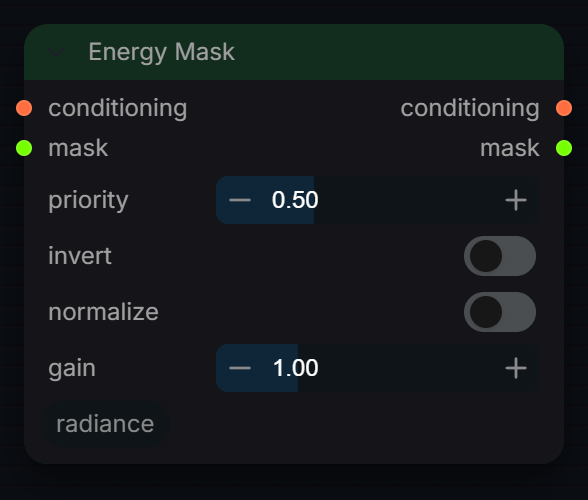
Attach an energy mask to conditioning for Energy-Prioritized Sampling.
Inputs
| Input | Type | Default | Range or choices | What it does |
|---|---|---|---|---|
conditioning |
CONDITIONING | Positive conditioning. Connect the output to RadianceSamplerPro's positive. |
||
mask |
MASK | High-energy region. White = boosted guidance, black = untouched. Resized to the latent grid at sampling time, so any resolution works. | ||
priority |
float | 0.5 | -1 to 4, step 0.05 | Local guidance bonus inside the mask. Effective CFG there is cfg × (1 + priority). 0 disables EPS; negative softens the region. Chained Energy Mask nodes stack, so priorities add where masks overlap. |
invert |
boolean | off | Swap masked and unmasked regions before applying priority. | |
normalize |
boolean | off | Rescale the mask so its darkest pixel is 0 and brightest is 1. Use for luminance or depth passes that are not already in [0,1]. | |
gain |
float | 1 | 0 to 4, step 0.05 | Multiplier applied to the mask before clamping to [0,1]. Hardens a soft mask. |
Outputs
| Output | Type |
|---|---|
conditioning |
CONDITIONING |
mask |
MASK |
Loader
RadianceUnifiedLoader
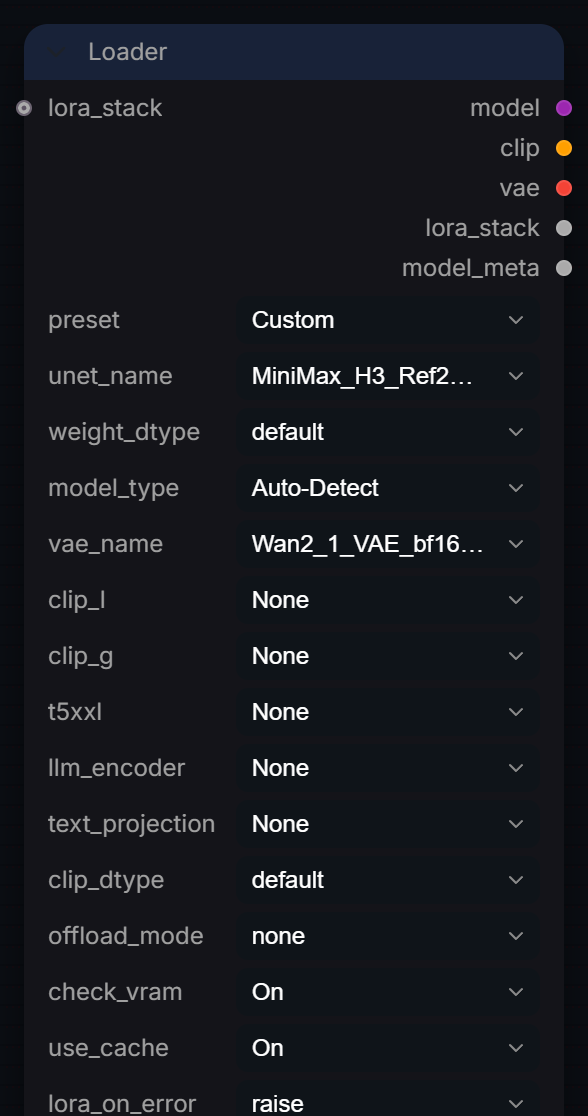
Universal loader v3.3 — streamlined to be extremely visual and modular. Auto-detects architecture, auto-tunes weights/offload, supports chainable LORA_STACK, and outputs JSON model metadata.
Inputs
| Input | Type | Default | Range or choices | What it does |
|---|---|---|---|---|
preset |
choice | Custom |
Custom, AuraFlow, Chroma, Flux.1, Flux.1 (Low VRAM), Flux.2, Flux.2 (Low VRAM), Lumina2, PixArt Sigma, SD 1.5, and 3 more |
Quick-configure for common architectures. Overrides model_type, dtypes, offload_mode, and hints which CLIP slots are needed. |
unet_name |
choice | files found in the matching models or input folder | Main diffusion model (UNET / DiT / Transformer). | |
weight_dtype |
choice | default |
default, fp8_e4m3fn, fp8_e5m2, fp16, bf16, fp32 |
UNET weight precision. fp8_e4m3fn saves ~40% VRAM vs fp16. |
model_type |
choice | Auto-Detect |
Auto-Detect, flux, sd3, sd3.5, sdxl, sd1.5, lumina2, z_image, pixart, aura_flow, and 10 more |
'Auto-Detect' reads the checkpoint's key names to determine architecture. Override manually if detection fails. |
vae_name |
choice | Baked VAE (from UNET) |
VAE for encoding/decoding latents. 'Baked VAE (from UNET)' extracts it from the checkpoint, for architectures whose standard release bundles the VAE into the main file instead of shipping it separately. | |
clip_l (optional) |
choice | None |
None |
CLIP-L (text encoder). Used by: SD1.5, SDXL, Flux, SD3. |
clip_g (optional) |
choice | None |
None |
CLIP-G (text encoder). Used by: SDXL, SD3, SD3.5. |
t5xxl (optional) |
choice | None |
None, Baked (from UNET) |
T5-XXL (text encoder). Used by: Flux, SD3, SD3.5, Wan, PixArt, LTX (pre-2.3). 'Baked (from UNET)' loads it from the main checkpoint -- AuraFlow ships no standalone text encoder file. |
llm_encoder (optional) |
choice | None |
None |
LLM encoder. Used by: HunyuanVideo (Llava-Llama3), LTX 2.3 (Gemma 3), Lumina2 (Gemma-2), Z-Image (Qwen3), Flux.2 (Mistral-3/Qwen3). |
text_projection (optional) |
choice | None |
None, Baked (from UNET) |
Text projection matrix. Used by: LTX 2.3 (with Gemma 3 llm_encoder). 'Baked (from UNET)' loads it from the main LTX 2.3 checkpoint, like the native LTXV Audio Text Encoder Loader. |
clip_dtype (optional) |
choice | default |
default, fp16, bf16, fp8_e4m3fn, fp32 |
CLIP weight precision. Independent from UNET. For Flux T5XXL: fp8 saves ~4.7 GB vs fp16. |
offload_mode (optional) |
choice | none |
none, cpu_offload, sequential |
none = GPU only. cpu_offload = CLIP loaded to CPU RAM. sequential = enable ComfyUI sequential CPU offload (8–12 GB GPUs). |
lora_stack (optional) |
LORA_STACK | Accept a LORA_STACK from RadianceLoraStack node. | ||
check_vram (optional) |
choice | On |
On, Off |
Estimate VRAM before load and warn if tight. |
use_cache (optional) |
choice | On |
On, Off |
Cache loaded models. Skips disk I/O when re-running with the same files. Cache auto-invalidates if files change. |
lora_on_error (optional) |
choice | raise |
warn, raise |
'warn' skips failed LoRA and continues. 'raise' stops execution. |
auto_download (optional) |
boolean | on | If a selected model is missing and is one Radiance knows, download it on first run from its pinned Hugging Face source, checked against its SHA-256 before it is installed (large: 4 to 60 GB). Gated repositories (FLUX.2-dev, FLUX.2-klein 9B, LTX-2.5) need their licence accepted on Hugging Face and HF_TOKEN set. RADIANCE_ALLOW_DOWNLOADS=0 always stops downloads. |
Outputs
| Output | Type |
|---|---|
model |
MODEL |
clip |
CLIP |
vae |
VAE |
lora_stack |
LORA_STACK |
model_meta |
STRING |
LoRA Stack
RadianceLoraStack
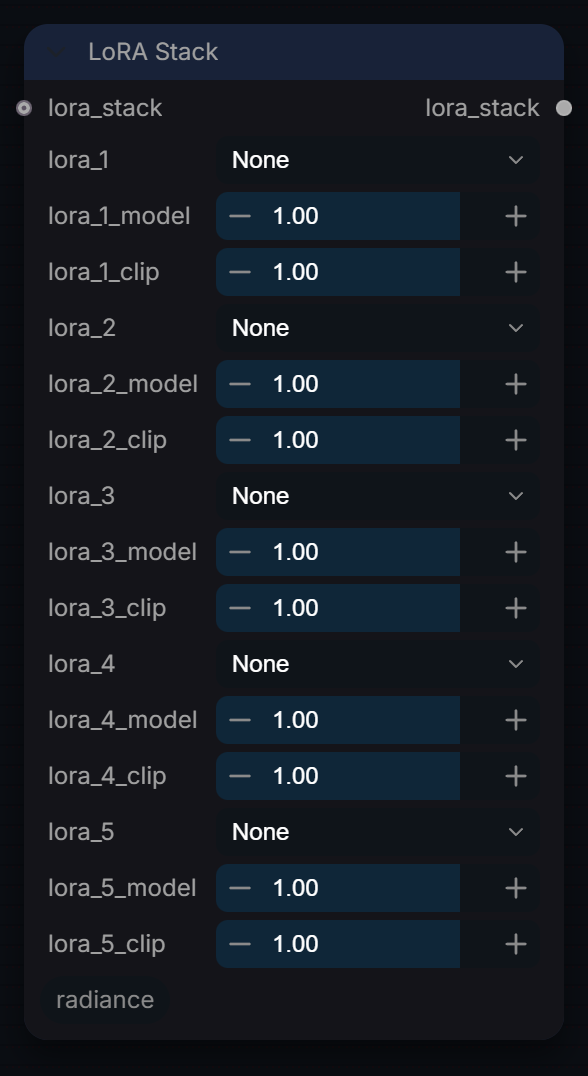
Compose up to 5 LoRAs into an accumulating LORA_STACK. Chain multiple stacks together. Feed into Radiance Read Models.
Inputs
| Input | Type | Default | Range or choices | What it does |
|---|---|---|---|---|
lora_stack (optional) |
LORA_STACK | Chain an upstream LORA_STACK before these LoRAs. | ||
lora_1 (optional) |
choice | None |
None |
LoRA 1 |
lora_1_model (optional) |
float | 1 | -2 to 2, step 0.05 | LoRA 1 model strength |
lora_1_clip (optional) |
float | 1 | -2 to 2, step 0.05 | LoRA 1 CLIP strength |
lora_2 (optional) |
choice | None |
None |
LoRA 2 |
lora_2_model (optional) |
float | 1 | -2 to 2, step 0.05 | LoRA 2 model strength |
lora_2_clip (optional) |
float | 1 | -2 to 2, step 0.05 | LoRA 2 CLIP strength |
lora_3 (optional) |
choice | None |
None |
LoRA 3 |
lora_3_model (optional) |
float | 1 | -2 to 2, step 0.05 | LoRA 3 model strength |
lora_3_clip (optional) |
float | 1 | -2 to 2, step 0.05 | LoRA 3 CLIP strength |
lora_4 (optional) |
choice | None |
None |
LoRA 4 |
lora_4_model (optional) |
float | 1 | -2 to 2, step 0.05 | LoRA 4 model strength |
lora_4_clip (optional) |
float | 1 | -2 to 2, step 0.05 | LoRA 4 CLIP strength |
lora_5 (optional) |
choice | None |
None |
LoRA 5 |
lora_5_model (optional) |
float | 1 | -2 to 2, step 0.05 | LoRA 5 model strength |
lora_5_clip (optional) |
float | 1 | -2 to 2, step 0.05 | LoRA 5 CLIP strength |
Outputs
| Output | Type |
|---|---|
lora_stack |
LORA_STACK |
Prompt
RadianceCinematicPromptEncoder
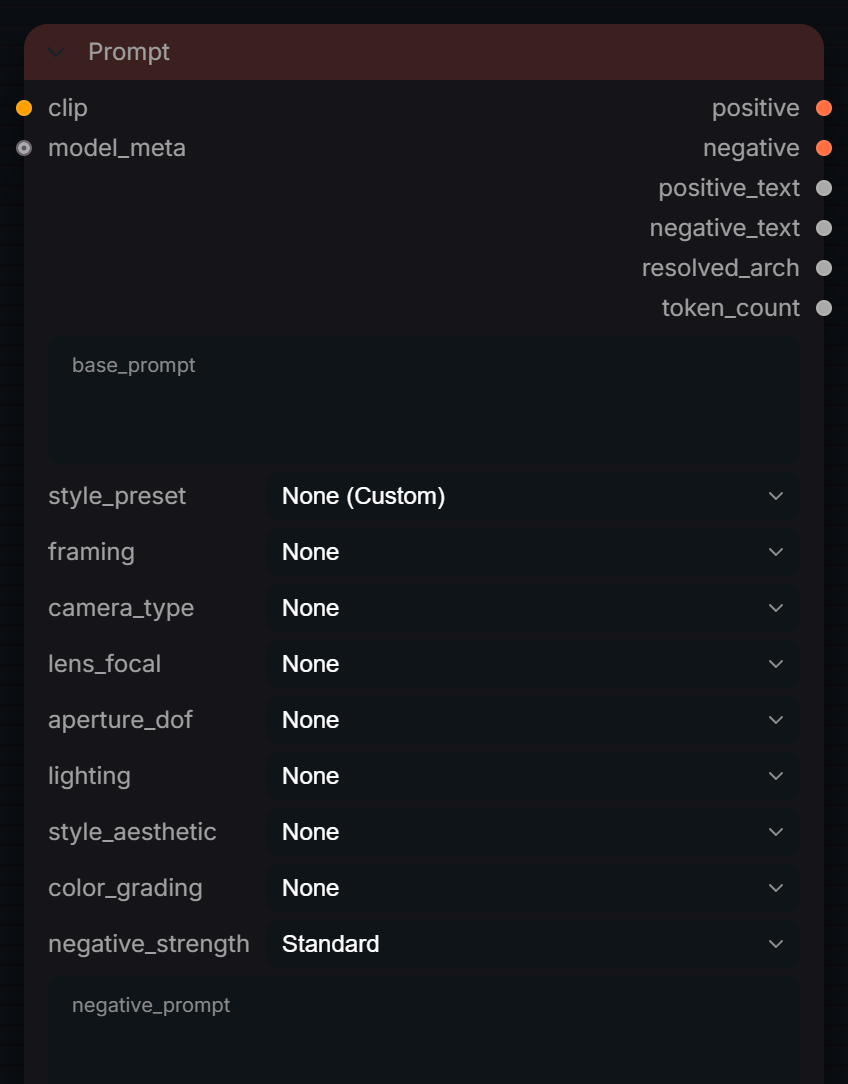
Professional cinematic encoder. Detects the text encoder (CLIP, T5 or LLM) and writes the prompt in the form it reads best; skips the negative encode on guidance-distilled models.
Inputs
| Input | Type | Default | Range or choices | What it does |
|---|---|---|---|---|
clip |
CLIP | CLIP model for encoding. | ||
base_prompt (optional) |
string | multi-line text | Primary subject/scene description. | |
style_preset (optional) |
choice | None (Custom) |
None (Custom), → Classic Hollywood, → Film Noir, → Sci-Fi Cinematic, → Cyberpunk, → Drama / Emotional, → Epic Landscape, → Portrait, → Documentary, → Artistic / Painterly, and 19 more |
One-click style preset. |
framing (optional) |
choice | None |
None, Extreme Close-Up (ECU), Close-Up (CU), Medium Close-Up (MCU), Medium Shot (MS), Medium Wide (MW), Medium Full Shot (MFS), Cowboy Shot (American Shot), Wide Shot (WS), Full Body Shot (Wide), and 11 more |
Shot framing type. |
camera_type (optional) |
choice | None |
None, ARRI Alexa 65 (IMAX), ARRI Alexa Mini LF, ARRI Alexa 35, Sony Venice 2, Sony FX9, Sony A7S III, RED V-Raptor XL, RED Komodo, RED Monstro 8K VV, and 12 more |
Camera body. |
lens_focal (optional) |
choice | None |
None, 14mm Ultra-Wide Angle, 16mm Ultra-Wide Angle, 24mm Wide Angle, 28mm Wide Angle, 35mm Classic Wide, 40mm Semi-Wide, 50mm Standard Prime, 85mm Portrait Prime, 105mm Macro, and 29 more |
Lens + focal length. |
aperture_dof (optional) |
choice | None |
None, f/0.95 (Razor Thin DoF), f/1.2 (Dreamy Bokeh), f/1.8 (Soft Background), f/2.0 (Shallow Cinematic), f/2.8 (Cinematic Separation), f/4.0 (Balanced), f/5.6 (Sharp Subject), f/8.0 (Deep Focus), f/11 (Landscape Sharpness), and 2 more |
Depth of field. |
lighting (optional) |
choice | None |
None, Rembrandt Lighting, Chiaroscuro (High Contrast), Film Noir Lighting, Split Lighting, Butterfly Lighting, Paramount Lighting, Soft Window Light, Golden Hour (Magic Hour), Blue Hour, and 16 more |
Lighting style. |
style_aesthetic (optional) |
choice | None |
None, Photorealistic (Raw), Cinematic Movie Still, Hyper-Realism, Editorial Photography, National Geographic Style, Documentary Texture, Vintage 1990s VHS, Analog Film (Kodak Portra 400), Fujifilm Velvia 50, and 21 more |
Visual aesthetic. |
color_grading (optional) |
choice | None |
None, Teal and Orange (Blockbuster), Bleach Bypass (Gritty), Technicolor (Vintage), Cross Processed, Desaturated (Muted), Vibrant High Contrast, Sepia Tone, Monochrome High Key, Cyberpunk Neon Grading, and 5 more |
Color grading look. |
negative_strength (optional) |
choice | Standard |
Off, Soft, Standard, Aggressive |
Auto-negative strength. 'Soft' is recommended for Flux. |
negative_prompt (optional) |
string | multi-line text | Custom negative prompt. Appended after auto-negatives. | |
negative_mode (optional) |
choice | Auto |
Auto, Always encode, Zero (skip encode) |
Auto: on guidance-distilled models (Flux, Flux.2, MiniMax H3) with no custom negative, return a zeroed negative instead of encoding one: ComfyUI never reads the negative at CFG 1, so this saves a full text-encoder pass. Always encode: pick this if you run those models above CFG 1 with a negative. Zero: never encode the negative. |
model_meta (optional) |
string | Optional JSON metadata from Radiance Read Models. When connected, architecture detection uses this before tokenizer heuristics. |
Outputs
| Output | Type | What it is |
|---|---|---|
positive |
CONDITIONING | Positive conditioning for the sampler. |
negative |
CONDITIONING | Negative conditioning for the sampler. |
positive_text |
STRING | Final positive prompt text that was encoded. |
negative_text |
STRING | Final negative prompt text that was encoded. |
resolved_arch |
STRING | Detected architecture used to choose prose vs CLIP-style prompting. |
token_count |
INT | Tokenizer-derived positive prompt token count after safety handling. |
Regional Grid
RadianceRegionalGrid
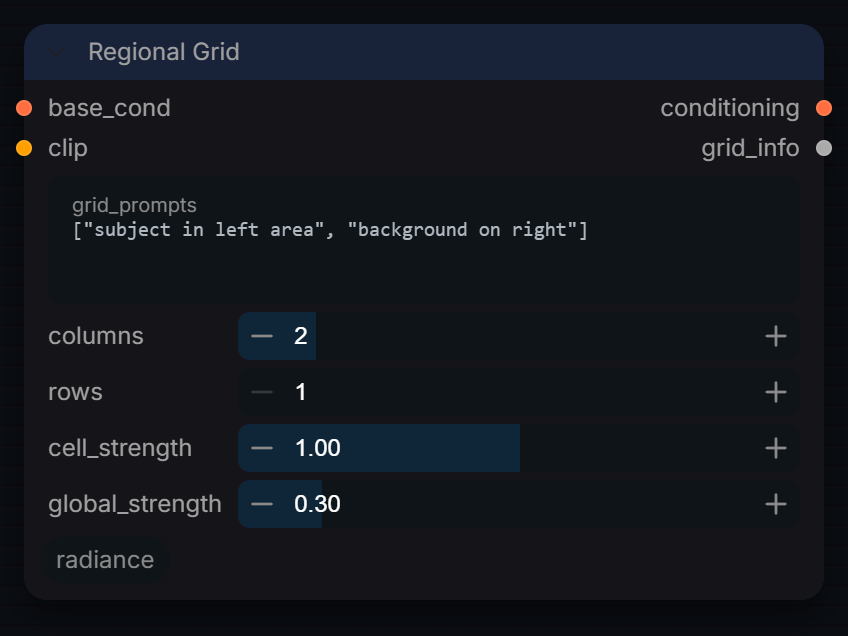
Divide the canvas into a grid of independently prompted regions.
Inputs
| Input | Type | Default | Range or choices | What it does |
|---|---|---|---|---|
base_cond |
CONDITIONING | Global positive conditioning for the whole frame, passed through with its strength set to global_strength. Cells with no prompt get only this. | ||
clip |
CLIP | Text encoder used to encode each cell's prompt from grid_prompts. | ||
grid_prompts |
string | ["subject in left area", "background on right"] |
multi-line text | JSON array of prompts, one per grid cell, row-major order. |
columns |
int | 2 | 1 to 8, step 1 | Number of columns in the regional prompt grid. |
rows |
int | 1 | 1 to 8, step 1 | Number of rows in the regional prompt grid. |
cell_strength |
float | 1 | 0 to 2, step 0.05 | Conditioning strength for each individual region cell. Higher values make the model follow regional prompts more closely. |
global_strength |
float | 0.3 | 0 to 2, step 0.05 | Conditioning strength for the global (full-image) prompt. Blended with cell conditioning at each step. |
Outputs
| Output | Type |
|---|---|
conditioning |
CONDITIONING |
grid_info |
STRING |
Regional Prompt
RadianceRegionalPrompt
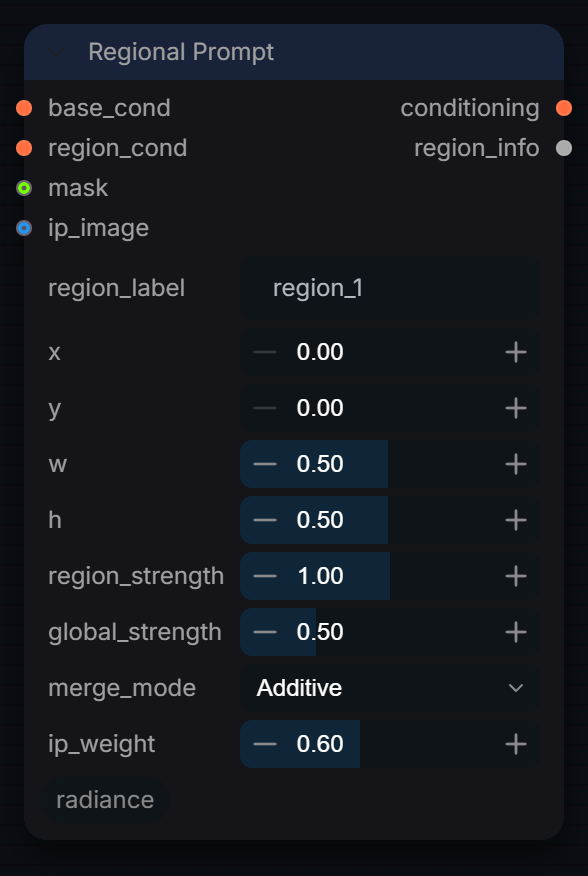
Apply region-specific text prompts with spatial masks.
Inputs
| Input | Type | Default | Range or choices | What it does |
|---|---|---|---|---|
base_cond |
CONDITIONING | Global positive conditioning, passed through with its strength set to global_strength. When chaining, regions from earlier nodes keep their own strength and area. | ||
region_cond |
CONDITIONING | Encoded prompt for this region, restricted to the x/y/w/h box (or the mask's bounding box) via ComfyUI area conditioning. | ||
region_label |
string | region_1 |
Human-readable label for this region (used in JSON output). | |
x |
float | 0 | 0 to 1, step 0.01 | Left edge of region as fraction of image width. |
y |
float | 0 | 0 to 1, step 0.01 | Top edge of region as fraction of image height. |
w |
float | 0.5 | 0.01 to 1, step 0.01 | Width of region as fraction of image width. |
h |
float | 0.5 | 0.01 to 1, step 0.01 | Height of region as fraction of image height. |
region_strength |
float | 1 | 0 to 2, step 0.05 | Conditioning weight for this region vs global. |
global_strength |
float | 0.5 | 0 to 2, step 0.05 | Weight of the global base conditioning passed through. |
merge_mode |
choice | Additive |
Additive, Replace |
Additive: region added on top of global (default, safe). Replace: region replaces global in its area; the global still applies outside it (masked). |
mask (optional) |
MASK | Optional. When connected, overrides x/y/w/h with the mask's bounding box. | ||
ip_image (optional) |
IMAGE | IGNORED. Kept so existing graphs still load. IP-Adapter is a model-side attention patch, not a conditioning key, so it cannot be enabled from this node. Apply an IPAdapter loader/apply node to the MODEL before the sampler instead. Connecting this logs a warning and changes nothing. | ||
ip_weight (optional) |
float | 0.6 | 0 to 1.5, step 0.05 | IGNORED. See ip_image. Set the weight on the IPAdapter node that patches the MODEL. |
Outputs
| Output | Type |
|---|---|
conditioning |
CONDITIONING |
region_info |
STRING |
Resolution
RadianceResolution
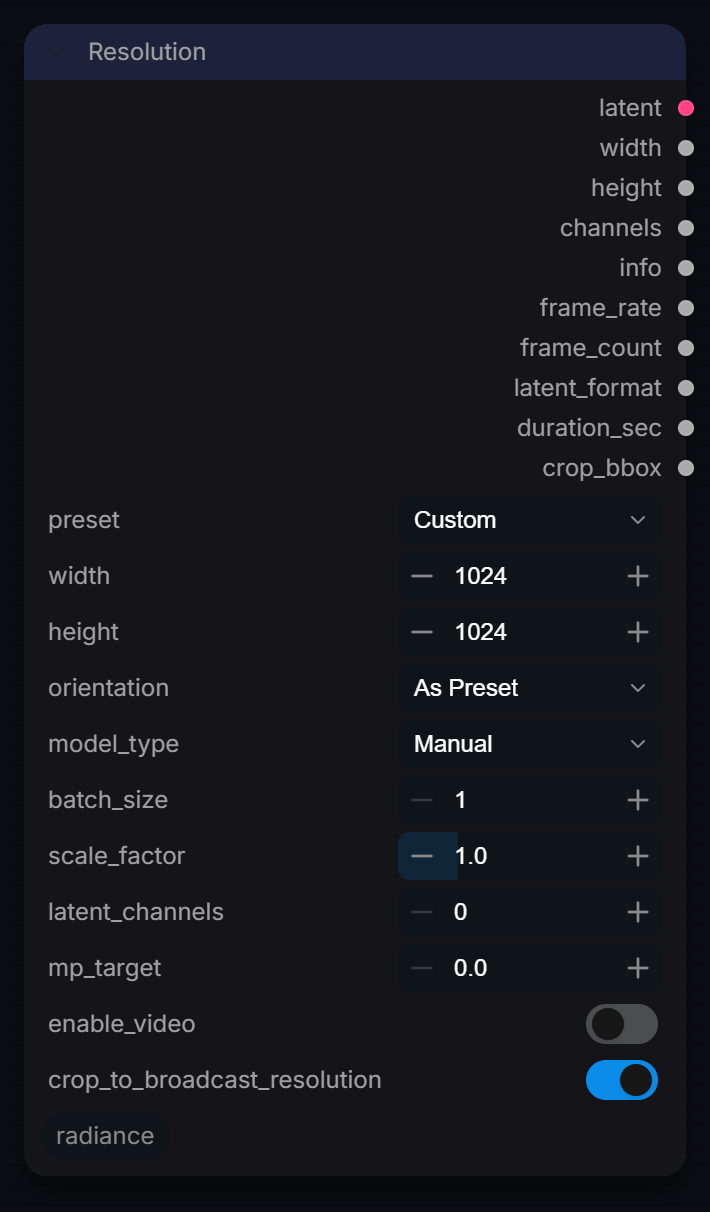
Professional resolution selector with internal preview card. Outputs empty LATENT for Flux/SDXL/SD/Cosmos/CogVideoX with correct channel count. 40+ cinema/social/AI/video presets. WAN frame count validation. LTX 32px alignment. Manual latent_channels override for custom architectures.
Inputs
| Input | Type | Default | Range or choices | What it does |
|---|---|---|---|---|
preset |
choice | Custom |
Custom, 4K DCI (4096×2160), 4K UHD (3840×2160), 2K DCI (2048×1080), HD 1080p (1920×1080), HD 720p (1280×720), Anamorphic 2.39:1 (2048×856), Anamorphic 2.39:1 (4096×1712), Super 35 (2048×1552), IMAX (5616×4096), and 7 more |
Resolution preset (Cinema or Social). The final width/height are automatically aligned for the selected 'model_type'. Select 'Custom' to use manual width/height. |
width |
int | 1024 | 64 to 16384, step 8 | Custom width (only used when preset is 'Custom'). Auto-aligned to 8px (32px for LTX Video). |
height |
int | 1024 | 64 to 16384, step 8 | Custom height (only used when preset is 'Custom'). Auto-aligned to 8px (32px for LTX Video). |
orientation |
choice | As Preset |
As Preset, Landscape, Portrait, Square |
Override orientation. 'As Preset' uses the preset's native orientation. |
model_type |
choice | Manual |
Manual, Flux / SD3 / Lumina2 / Z-Image (16ch), SDXL / SD 1.5 / PixArt / Aura Flow (4ch), Chroma (16ch), Cosmos World (16ch), CogVideoX (16ch), Mochi (12ch), LTXV (128ch), WAN (16ch), WAN TI2V (48ch), and 8 more |
Drives pixel alignment, video-latent shape, frame-count rules, latent_format, and the Est. VRAM readout. Flux/SD3/Cosmos = 16ch. SDXL/SD 1.5 = 4ch. Mochi = 12ch. MiniMax H3 = 24ch video-only (fixed 24fps, 17k+5 frame grid); pair with an audio latent + 'Concat AV Latent' for the full AV pipeline. 'Manual': no alignment/frame-count constraints; use 'latent_channels' for experimental/unlisted models. Est. VRAM assumes a full load; actual usage may be lower with DynamicVRAM/CPU offload active. |
batch_size |
int | 1 | 1 to 64, step 1 | Number of latent frames in batch. |
scale_factor (optional) |
float | 1 | 0.1 to 4, step 0.1 | Scale the resolution by this factor after preset/custom. 0.5 = half res, 2.0 = double res. Applied before alignment. |
latent_channels (optional) |
int | 0 | 0 to 256, step 1 | Override latent channel count. 0 = use model_type default. Common: 4 (SD/SDXL), 12 (Mochi), 16 (Flux/SD3/Cosmos). Set manually for custom architectures. |
mp_target (optional) |
float | 0 | 0 to 64, step 0.1 | MEGAPIXEL TARGET: When > 0, auto-calculates W×H from this MP target and mp_aspect_ratio. Overrides preset and custom W/H. 0 = disabled. |
mp_aspect_ratio (optional) |
choice | 16:9 |
1:1, 4:3, 3:2, 16:9, 21:9, 2.39:1, 1.85:1, 9:16, 2:3, 3:4 |
Aspect ratio for megapixel target mode (only used when mp_target > 0). |
enable_video (optional) |
boolean | off | Enable video sequence mode (replaces batch parameter). | |
crop_to_broadcast_resolution (optional) |
boolean | on | Compute crop_bbox to remove model-alignment padding (e.g. 1920x1088 -> 1920x1080 for LTX's 32px grid). Wire crop_bbox into RadianceHDRVAEDecode's crop_bbox input to actually apply the crop after decode. | |
frame_computation (optional) |
choice | Manual (Frames) |
Manual (Frames), Auto (Seconds) |
How the video frame count is set (video only). Manual uses video_frames as typed; Auto (Seconds) uses duration_seconds x frame_rate snapped to the model's stride*k+1 grid. |
duration_seconds (optional) |
float | 5 | 0.1 to 100000, step 0.1 | Target video duration in seconds (used when frame_computation = 'Auto (Seconds)'). Combined with frame_rate this must stay within video_frames' 100000 ceiling; a longer request is clamped with a warning. |
video_frames (optional) |
int | 81 | 1 to 100000, step 1 | Total number of video frames. 5D-latent models require (stride*k+1) — e.g. 4k+1 for WAN/HunyuanVideo (1, 5, 9, 13...), 8k+1 for LTXV (1, 9, 17...), 6k+1 for Mochi (1, 7, 13...). MiniMax H3 uses its own 17k+5 grid instead (5, 22, 39, 56...). A warning is logged if this constraint is violated. Ignored when frame_computation = 'Auto (Seconds)'. |
frame_rate (optional) |
float | 24 | 1 to 120, step 1 | Playback frame rate. |
Outputs
| Output | Type | What it is |
|---|---|---|
latent |
LATENT | Empty latent tensor at the selected resolution. |
width |
INT | Final image width (pixels). |
height |
INT | Final image height (pixels). |
channels |
INT | Latent channel count. |
info |
STRING | Resolution info string. |
frame_rate |
FLOAT | Playback frame rate. Always the widget value — never 0.0. |
frame_count |
INT | Total video frames (or batch size for images). |
latent_format |
STRING | Latent format string — wire to Sampler Pro latent_format input. |
duration_sec |
FLOAT | Duration in seconds (video_frames / frame_rate). 0.0 for images. |
crop_bbox |
BOUNDING_BOX | Crop box {x, y, width, height} to remove model-alignment padding. Wire into RadianceHDRVAEDecode's crop_bbox input. |
Sampler
RadianceSamplerPro
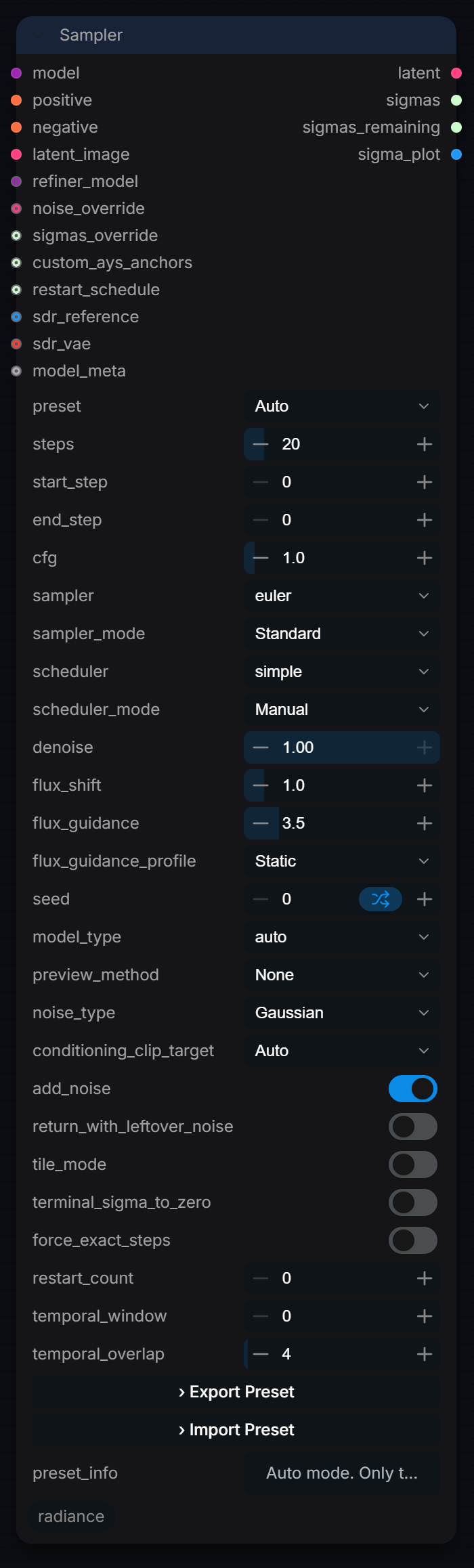
Universal diffusion sampler. Auto-detects model type (Flux, SD3, SDXL, WAN, LTX, HunyuanVideo, Lumina2, Chroma). Phase-shift sampling, AYS schedules, PAG, dynamic guidance, tiled sampling, multi-conditioning, noise types, refiner chain. Restart sampling (IRES style), noise alpha schedule, sigma plot output, custom AYS anchors, sigmas_remaining for multi-node chains. AVControl-style SDR reference conditioning: encode an SDR reference through the VAE and blend it into the initial latent + per-step post-CFG anchor for HDR structure preservation.
Inputs
| Input | Type | Default | Range or choices | What it does |
|---|---|---|---|---|
model |
MODEL | Diffusion model to sample with. It is cloned before any patch (PAG, guidance rescale, SDR anchor, windowing), so the loader's model is not modified. | ||
positive |
CONDITIONING | Prompt conditioning to steer toward. For guidance-embedded models (Flux, Flux.2, LTXV, LongCat) flux_guidance is written into it. | ||
negative |
CONDITIONING | Conditioning to steer away from. Only evaluated when cfg is above 1.0; at 1.0 ComfyUI skips the negative pass. | ||
latent_image |
LATENT | Starting latent: empty for text-to-image, VAE-encoded for img2img (lower denoise). A noise_mask on it limits sampling to the masked area. | ||
preset |
choice | Auto |
Auto, Custom, [F] Flux txt2img, [F] Flux img2img, [F] Flux Inpaint, [F] Flux High-Res Fix, [F] Flux Fast (12 steps), [F] Flux Quality (28 steps), [F] Flux Cinematic (30 steps), [F] Flux Schnell (4 steps), and 18 more |
Auto and Custom let the node replace cfg, flux_guidance, steps and sampler with the detected model's defaults while they sit at their widget defaults. A named preset only fills the widgets in the UI; at run time the widget values are used as-is. |
steps |
int | 20 | 1 to 200, step 1 | Total denoising steps. More steps = higher quality but slower. 20–30 is typical for most samplers. |
start_step |
int | 0 | 0 to 200, step 1 | Start step (0 = beginning) |
end_step |
int | 0 | 0 to 200, step 1 | End step (0 = use total steps) |
cfg |
float | 1 | 0 to 20, step 0.1 | Classifier-free guidance scale. 1.0 runs one model pass per step and ignores the negative; above 1.0 adds a negative pass (about twice the time). Keep 1.0 for Flux and distilled or turbo models and use flux_guidance instead. |
audio_cfg |
float | 0 | 0 to 100, step 0.1 | LTX-AV only (e.g. LTX 2.5): separate CFG scale for the audio half of the latent. 0 = same as cfg (single-CFG, pre-2.5 behavior). |
sampler |
choice | ComfyUI's samplers | ComfyUI sampling algorithm. With preset Auto or Custom, 'euler' is replaced by the detected model's recommended sampler, if it has one. | |
sampler_mode |
choice | Standard |
Standard, Phase-Shift (Euler >> DPM), Phase-Shift (Euler >> SGM), CFG++ (Perpendicular) |
Standard: one sampler throughout. Phase-Shift: switch at phase_split to dpmpp_2m (DPM) or to the same sampler on the sgm_uniform schedule (SGM); not used for video models. CFG++: scales cfg toward 1.0 by a cosine of each stage's starting sigma, so a plain single-stage run keeps cfg unchanged. |
phase_split |
float | 0.4 | 0 to 1, step 0.05 | Phase-Shift modes only: fraction of the total steps at which the second sampler takes over (0.4 of 20 steps = step 8). |
scheduler |
choice | ComfyUI's schedulers | ComfyUI noise schedule used to build the sigmas. Ignored when ays_schedule, sigmas_override or the SD/SDXL Turbo schedule is in use. | |
scheduler_mode |
choice | Manual |
Manual, Auto (Match Steps) |
Manual uses the scheduler widget. Auto replaces it with the detected model's default scheduler (it does not depend on the step count). |
denoise |
float | 1 | 0 to 1, step 0.01 | Fraction of the noise schedule to run. 1.0 starts from pure noise; lower values skip the noisiest steps and keep more of latent_image (img2img). Fewer steps run unless force_exact_steps is on. |
flux_shift |
float | 1 | 0.01 to 10, step 0.1 | Extra time-shift applied to the sigma schedule, shifts / (1 + (shift-1)s), on top of the model's own shift. 1.0 = off; higher spends more steps at high noise. Intended for flow-matching models (sigmas 0-1). Auto/Custom preserve this value. |
flux_guidance |
float | 3.5 | 0 to 20, step 0.1 | Embedded guidance written into the positive conditioning for Flux, Flux.2, LTXV and LongCat; ignored by other models. Auto/Custom replace 3.5 with the model default (for example 0 for Schnell). |
flux_guidance_profile |
choice | Static |
Static, Dynamic (Creative Start/End) |
Static: one value for the whole run. Dynamic: splits the run into stages; guidance-embedded models start at 0.6x flux_guidance and end slightly lower, CFG models start at 1.2x cfg and end at 0.7x (cfg above 1.0 only). Stage boundaries include ramp ends so the middle reaches 1.0x when the step range includes it. Short or partial runs may omit phases. Ignored in tile_mode. |
seed |
int | 0 | 0 to 18446744073709551615 | Random seed for reproducible results. Use the control below it (randomize / increment / fixed) to vary the seed between runs. |
pag_scale |
float | 0 | 0 to 5, step 0.1 | Perturbed-attention guidance strength (0 = off). It perturbs the unconditional pass, so it only works with cfg above 1.0. |
model_type |
choice | auto |
auto, flux, flux2, flux2-klein, sd3, sd3.5, sdxl, sd1.5, wan, wan_ti2v, and 19 more |
Model family used for defaults, guidance handling and schedules. auto detects it from the model (or from model_meta when connected); set it by hand if detection is wrong. |
sigma_blend_steps |
int | 0 | 0 to 10, step 1 | Smooth sigma transition steps at phase-shift boundary |
guidance_rescale_phi |
float | 0 | 0 to 1, step 0.05 | Guidance rescale (Imagen). 0=off, 0.7=recommended for SDXL. Prevents oversaturation at high CFG. |
preview_method |
choice | None |
None, TAESD, Latent2RGB |
Live preview during sampling. TAESD needs the taesd weights in models/vae_approx and falls back to Latent2RGB without them. None sends no Radiance preview, only ComfyUI's progress bar. |
noise_type |
choice | Gaussian |
Gaussian, Perlin, Uniform, Spectral, Brownian, Simplex, Voronoi, Curl |
Noise generation algorithm. Perlin=coherent structure, Spectral=pink/1f noise, Brownian=video-correlated, Uniform=flat distribution. |
conditioning_clip_target |
choice | Auto |
Auto, clip_l, clip_g, t5xxl |
Has no effect. Kept so saved workflows load; any value other than Auto only logs a warning. Choose the text encoder at encode time instead (e.g. CLIPTextEncodeSDXL). |
add_noise |
boolean | on | Inject fresh noise at the start of sampling. Disable for img2img-style passes that should preserve structure. | |
return_with_leftover_noise |
boolean | off | Return the latent with residual noise un-removed. Useful for multi-pass workflows. | |
ays_schedule |
boolean | off | Use AYS (Align Your Steps) research-optimized sigma schedule. Best at 8-15 steps. | |
tile_mode |
boolean | off | Enable tiled sampling for memory-efficient high-resolution generation. | |
tile_size |
int | 128 | 32 to 1024, step 32 | Tile size in latent pixels (128 latent ≈ 1024px output with VAE factor 8). |
tile_overlap |
int | 16 | 0 to 256, step 8 | Overlap between adjacent tiles to reduce seam artifacts. |
tile_blend |
choice | feather |
feather, average, gaussian |
Seam blending method. feather=cosine fade, gaussian=bell curve, average=uniform. |
terminal_sigma_to_zero |
boolean | off | Ensure terminal step reaches zero noise even on truncated image-to-image runs. Vital for Flow Matching models. | |
force_exact_steps |
boolean | off | Ensure precise step count in image-to-image runs, adjusting calculations rather than purely truncating stages. | |
refiner_model (optional) |
MODEL | Optional second model that takes over from refiner_start_step with the same conditioning, so it must accept the same text-encoder width. PAG, guidance rescale and the SDR anchor are not applied to it. Ignored in tile_mode. | ||
refiner_start_step (optional) |
int | 20 | 0 to 200, step 1 | Step index (0-based, out of steps) where refiner_model takes over. At or above the last step being run, the refiner never runs. |
noise_override (optional) |
LATENT | Use this latent's samples as the initial noise instead of generating it from seed and noise_type. Its shape must match latent_image exactly. | ||
sigmas_override (optional) |
SIGMAS | Inject a pre-computed sigma schedule. Bypasses all internal sigma computation. | ||
_js_export_btn (optional) |
string | JS serialization placeholder (not user-editable). | ||
_js_import_btn (optional) |
string | JS serialization placeholder (not user-editable). | ||
_js_preset_info (optional) |
string | JS serialization placeholder (not user-editable). | ||
restart_count (optional) |
int | 0 | 0 to 4, step 1 | Number of restart iterations at each restart_schedule sigma. 0 = disabled. 1–2 restarts add ~5% extra steps but measurably improve high-frequency detail on Flux and WAN. |
noise_alpha_start (optional) |
float | 1 | 0 to 1, step 0.05 | Weight of the selected noise_type against Gaussian at step 0 (1.0 = pure noise_type; no effect with Gaussian). The noise is injected once, so the start/end cosine ramp is read only at start_step: on a run from step 0 only this value matters. |
noise_alpha_end (optional) |
float | 1 | 0 to 1, step 0.05 | Weight of the selected noise_type at the final step of the ramp. The noise is injected once, at start_step, so this only has an effect when start_step is above 0 (partial or multi-pass runs). |
custom_ays_anchors (optional) |
SIGMAS | Optional model-specific AYS anchor schedule. Overrides the built-in AYS tables when ays_schedule=True. Must be a monotonically decreasing tensor ending at 0. | ||
restart_schedule (optional) |
SIGMAS | Optional list of sigma levels at which to re-inject noise and re-denoise (Restart / IRES style). Improves fine detail at fixed step count. Requires restart_count > 0. | ||
sdr_reference (optional) |
IMAGE | Optional structure reference: a display-referred 0-1 image, VAE-encoded with sdr_vae and resized to the latent. Needs sdr_vae connected and sdr_blend above 0. | ||
sdr_vae (optional) |
VAE | VAE used to encode sdr_reference. Use the VAE that matches the model. | ||
sdr_blend (optional) |
float | 0.35 | 0 to 1, step 0.05 | Weight of the encoded reference: it is mixed into the starting latent at this weight, and is the starting weight of the per-step anchor. 0 disables SDR conditioning. |
sdr_inject_steps (optional) |
int | 6 | 0 to 100, step 1 | Number of model evaluations after CFG in which the denoised result is pulled toward the reference (0 = only the starting-latent mix). Multi-evaluation samplers use these up faster than one per step. |
sdr_decay (optional) |
float | 0.65 | 0 to 1, step 0.05 | Per-evaluation falloff of the anchor: weight = sdr_blend x sdr_decay^n. Lower fades faster; 1.0 holds it constant. |
model_meta (optional) |
string | Optional: connect RadianceUnifiedLoader's model_meta output. Only used when preset='Auto'/'Custom' and model_type='auto'. Refines cfg/guidance/steps beyond what the loaded model's architecture alone can tell -- e.g. distinguishing Flux.2 Klein Base from Klein distilled, which are architecturally identical. | ||
temporal_window (optional) |
int | 0 | 0 to 512, step 1 | Experimental long-video windowing; may produce ghosting or scene changes at joins. Use 0 for production work. ControlNet requires 0 or a window covering the whole clip. 0 = off (whole clip denoised at once, the previous behaviour). Above 0, this many LATENT frames are denoised per window, with the windows blended at every step, so peak VRAM follows the window size instead of the clip length. Only applies to 5D video latents longer than the window. 16-32 is a usual range; smaller windows save more memory and give the model less temporal context. |
temporal_overlap (optional) |
int | 4 | 0 to 256, step 1 | Latent frames shared between neighbouring windows, used to cross-fade them at every denoising step. Clamped to half of temporal_window. More overlap increases compute but does not guarantee coherent joins; 0 means hard cuts between windows. Ignored when temporal_window is 0. |
Outputs
| Output | Type | What it is |
|---|---|---|
latent |
LATENT | Denoised latent ready for VAE decode. |
sigmas |
SIGMAS | The full sigma schedule used — chain to another sampler or inspect. |
sigmas_remaining |
SIGMAS | Unused tail of the sigma schedule after end_step. Chain directly to a refiner or upscaler sampler. |
sigma_plot |
IMAGE | Visual plot of the sigma schedule as an IMAGE. Blank if matplotlib is unavailable. |
VAE Decode (HDR)
RadianceHDRVAEDecode
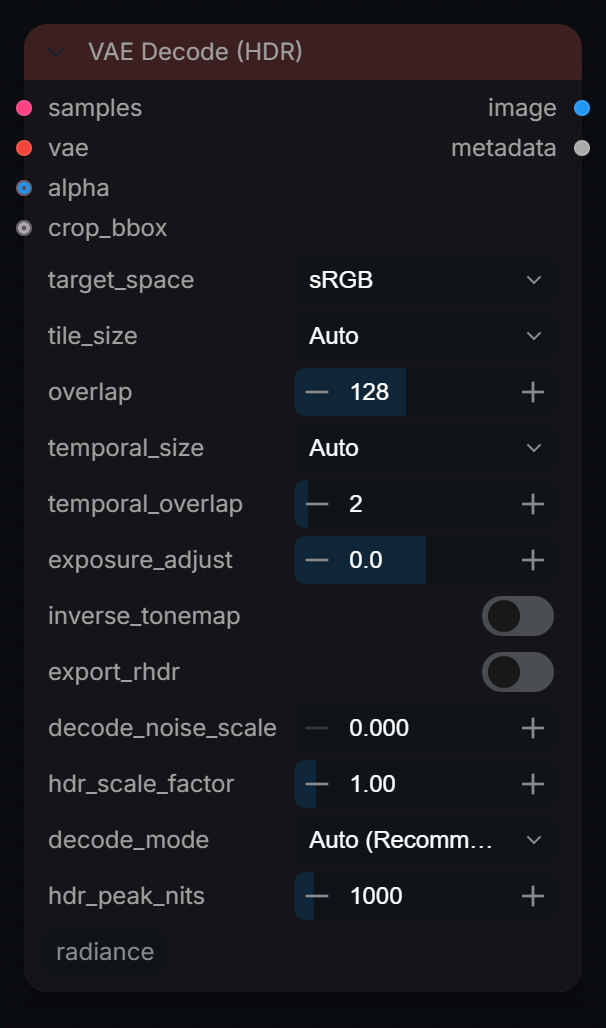
Decode a latent with an ordinary VAE into the chosen output space. Auto inverts the HDR coding of latents straight from VAE Encode (HDR); Direct HDR returns scene-linear values above 1.0.
Inputs
| Input | Type | Default | Range or choices | What it does |
|---|---|---|---|---|
samples |
LATENT | Latent to decode: from a sampler, or straight from VAE Encode (HDR), whose embedded metadata lets Auto invert the HDR coding exactly. | ||
vae |
VAE | VAE matching the model (and the VAE used by VAE Encode (HDR), if any). | ||
target_space |
choice | sRGB |
Linear, ACEScg, ACES 2065-1, Rec.2020 Linear, sRGB, Raw, ARRI LogC3, ARRI LogC4, Sony S-Log3, Panasonic V-Log, and 2 more |
Output colour space. Sampler-safe decodes deliver it as chosen: sRGB is display-ready for Preview/Save; Linear, ACEScg, ACES 2065-1 and Rec.2020 Linear are linear light in that gamut; a camera log target applies its gamut and curve (ARRI LogC4 = AWG4 + LogC4, Sony S-Log3 = S-Gamut3.Cine). Direct HDR output is scene-linear: sRGB and Raw become Linear there. |
tile_size (optional) |
choice | Auto |
Auto, 512, 768, 1024, 1280, 1536 |
Tile size for decode. Auto queries VRAM. |
overlap (optional) |
int | 128 | 32 to 256, step 16 | Overlap between tiles. 128px optimal for cosine blending. |
temporal_size (optional) |
choice | Auto |
Auto, 2, 4, 8, 16, 32, 64 |
Temporal chunk size in LATENT frames (not pixel frames — unlike ComfyUI's native 'VAE Decode (Tiled)', which counts pixel frames and divides internally by the VAE's temporal compression). Auto sizes it from the same VRAM budget as tile_size, computed jointly since a larger spatial tile leaves less room per frame. A manual value forces chunking at that many latent frames regardless of tile_size. Images (4D latents) are not affected. |
temporal_overlap (optional) |
int | 2 | 0 to 32, step 1 | Overlap in latent frames between temporal chunks. 0 = hard cuts at chunk boundaries. A small value (1–2) blends them instead. Only active when the video actually needs temporal chunking (temporal_size='Auto' decides on its own, or set a manual value smaller than the clip's latent frame count). |
exposure_adjust (optional) |
float | 0 | -10 to 10, step 0.1 | Post-decode exposure in stops. |
alpha (optional) |
IMAGE | Alpha channel from Radiance VAE 4K Encode. | ||
hdr_mode (optional) |
choice | Clip (SDR) |
Clip (SDR), Soft Clip, Compress (Log), Passthrough |
Must match encode setting. 'Compress (Log)' (v2.3): true HDR — soft-shouldered, highlight-denoised, no hard clamp. Produces clean HDR output across the full log-curve dynamic range. 'Soft Clip': inverts tanh rolloff to recover highlights. 'Passthrough': extended sRGB range. |
display_tonemap (optional) |
choice | None |
Reinhard, ACES Filmic, None |
v2.3.8: display_tonemap is NOW THE SOLE TONEMAP CONTROL — independent of hdr_output. 'Reinhard' or 'ACES Filmic': tonemap ALWAYS fires for Compress(Log), even when hdr_output=True. Reinhard → smooth rolloff [0,∞)→[0,1), hue-preserving. ACES Filmic → filmic contrast, clips cleanly above ~10 lin. 'None': NO tonemap regardless of hdr_output. Scene-linear values far above 1.0 pass through — GUARANTEED OVEREXPOSURE in ComfyUI preview. Use only with an OCIO-aware downstream viewer. Ignored for all non-Compress(Log) hdr_modes. |
inverse_tonemap (optional) |
boolean | off | Expand SDR to HDR (recover highlights). | |
target_stops (optional) |
float | 12 | 8 to 16, step 0.5 | Target dynamic range for inverse tonemap. |
export_rhdr (optional) |
boolean | off | Export .rhdr sidecar for Radiance Viewer. | |
rhdr_precision (optional) |
choice | f32 |
f16, f32 |
RHDR export precision. 'f16' (fp16, default): smaller files, values capped at 65504 — adequate for most VFX material. 'f32' (fp32): full 32-bit range, ~2× file size — use for shots with extreme linear values (direct sun, fire VDBs). |
source_space (optional) |
choice | sRGB |
Linear, ACEScg, ACES 2065-1, Rec.2020 Linear, sRGB, Raw, ARRI LogC3, ARRI LogC4, Sony S-Log3, Panasonic V-Log, and 2 more |
Kept for saved workflows. The log curve and camera gamut are read from the latent's HDR Encode metadata; this widget is not used. |
hdr_output (optional) |
boolean | off | 32-BIT HDR OUTPUT — when True, skips the final [0,1] clamp so the output IMAGE tensor carries full 32-bit scene-linear values (>1.0 for bright highlights, <0.0 for below-black). Required for Linear/ACEScg/Log target spaces in HDR VFX pipelines. Disable when feeding SDR nodes (preview, PNG export, etc.). | |
decode_noise_scale (optional) |
float | 0 | 0 to 0.1, step 0.001 | v2.4 — Decode-time noise injection. Mixes a small amount of Gaussian noise into the latent BEFORE VAE decode using lerp: noised = (1-scale)latent + scalenoise. Breaks up coherent VAE decoder grid artifacts in flat highlight regions. Effect is most valuable for Compress (Log) mode where the log→linear decompression exponentially amplifies any residual decoder artifact in the highlight band. 0.0 = disabled (default — safe for existing workflows). Per-profile recommended starting points: ARRI LogC4: 0.018 Sony S-Log3: 0.018 ARRI LogC3: 0.025 (matches LTX default) Panasonic V-Log: 0.022 DaVinci Intermediate: 0.030 RED Log3G10: 0.035 Ignored for non-Compress(Log) hdr_modes. |
hdr_scale_factor (optional) |
float | 1 | 0.1 to 10, step 0.05 | Linear gain on the Direct HDR output (RGB only, alpha untouched). Not applied to sampler-safe SDR decodes or to log targets; the metadata output says when it was skipped. |
decode_mode (optional) |
choice | Auto (Recommended) |
Auto (Recommended), Sampler (SDR-safe), Direct HDR |
Auto: Direct HDR when the latent comes straight from VAE Encode (HDR) (its fingerprint still matches), sampler-safe for anything a sampler touched. Sampler: standard SDR decode, never log inversion. Direct HDR: scene-linear output above 1.0, no display tonemap; a VAE Encode (HDR) latent is log-inverted exactly, any other latent is decoded and its clipped highlights are reconstructed by the pixel SDR -> HDR model. The metadata output names the path that ran. |
hdr_peak_nits (optional) |
float | 1000 | 200 to 10000, step 50 | Direct HDR on an ordinary sampler latent: the mastering peak the reconstructed highlights are limited to. Output is linear with SDR white = 1.0 = 203 nits (BT.2408), so the peak sits at peak/203 (4.93 at 1000). Not used when the latent is log-encoded by HDR Encode. |
crop_bbox (optional) |
BOUNDING_BOX | Optional: connect RadianceResolution's crop_bbox output to crop off model-alignment padding (e.g. 1920x1088 -> 1920x1080) after decode. |
Outputs
| Output | Type | What it is |
|---|---|---|
image |
IMAGE | Decoded image tensor. |
metadata |
STRING | JSON string with decode settings and applied hdr_scale_factor. |
VAE Encode (HDR)
RadianceHDRVAEEncode
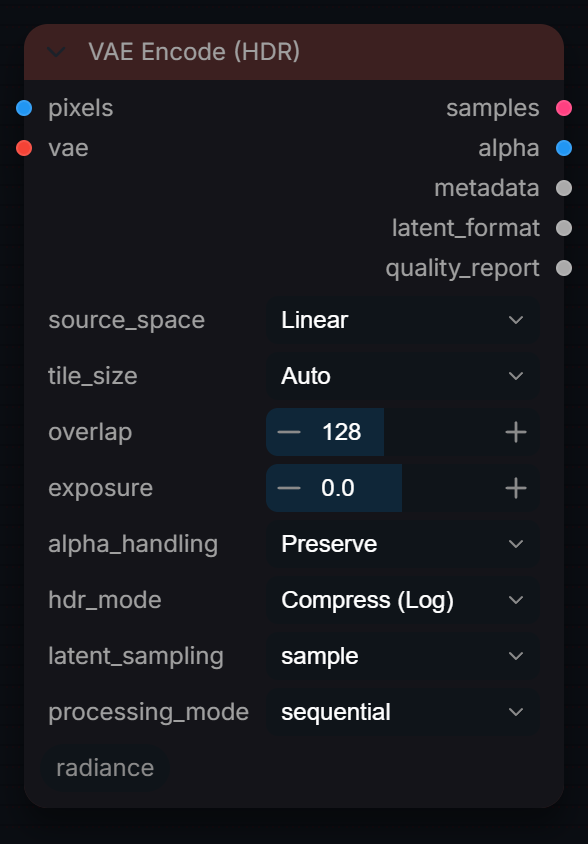
HDR-aware VAE encode, the partner of VAE Decode (HDR). Compress (Log) (default) keeps values above 1.0 through the VAE: VAE Decode (HDR) in Auto inverts it exactly. Tiled for 4K+ and video latents.
Inputs
| Input | Type | Default | Range or choices | What it does |
|---|---|---|---|---|
pixels |
IMAGE | Image to encode, in the encoding named by source_space (scene-linear by default, values above 1.0 allowed). It is linearised, exposed and HDR-coded per hdr_mode before the VAE sees it. | ||
vae |
VAE | VAE of the model the latent is meant for. Pair it with the same VAE in VAE Decode (HDR) so the HDR coding can be inverted. | ||
source_space |
choice | Linear |
Linear, ACEScg, ACES 2065-1, Rec.2020 Linear, sRGB, Raw, ARRI LogC3, ARRI LogC4, Sony S-Log3, Panasonic V-Log, and 2 more |
Input color space. Auto-linearized before VAE encode. |
tile_size (optional) |
choice | Auto |
Auto, 512, 768, 1024, 1280, 1536 |
Tile size in pixels. Auto queries VRAM. |
overlap (optional) |
int | 128 | 32 to 256, step 16 | Overlap between tiles in pixels. 128px optimal for cosine blending. |
exposure (optional) |
float | 0 | -10 to 10, step 0.1 | Exposure adjustment in stops (linear space). |
alpha_handling (optional) |
choice | Preserve |
Preserve, Ignore |
Preserve alpha channel for roundtrip. |
hdr_mode (optional) |
choice | Compress (Log) |
Clip (SDR), Soft Clip, Compress (Log), Passthrough |
How HDR is carried through the VAE. Compress (Log): values above 1.0 survive and VAE Decode (HDR) inverts them exactly (recommended). Soft Clip: gentler roll-off, less exact. Clip (SDR): ordinary SDR encode. Passthrough: no coding. |
latent_sampling (optional) |
choice | sample |
sample, mean, mode |
How to sample from the VAE posterior distribution. 'mean' gives deterministic, lowest-noise results for img2img. 'sample' gives diverse outputs (default ComfyUI behaviour). |
processing_mode (optional) |
choice | sequential |
sequential, batched |
'sequential' uses minimal VRAM (one tile at a time). 'batched' groups tiles for 2-4x faster encode on high-VRAM GPUs. |
Outputs
| Output | Type | What it is |
|---|---|---|
samples |
LATENT | Encoded latent — wire to Radiance Sampler or save node. |
alpha |
IMAGE | Alpha channel tensor — wire to Radiance VAE 4K Decode alpha input. |
metadata |
STRING | Encode metadata JSON — wire to Decode crop_padding for auto-crop. |
latent_format |
STRING | Latent format string (e.g. 'flux_16ch') — wire to Radiance Sampler latent_format input. |
quality_report |
STRING | Quality metrics JSON: clipping %, NaN count, latent range, tile info. |