Load & Save nodes
Readers, writers, EXR, image, video, and file exchange.
5 nodes. All sections
DPX Read
RadianceDigitalCinemaRead
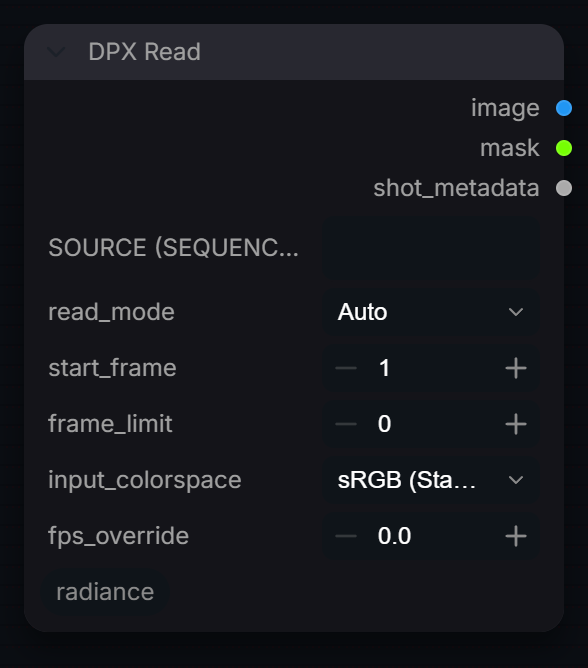
Read a video, image or frame sequence through Radiance Read, decoded to scene-linear, and output shot metadata (source info, colorspace, fps) for downstream pipeline nodes.
Inputs
| Input | Type | Default | Range or choices | What it does |
|---|---|---|---|---|
source_path |
string | Video file, image, or frame sequence (e.g. shot.####.exr). Required: an empty path stops the graph. | ||
read_mode |
choice | Auto |
Auto, Video, Sequence, EXR |
How to treat source_path. Auto detects from the path; EXR is handled exactly like Sequence. |
start_frame |
int | 1 | Sequence: the frame number to start at (a number outside the range on disk falls back to the first frame). Video: the frame to start at counting from 1, so the default 1 is the clip's first frame. | |
frame_limit |
int | 0 | Maximum number of frames to read from start_frame. 0 reads to the end. | |
input_colorspace |
choice | sRGB (Standard) |
sRGB (Standard), Auto / Linear (pass-through), Rec.709 (BT.1886), Rec.709 (camera OETF), Rec.2020 (BT.2020 OETF), P3-D65 (Gamma 2.6), PQ (ST.2084), HLG (BT.2100), Linear Rec.709 (sRGB), Linear Rec.2020, and 12 more |
Transfer the source was encoded with. It is decoded to scene-linear; shot_metadata.colorspace records the result. |
fps_override |
float | 0 | 0 = the source's own rate. Written to shot_metadata.fps. |
Outputs
| Output | Type |
|---|---|
image |
IMAGE |
mask |
MASK |
shot_metadata |
RADIANCE_SHOT |
DPX Write
RadianceDigitalCinemaWrite
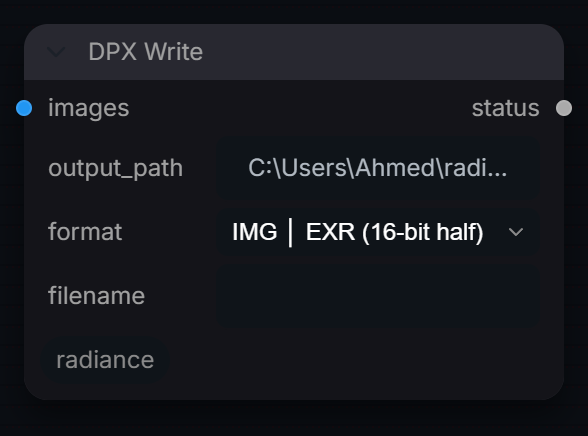
Simplified writer kept for older pipelines: passes images, output_path, format and filename to Radiance Write with every other setting at its default, and returns a status string.
Inputs
| Input | Type | Default | Range or choices | What it does |
|---|---|---|---|---|
images |
IMAGE | Frames to write, passed to Radiance Write with its defaults (color_space Linear (pass-through), so values are written unchanged). | ||
output_path |
string | ~/radiance_output |
Output path, as in Radiance Write. With filename empty it is the full stem (single images and video get the extension appended; sequences use it as a folder). | |
format (optional) |
choice | IMG │ EXR (16-bit half) |
IMG │ PNG (8-bit), IMG │ PNG (16-bit), IMG │ JPEG, IMG │ TIFF (16-bit), IMG │ TIFF (32-bit float), IMG │ DPX, IMG │ WEBP, IMG │ EXR (16-bit half), IMG │ EXR (32-bit float), IMG │ Radiance HDR (.hdr), and 12 more |
Output format. IMG writes only the first frame of a batch; SEQ and VID write every frame. |
filename (optional) |
string | Optional stem. When set, output_path is treated as a folder and the file is named |
Outputs
| Output | Type |
|---|---|
status |
STRING |
Read
RadianceRead
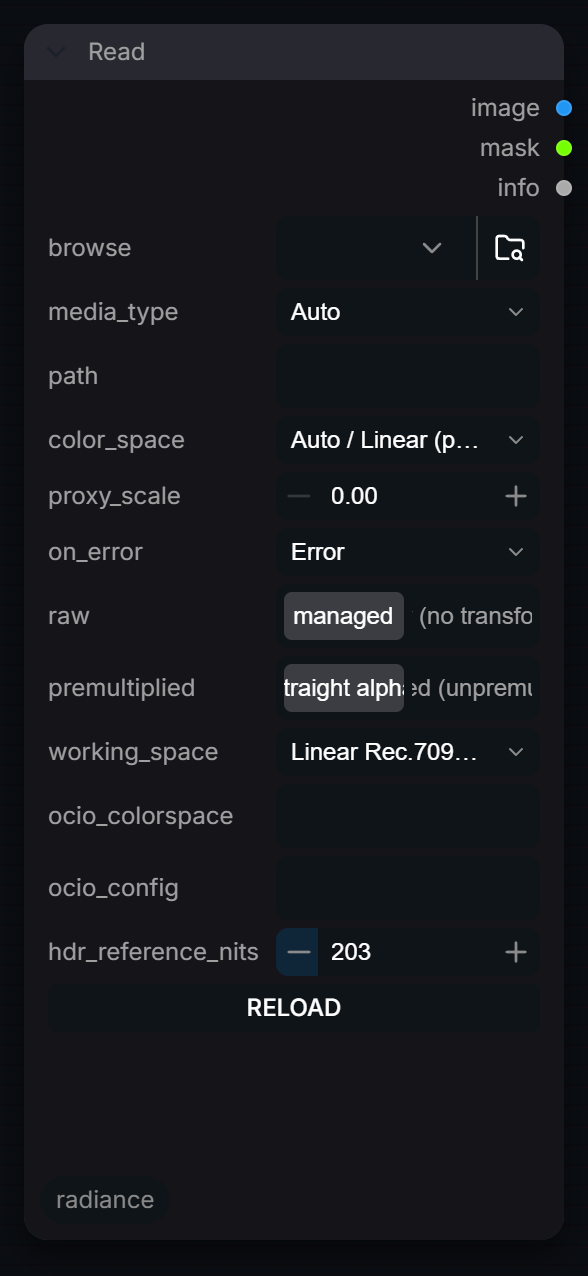
Read an image, EXR, video or numbered sequence into the pipeline. Video decodes at the source bit depth through ffmpeg, keeps ProRes 4444 alpha on the mask output, and honours the file's colour tags.
Inputs
| Input | Type | Default | Range or choices | What it does |
|---|---|---|---|---|
browse |
choice | `` | Browse or upload a file from disk. • Click the upload icon (📎) to open a native file picker. • Supports images (PNG, JPG, TIFF, EXR, DPX, HDR, WebP) and video (MP4, MOV, MXF, AVI, WebM, MKV). • Uploaded files are copied to ComfyUI's input• Leave blank and fill in 'path' below for absolute / network / sequence paths. | |
media_type (optional) |
choice | Auto |
Auto, Image, Video, Sequence |
Override auto-detection. Auto infers from path extension and pattern. |
path (optional) |
string | Optional — used only when 'browse' is left blank. Accepts any absolute path, UNC network path, or sequence pattern: Sequence patterns: /frames/f.%04d.exr · /frames/f.####.png · /dir/ Network paths: /mnt/nas/renders/shot or \server\share\shot Format is auto-detected from extension. | ||
color_space (optional) |
choice | Auto / Linear (pass-through) |
Auto / Linear (pass-through), sRGB, Rec.709 (BT.1886), Rec.709 (camera OETF), Rec.2020 (BT.2020 OETF), P3-D65 (Gamma 2.6), PQ (ST.2084), HLG (BT.2100), Linear Rec.709 (sRGB), Linear Rec.2020, and 12 more |
Decode the input from this color space to scene-linear before processing. |
start_frame (optional) |
int | 1001 | 0 to 99999 | First frame to read. • Sequence: the frame number in the filename (1001 is the usual VFX start). • Video: a 0-based offset into the clip. The 1001 default is a sequence convention, so it is ignored for any clip shorter than that rather than reading nothing. |
end_frame (optional) |
int | 0 | 0 to 99999 | Last frame to read, inclusive. 0 = to the end. Applies to sequences and video. |
frame_step (optional) |
int | 1 | 1 to 100 | Step size — e.g. 2 reads every other frame. Applies to sequences and video. |
max_video_frames (optional) |
int | 0 | 0 to 99999 | Hard cap on decoded video frames (0 = all). Frames are float32 RGB in RAM: 240 frames of 4K RGBA is about 31 GB, so cap this while building a graph. |
proxy_scale (optional) |
float | 0 | 0 to 1, step 0.05 | Downscale factor for proxy preview (0 = full resolution). 0.5 = half res for faster iteration. |
missing_frames (optional) |
choice | Skip |
Error, Black, Skip |
A frame inside a sequence that is not on disk. Black inserts a zero frame, Skip omits it, Error raises. For a read that fails outright, see on_error. |
layer (optional) |
string | auto |
Which EXR layer to read. 'auto' takes the beauty, or the first colour layer, or — for a data-only file such as a Z-depth pass — the first layer of any kind. With the frontend loaded this is a dropdown listing the layers actually in the selected file. | |
on_error (optional) |
choice | Error |
Error, Black frame |
What to do when the read fails — file missing, corrupt, unreadable. • Error: the node goes red and the queue stops. What Nuke and every other application does, and the default. • Black frame: return black and carry on. This is what 3.1.x always did, silently, which is how a black master got delivered. |
raw (optional) |
boolean | off | Hand back exactly what is stored in the file: no colour space decode, and no conform to the EXR display window (so overscan is preserved). Nuke's 'raw data'. | |
premultiplied (optional) |
boolean | off | Tick when the file's RGB is already multiplied by its alpha — the EXR convention — and you want it divided back out on read. Off by default, matching Nuke, because turning it on changes pixels. | |
reload (optional) |
int | 0 | 0 to 2147483647 | Bump to force a re-read of the file, for when the contents changed but the timestamp did not. |
working_space (optional) |
choice | Linear Rec.709 (sRGB) |
Linear Rec.709 (sRGB), ACEScg, Linear Rec.2020, Linear P3-D65, ACES2065-1 |
Scene-linear space the IMAGE is delivered in. color_space is decoded all the way here: transfer AND primaries. Linear Rec.709 matches ComfyUI; ACEScg for an ACES pipeline. |
ocio_colorspace (optional) |
string | Any colorspace name or alias from the OCIO config. When set it overrides color_space and OpenColorIO converts it to the working space. Empty = use color_space. | ||
ocio_config (optional) |
string | Path to a config.ocio, or an ocio:// built-in URI. Empty uses $OCIO, and without it OpenColorIO's built-in ACES 2.0 studio config (every major camera log). Used by ocio_colorspace and, when OCIO is installed, by the named color_space entries. | ||
hdr_reference_nits (optional) |
float | 203 | 48 to 1000, step 1 | PQ and HLG only: the luminance that scene-linear 1.0 (diffuse white) sits at. 203 is BT.2408 and what Radiance's HDR nodes use; 100 matches OCIO/ACES conventions. |
Outputs
| Output | Type | What it is |
|---|---|---|
image |
IMAGE | Frames as a batch. Scene-linear once color_space has decoded them. |
mask |
MASK | Alpha. For a ProRes 4444, an RGBA EXR or an RGBA sequence this is the file's own matte; otherwise zeros. |
info |
STRING | JSON describing what was actually read: resolution, frame count and range, bit depth, codec, EXR layers and windows, colour tags, timecode. Nuke's metadata tab, as a wire you can plug in. |
Write
RadianceWrite
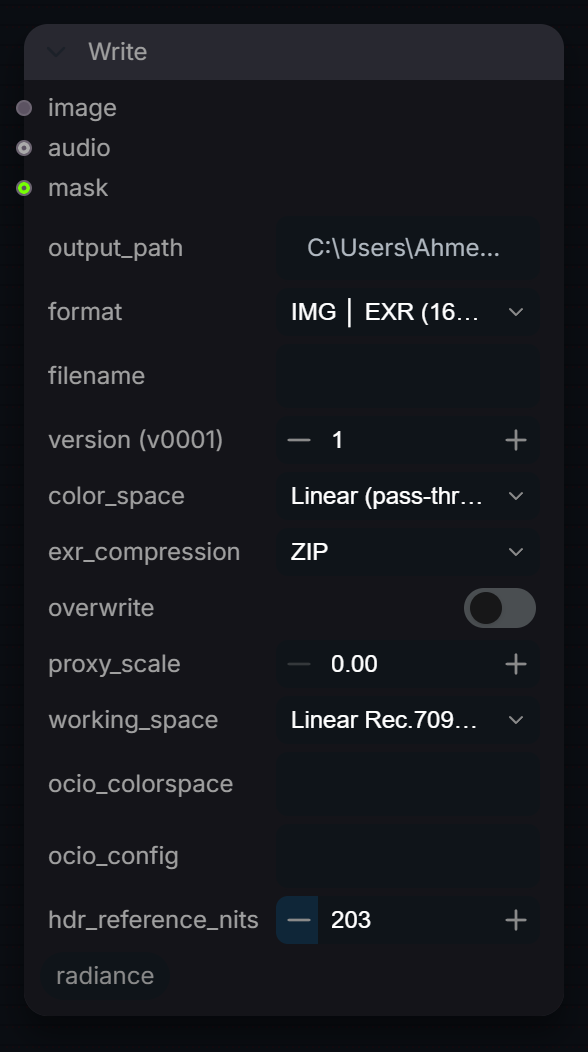
Write images or EXR sequences to disk with configurable format options.
Inputs
| Input | Type | Default | Range or choices | What it does |
|---|---|---|---|---|
image |
* | Accepts any ComfyUI output: IMAGE tensor, batched video frames, VHSor any dict/list carrying a video path. | ||
output_path |
string | ~/radiance_output |
Output directory + filename stem. Extension is appended automatically based on format. For sequences: output_path becomes a folder and frames are named |
|
format |
choice | IMG │ EXR (16-bit half) |
IMG │ PNG (8-bit), IMG │ PNG (16-bit), IMG │ JPEG, IMG │ TIFF (16-bit), IMG │ TIFF (32-bit float), IMG │ DPX, IMG │ WEBP, IMG │ EXR (16-bit half), IMG │ EXR (32-bit float), IMG │ Radiance HDR (.hdr), and 12 more |
Output format. Extension is appended automatically. |
filename (optional) |
string | Output filename stem (version appended automatically). Leave empty to use output_path as the full stem. | ||
version (optional) |
int | 1 | 0 to 9999 | Version number appended to filename (e.g. shot_001_v0001). |
color_space (optional) |
choice | Linear (pass-through) |
Linear (pass-through), sRGB, Rec.709 (BT.1886), Rec.709, Rec.2020, P3-D65 (Gamma 2.6), PQ (HDR10 / ST.2084), HLG (Hybrid Log-Gamma), Linear Rec.709 (sRGB), Linear Rec.2020, and 12 more |
File encoding: transfer AND primaries, from working_space. Linear (pass-through) writes the working values unchanged. EXR and DPX record it in their headers (chromaticities, oiio:ColorSpace); video gets primaries/transfer/matrix tags. |
fps (optional) |
float | 0 | 0 to 240, step 0.001 | Frame rate for video and sequence outputs. 0 = auto-detect from the source video (falls back to 24 if unavailable). |
quality (optional) |
int | 18 | 0 to 51 | CRF quality for H.264/H.265 (lower = better). Also JPEG quality 0–100 (remapped). |
exr_compression (optional) |
choice | ZIP |
ZIP, ZIPS, PIZ, RLE, Uncompressed, PXR24, B44, B44A, DWAA, DWAB |
EXR compression codec (EXR formats only). |
start_frame (optional) |
int | 1001 | 0 to 99999 | First frame number for sequences. |
frame_padding (optional) |
int | 4 | 1 to 8 | Zero-padding width for frame numbers (e.g. 4 → 0001). |
audio_source (optional) |
string | Path to audio file to mux into video output (optional). Takes priority over the 'audio' input when both are set. | ||
broadcast_safe (optional) |
boolean | off | 8/16-bit stills: clamp to legal range (16–235). Video is always encoded legal-range by the RGB→YUV step; float formats are never clamped. | |
overwrite (optional) |
boolean | off | Overwrite existing files. When disabled (default), a unique suffix is appended instead of destroying the existing file. | |
proxy_scale (optional) |
float | 0 | 0 to 1, step 0.05 | Downscale output by this factor for proxy preview (0 = full resolution). |
audio (optional) |
AUDIO | Audio tensor from RadianceVideoLoader (muxed into video output). | ||
mask (optional) |
MASK | Optional alpha/matte, written as the alpha channel of EXR, PNG, TIFF, DPX, WEBP and ProRes 4444. Ignored by JPEG, HDR, H.264, H.265, ProRes 422 and DNxHR, which have no alpha. | ||
working_space (optional) |
choice | Linear Rec.709 (sRGB) |
Linear Rec.709 (sRGB), ACEScg, Linear Rec.2020, Linear P3-D65, ACES2065-1 |
Scene-linear space the incoming IMAGE is in. color_space is encoded from here, primaries AND transfer. Match the Read node's working_space. |
ocio_colorspace (optional) |
string | Any colorspace name or alias from the OCIO config. When set it overrides color_space and OpenColorIO encodes the working space into it. Empty = use color_space. | ||
ocio_config (optional) |
string | Path to a config.ocio or an ocio:// URI. Empty = $OCIO, else OCIO's built-in ACES 2.0 studio config. | ||
hdr_reference_nits (optional) |
float | 203 | 48 to 1000, step 1 | PQ and HLG only: the luminance scene-linear 1.0 (diffuse white) is written at. 203 is BT.2408 and Radiance's HDR convention; 100 matches OCIO/ACES. PQ clips at 10,000 nits, HLG at about 3.8x diffuse white. |
Output node: writes or displays, no graph outputs.
Write EXR
RadianceEXRMultiPart
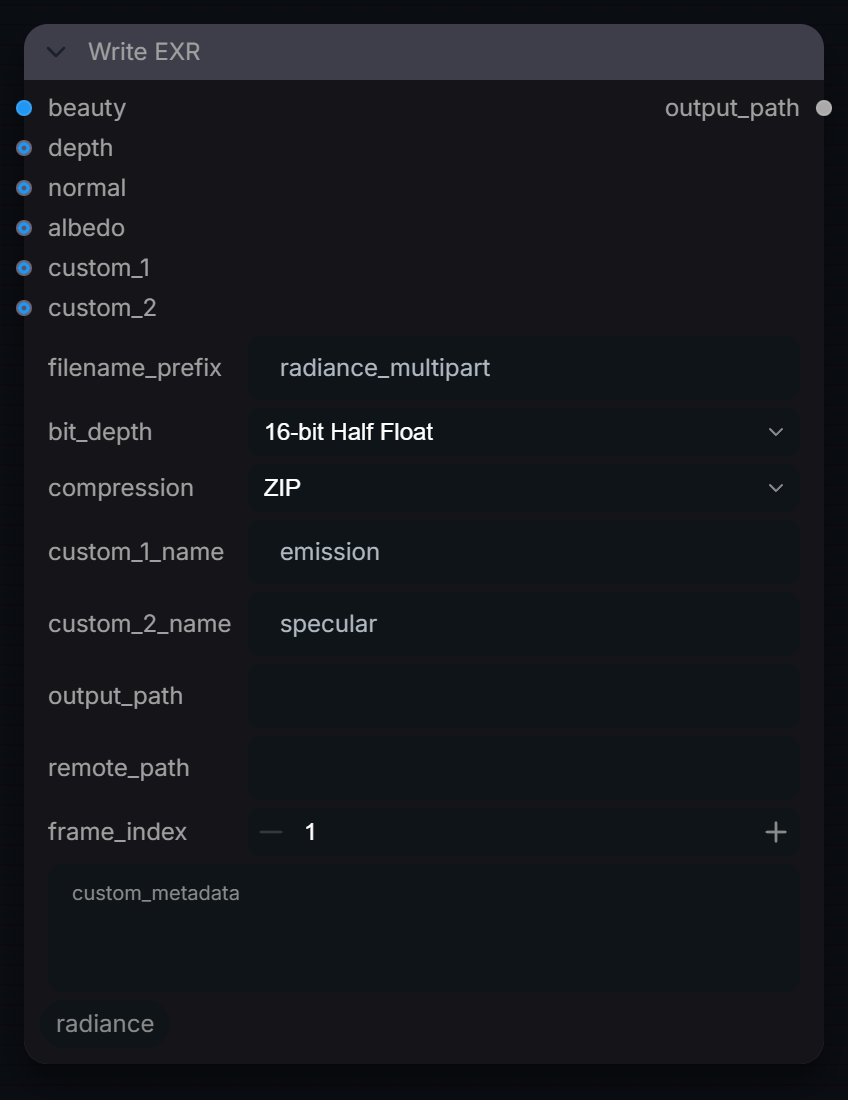
Write one multi-part OpenEXR frame with named AOV parts (beauty, depth, normal, albedo, two custom). Values are written unchanged; if multi-part output fails, one EXR per part is written.
Inputs
| Input | Type | Default | Range or choices | What it does |
|---|---|---|---|---|
filename_prefix |
string | radiance_multipart |
File name stem. The file is written as |
|
beauty |
IMAGE | Main image, written as the 'beauty' part (R, G, B, plus A if it has 4 channels). Values are written unchanged, so feed scene-linear data. Each frame of a batch is written to its own file. | ||
bit_depth |
choice | 16-bit Half Float |
16-bit Half Float, 32-bit Float |
Pixel type for every part: 16-bit half float (smaller, about 11 bits of precision) or 32-bit float. |
compression |
choice | ZIP |
ZIP, ZIPS, PIZ, RLE, Uncompressed, PXR24, B44, B44A, DWAA, DWAB |
EXR compression for every part. ZIP, ZIPS, PIZ, RLE and Uncompressed are lossless; PXR24 is lossy on 32-bit float; B44, B44A, DWAA and DWAB are lossy. |
depth (optional) |
IMAGE | Depth AOV written as a single Z channel in a 'depth' part, from the first channel (a grey depth image carries the same value in all three); values are not normalised. | ||
normal (optional) |
IMAGE | Normals AOV written as NX, NY, NZ in a 'normal' part, values unchanged (no 0-1 to -1..1 remap). | ||
albedo (optional) |
IMAGE | Albedo AOV written as albedo.R/G/B in an 'albedo' part, values unchanged. | ||
custom_1 (optional) |
IMAGE | Extra AOV written as |
||
custom_1_name (optional) |
string | emission |
Part and channel-prefix name for custom_1. Letters, digits, underscore, hyphen or dot only; anything else stops the node. | |
custom_2 (optional) |
IMAGE | Extra AOV written as |
||
custom_2_name (optional) |
string | specular |
Part and channel-prefix name for custom_2. Letters, digits, underscore, hyphen or dot only. | |
output_path (optional) |
string | Output folder. Empty writes to the ComfyUI output folder; a relative path is inside it; an absolute path is used as-is. Created if missing. | ||
remote_path (optional) |
string | Optional second folder (for example a NAS or UNC share) the finished file is copied to. A failed copy only logs a warning. | ||
frame_index (optional) |
int | 1 | Frame number of the first image in the batch, used in the file name; later frames count up from it. An AOV with one frame is used for every frame. | |
custom_metadata (optional) |
string | multi-line text | Extra header attributes, one key=value per line. Keys are stored with a 'rad_' prefix unless they are standard EXR names (owner, comments, capDate and so on). |
Outputs
| Output | Type |
|---|---|
output_path |
STRING |