Color nodes
White balance, CDL, curves, LUTs, OCIO, grades, and color checks.
18 nodes. All sections
- Apply Grade Info
- ARRI Wide Gamut 4
- Bake Viewer Grade
- CDL
- CDL Export
- CDL Import
- ColorCorrect
- ColorLookup
- DaVinci Wide Gamut
- Grade
- Grade Match
- HDR Color Convert
- HueCorrect
- LUT
- LUT Blend
- OCIO ColorSpace
- OCIO Context
- White Balance
Apply Grade Info
RadianceApplyGradeInfo
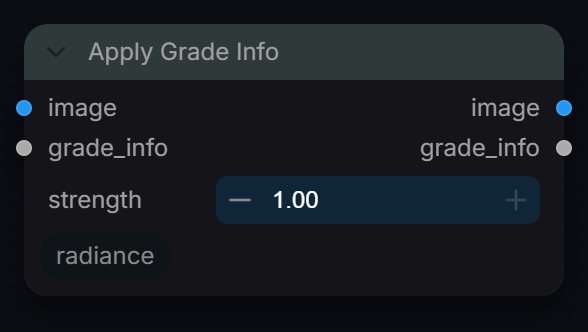
Apply a saved grade_info JSON to any image.
Inputs
| Input | Type | Default | Range or choices | What it does |
|---|---|---|---|---|
image |
IMAGE | Image to grade, processed in its own encoding (the grade is plain arithmetic, not colour-managed). Single-channel images are expanded to RGB. | ||
grade_info |
string | grade_info JSON from Radiance Grade or Grade Match (lift, gamma, gain, offset lists plus contrast, pivot, saturation). Missing keys fall back to neutral; invalid JSON passes the image through unchanged. | ||
strength (optional) |
float | 1 | 0 to 1, step 0.05 | Mix between the original image (0) and the fully graded result (1). |
Outputs
| Output | Type |
|---|---|
image |
IMAGE |
grade_info |
STRING |
ARRI Wide Gamut 4
RadianceARRIWideGamut4
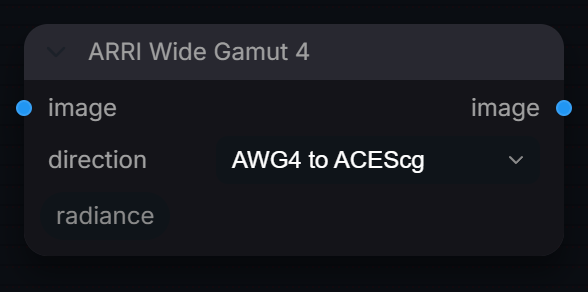
Convert to/from ARRI Wide Gamut 4 (AWG4) for Alexa 35.
Inputs
| Input | Type | Default | Range or choices | What it does |
|---|---|---|---|---|
image |
IMAGE | Linear image in the space named on the left of the chosen direction. Remove any LogC4 encoding first: this node converts primaries only. | ||
direction |
choice | AWG4 to ACEScg |
AWG4 to ACEScg, ACEScg to AWG4, AWG4 to Linear sRGB, Linear sRGB to AWG4 |
Primaries conversion to run, linear in and linear out. ACEScg options include a Bradford D65 to D60 white adaptation. |
Outputs
| Output | Type |
|---|---|
image |
IMAGE |
Bake Viewer Grade
RadianceGradeApply
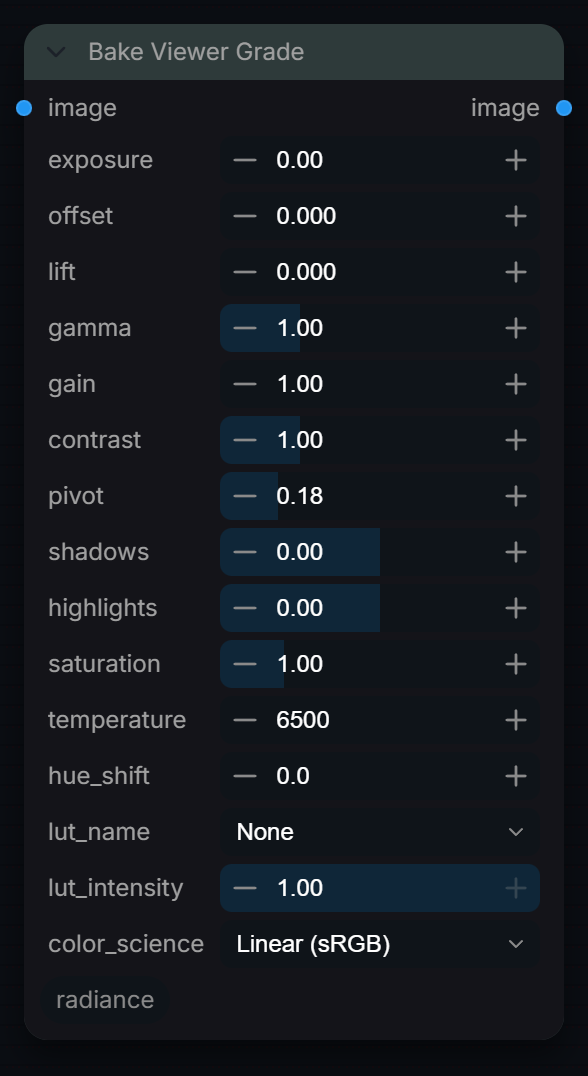
Bakes Radiance grading math into the image tensor permanently.
Inputs
| Input | Type | Default | Range or choices | What it does |
|---|---|---|---|---|
image |
IMAGE | Image to grade, treated as linear Rec.709/sRGB primaries. The result is not clamped (values above 1.0 are kept); NaN and Inf are zeroed or capped. | ||
exposure |
float | 0 | -10 to 10, step 0.01 | Exposure in stops, baked into the output: RGB is multiplied by 2^exposure before every other control. |
offset |
float | 0 | -1 to 1, step 0.001 | Additive brightness lift applied after exposure. Shifts all tones uniformly. |
lift |
float | 0 | -1 to 1, step 0.001 | Shadow lift (black point raise). Raises the darkest values without affecting highlights. |
gamma |
float | 1 | 0.01 to 4, step 0.01 | Mid-tone power curve, applied as x^(1/gamma) to positive values. Values > 1.0 brighten, < 1.0 darken the midtones. |
gain |
float | 1 | 0 to 10, step 0.01 | RGB multiplier (slope), applied after lift. 1.0 = no change. |
contrast |
float | 1 | 0 to 4, step 0.01 | Linear contrast around pivot: (x - pivot) x contrast + pivot, per channel. Not an S-curve, so values can go negative or above 1.0. |
pivot |
float | 0.18 | 0 to 1, step 0.01 | Value left unchanged by contrast. 0.18 = 18% grey in linear light. |
shadows |
float | 0 | -1 to 1, step 0.01 | Shadow brightness, no tint: RGB is scaled by 1 + 0.5 x shadows x (1 - luma)^2. Positive brightens dark areas, negative darkens them. |
highlights |
float | 0 | -1 to 1, step 0.01 | Highlight brightness, no tint: RGB is scaled by 1 + 0.5 x highlights x luma^2 (luma clipped to 1). Positive brightens bright areas, negative darkens them. |
saturation |
float | 1 | 0 to 5, step 0.01 | Global colour saturation. 1.0 = original, 0.0 = monochrome, > 1.0 = boosted. |
temperature |
float | 6500 | 2000 to 12000, step 10 | White balance in absolute Kelvin, 6500 = no change. RGB is multiplied by the blackbody colour of this temperature: lower values warm the image, higher cool it. |
hue_shift |
float | 0 | -180 to 180, step 0.1 | Global hue rotation in degrees. 0 = no change, 180 = complementary hues. |
lut_name |
choice | None |
None, sRGB (Display), Rec.709 (Broadcast), Filmic (Cinematic), Reinhard Tonemap, ACES Filmic, LogC3 (ARRI EI800), LogC4 (ARRI Alexa 35), F-Log2 (Fujifilm), C-Log3 (Canon), and 17 more |
Built-in transform applied last, after the grade: display/tone-map curves, linear-to-camera-log encodes, log-to-linear IDTs, or analysis views (False Color, Clip Check). None and the separator do nothing. |
lut_intensity |
float | 1 | 0 to 1, step 0.01 | Blend strength of the selected lut_name. 0.0 = bypass, 1.0 = full LUT application. |
color_science |
choice | Linear (sRGB) |
Linear (sRGB), ACEScct |
Space for offset, lift, gamma and gain. ACEScct converts linear sRGB to ACEScct, applies them there and converts back; the other controls stay linear. |
Outputs
| Output | Type |
|---|---|
image |
IMAGE |
CDL
RadianceCDLTransform
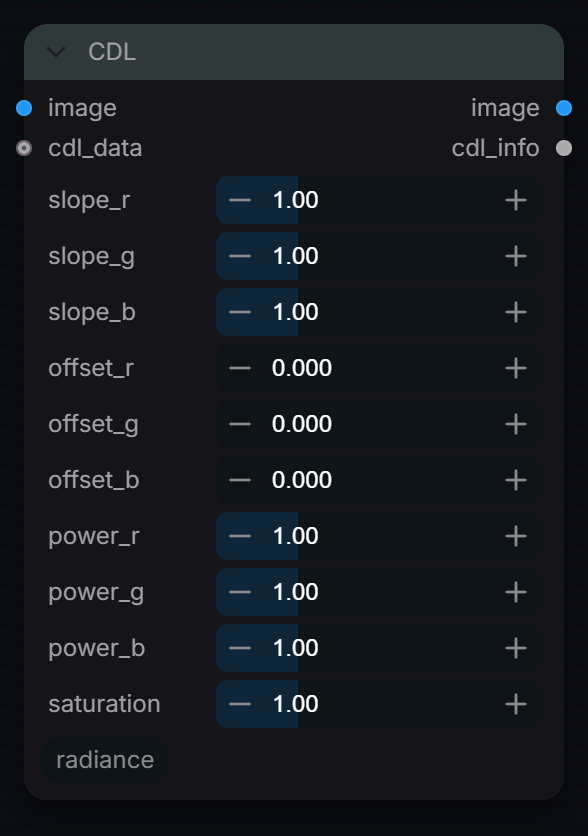
Apply an ASC CDL (Slope/Offset/Power/Saturation) colour transform.
Inputs
| Input | Type | Default | Range or choices | What it does |
|---|---|---|---|---|
image |
IMAGE | Image to grade. The CDL maths is applied to the values as they arrive (no colour space conversion), so feed it the encoding the CDL was authored in. | ||
slope_r |
float | 1 | 0 to 4, step 0.01 | Red channel slope (gain). 1.0 = unity. |
slope_g |
float | 1 | 0 to 4, step 0.01 | Green channel slope (gain). 1.0 = unity. |
slope_b |
float | 1 | 0 to 4, step 0.01 | Blue channel slope (gain). 1.0 = unity. |
offset_r |
float | 0 | -1 to 1, step 0.001 | Red channel offset. 0.0 = no shift. |
offset_g |
float | 0 | -1 to 1, step 0.001 | Green channel offset. 0.0 = no shift. |
offset_b |
float | 0 | -1 to 1, step 0.001 | Blue channel offset. 0.0 = no shift. |
power_r |
float | 1 | 0.01 to 4, step 0.01 | Red channel power (gamma). |
power_g |
float | 1 | 0.01 to 4, step 0.01 | Green channel power (gamma). |
power_b |
float | 1 | 0.01 to 4, step 0.01 | Blue channel power (gamma). |
saturation |
float | 1 | 0 to 4, step 0.01 | Global saturation. 1.0 = unity. |
cdl_data (optional) |
string | JSON CDL data from Radiance CDL Import. When connected, its slope, offset, power and saturation values replace the sliders above. |
Outputs
| Output | Type |
|---|---|
image |
IMAGE |
cdl_info |
STRING |
CDL Export
RadianceCDLExport
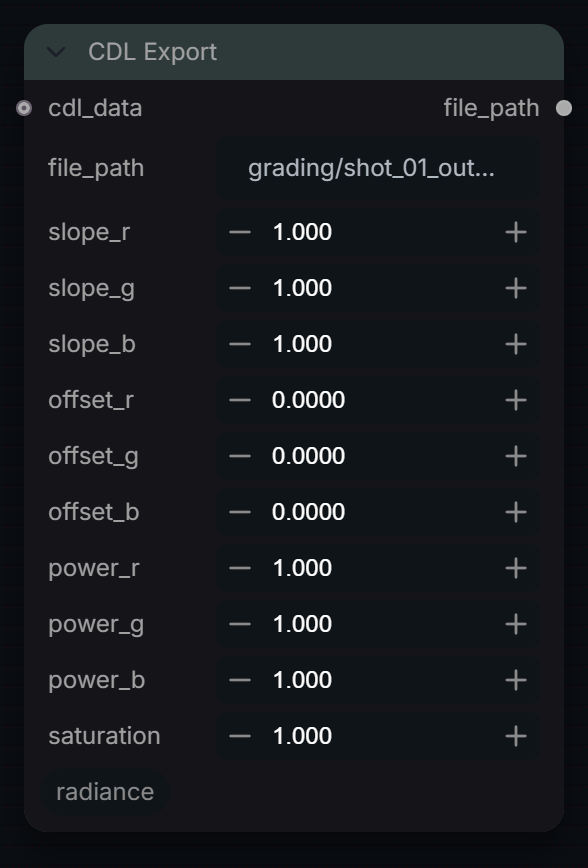
Export current CDL values to an ASC-compliant .cdl or .cc file.
Inputs
| Input | Type | Default | Range or choices | What it does |
|---|---|---|---|---|
file_path |
string | grading/shot_01_output.cdl |
Destination .cdl path. A relative path is written under ComfyUI's output/ folder; absolute paths are used as given. | |
slope_r |
float | 1 | 0 to 4, step 0.001 | Red slope (gain) written to the file. 1.0 = unity. |
slope_g |
float | 1 | 0 to 4, step 0.001 | Green slope (gain) written to the file. 1.0 = unity. |
slope_b |
float | 1 | 0 to 4, step 0.001 | Blue slope (gain) written to the file. 1.0 = unity. |
offset_r |
float | 0 | -1 to 1, step 0.0001 | Red offset written to the file. 0.0 = no shift. |
offset_g |
float | 0 | -1 to 1, step 0.0001 | Green offset written to the file. 0.0 = no shift. |
offset_b |
float | 0 | -1 to 1, step 0.0001 | Blue offset written to the file. 0.0 = no shift. |
power_r |
float | 1 | 0.01 to 4, step 0.001 | Red power (exponent) written to the file. 1.0 = unity. |
power_g |
float | 1 | 0.01 to 4, step 0.001 | Green power (exponent) written to the file. 1.0 = unity. |
power_b |
float | 1 | 0.01 to 4, step 0.001 | Blue power (exponent) written to the file. 1.0 = unity. |
saturation |
float | 1 | 0 to 4, step 0.001 | Saturation written to the file's SaturationNode. 1.0 = unity. |
cdl_data (optional) |
string | JSON CDL data (from CDL Import or the cdl_info output of CDL Transform). When connected, its values replace the sliders above. |
Outputs
| Output | Type |
|---|---|
file_path |
STRING |
CDL Import
RadianceCDLImport
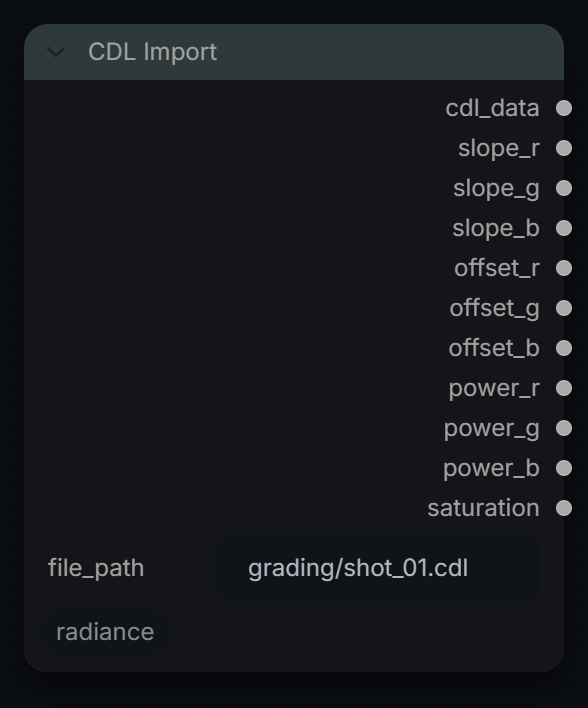
Import an ASC CDL (.cdl / .cc / .ccc) file into pipeline metadata.
Inputs
| Input | Type | Default | Range or choices | What it does |
|---|---|---|---|---|
file_path |
string | grading/shot_01.cdl |
Path to a .cdl, .cc, or .ccc file. A relative path is looked for in ComfyUI's input/ then output/ folder; absolute paths are used as given. |
Outputs
| Output | Type |
|---|---|
cdl_data |
STRING |
slope_r |
FLOAT |
slope_g |
FLOAT |
slope_b |
FLOAT |
offset_r |
FLOAT |
offset_g |
FLOAT |
offset_b |
FLOAT |
power_r |
FLOAT |
power_g |
FLOAT |
power_b |
FLOAT |
saturation |
FLOAT |
ColorCorrect
RadianceFloat32ColorCorrect
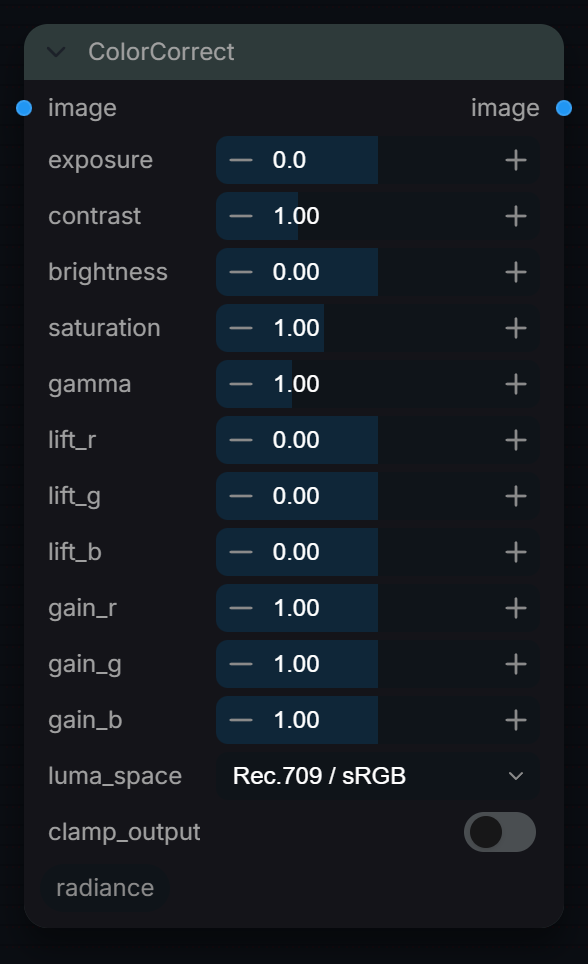
Professional 32-bit color correction with exposure, contrast, saturation, gamma, and per-channel lift/gain controls.
Inputs
| Input | Type | Default | Range or choices | What it does |
|---|---|---|---|---|
image |
IMAGE | Input image to color correct. Processed in 32-bit float precision. | ||
exposure |
float | 0 | -10 to 10, step 0.1 | Exposure adjustment in stops. +1 = double brightness, -1 = half brightness. |
contrast |
float | 1 | 0 to 4, step 0.05 | Contrast multiplier around mid-gray (0.18 in linear). >1 = more contrast, <1 = less. |
brightness |
float | 0 | -1 to 1, step 0.01 | Additive brightness offset. Applied last so it works in the final output space. |
saturation |
float | 1 | 0 to 3, step 0.05 | Color saturation. 0 = grayscale, 1 = original, >1 = boosted. |
gamma (optional) |
float | 1 | 0.1 to 4, step 0.01 | Gamma correction: values are raised to 1/gamma. >1 = brighten midtones, <1 = darken. Sign-preserving for HDR. |
lift_r (optional) |
float | 0 | -0.5 to 0.5, step 0.01 | Value added to the red channel at every level, applied first, so exposure and gain then scale it. A flat offset, not a shadow-weighted lift. |
lift_g (optional) |
float | 0 | -0.5 to 0.5, step 0.01 | Value added to the green channel at every level, applied first, so exposure and gain then scale it. A flat offset, not a shadow-weighted lift. |
lift_b (optional) |
float | 0 | -0.5 to 0.5, step 0.01 | Value added to the blue channel at every level, applied first, so exposure and gain then scale it. A flat offset, not a shadow-weighted lift. |
gain_r (optional) |
float | 1 | 0 to 2, step 0.01 | Red channel gain (multiplier). Applied after lift, before contrast. |
gain_g (optional) |
float | 1 | 0 to 2, step 0.01 | Green channel gain (multiplier). Applied after lift and exposure, before contrast. |
gain_b (optional) |
float | 1 | 0 to 2, step 0.01 | Blue channel gain (multiplier). Applied after lift and exposure, before contrast. |
luma_space (optional) |
choice | Rec.709 / sRGB |
Rec.709 / sRGB, ACEScg / AP1, Rec.2020 |
Luminance weights for saturation. Match your working colorspace. |
clamp_output (optional) |
boolean | off | Clamp output to [0,1]. OFF = HDR pass-through (preserves super-whites/negatives). |
Outputs
| Output | Type | What it is |
|---|---|---|
image |
IMAGE | Color corrected image in 32-bit float. |
ColorLookup
RadianceCurves
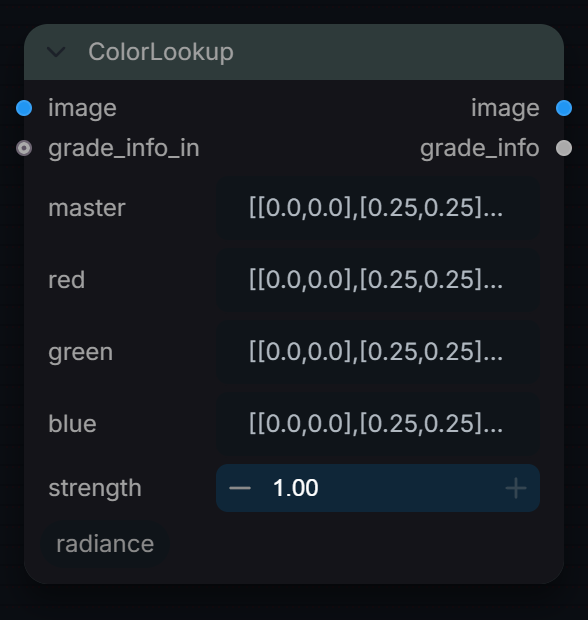
RGB curve grading with piecewise-linear control points: a master curve on all three channels, then per-channel red, green and blue curves. Values beyond the end points are extrapolated along the last segment, so HDR values are not clipped.
Inputs
| Input | Type | Default | Range or choices | What it does |
|---|---|---|---|---|
image |
IMAGE | Image to grade. Curves act on the values as they arrive, so point positions are in that encoding (0 to 1 for display-referred sRGB). | ||
master |
string | [[0.0,0.0],[0.25,0.25],[0.5,0.5],[0.75,0.75],[1.0,1.0]] |
JSON list of [in, out] points applied to R, G and B before the per-channel curves. The default diagonal is identity. | |
red |
string | [[0.0,0.0],[0.25,0.25],[0.5,0.5],[0.75,0.75],[1.0,1.0]] |
JSON list of [in, out] points for the red channel, applied after the master curve. The default diagonal is identity. | |
green |
string | [[0.0,0.0],[0.25,0.25],[0.5,0.5],[0.75,0.75],[1.0,1.0]] |
JSON list of [in, out] points for the green channel, applied after the master curve. The default diagonal is identity. | |
blue |
string | [[0.0,0.0],[0.25,0.25],[0.5,0.5],[0.75,0.75],[1.0,1.0]] |
JSON list of [in, out] points for the blue channel, applied after the master curve. The default diagonal is identity. | |
strength |
float | 1 | 0 to 1, step 0.01 | Mix between the input (0) and the fully curved result (1). |
grade_info_in (optional) |
string | Upstream grade metadata. Not used for the grade; it is stored as the 'upstream' field of the grade_info output. |
Outputs
| Output | Type |
|---|---|
image |
IMAGE |
grade_info |
STRING |
DaVinci Wide Gamut
RadianceDaVinciWideGamut
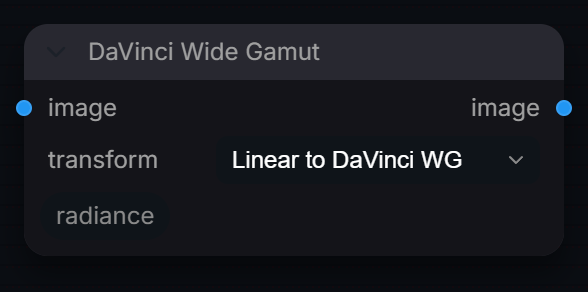
Convert to/from DaVinci Wide Gamut and DaVinci Intermediate.
Inputs
| Input | Type | Default | Range or choices | What it does |
|---|---|---|---|---|
image |
IMAGE | Image in the space named on the left of the chosen transform. 'Linear' means linear Rec.709/sRGB primaries, not display-encoded sRGB. | ||
transform |
choice | Linear to DaVinci WG |
Linear to DaVinci WG, DaVinci WG to Linear, Linear to DaVinci Intermediate, DaVinci Intermediate to Linear, DaVinci WG to ACEScg, ACEScg to DaVinci WG |
Conversion to run. The DaVinci WG options change primaries only (linear in, linear out); the Intermediate options also apply or remove the DaVinci Intermediate log curve. |
Outputs
| Output | Type |
|---|---|
image |
IMAGE |
Grade
RadianceGrade
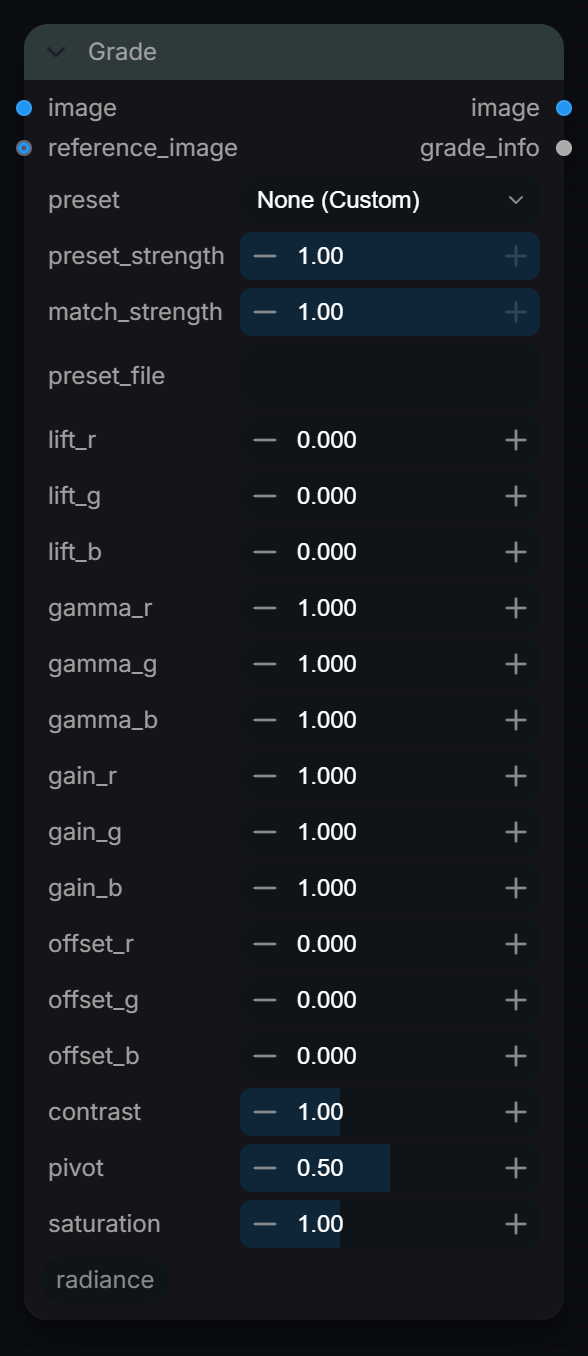
Professional color grading with per-channel Lift/Gamma/Gain/Offset, Contrast, Saturation, cinematic presets, optional grade matching, and JSON preset file loading.
Inputs
| Input | Type | Default | Range or choices | What it does |
|---|---|---|---|---|
image |
IMAGE | Input image to grade. | ||
preset |
choice | None (Custom) |
None (Custom), Cinematic Teal & Orange, Bleach Bypass, Cross Process, Film Noir, Vintage Film, Cool Blue Hour, Golden Hour, Matrix Green, High Key Bright, and 3 more |
Built-in look. Its lift/gamma/gain/offset/contrast/saturation values are blended with the manual sliders by preset_strength; pivot is not part of a preset. None (Custom) uses the sliders only. |
preset_strength |
float | 1 | 0 to 1, step 0.05 | Mix between the manual slider values (0) and the preset values (1). At 1.0 a selected preset fully replaces the manual lift/gamma/gain/offset/contrast/saturation sliders. |
reference_image (optional) |
IMAGE | Optional reference image for automatic grade matching. | ||
match_strength (optional) |
float | 1 | 0 to 1, step 0.05 | How far gain and offset are pulled toward the values derived from reference_image (0 = off, 1 = full). Only used when a reference image is connected. |
preset_file (optional) |
string | Optional path to a JSON file of presets, keyed by name, using the same fields as the built-ins. It is merged over the built-ins, so it can only redefine a preset already listed in the preset menu. | ||
lift_r (optional) |
float | 0 | -1 to 1, step 0.001 | Value added to the red channel before gain (so it is scaled by gain). A flat additive offset, not a shadow-weighted lift. |
lift_g (optional) |
float | 0 | -1 to 1, step 0.001 | Value added to the green channel before gain (so it is scaled by gain). A flat additive offset, not a shadow-weighted lift. |
lift_b (optional) |
float | 0 | -1 to 1, step 0.001 | Value added to the blue channel before gain (so it is scaled by gain). A flat additive offset, not a shadow-weighted lift. |
gamma_r (optional) |
float | 1 | 0.01 to 5, step 0.001 | Power applied to the red channel after lift, gain and offset: out = in^(1/gamma), sign preserved. Above 1.0 brightens mid-tones, below 1.0 darkens them; 1.0 is neutral. |
gamma_g (optional) |
float | 1 | 0.01 to 5, step 0.001 | Power applied to the green channel after lift, gain and offset: out = in^(1/gamma), sign preserved. Above 1.0 brightens mid-tones, below 1.0 darkens them; 1.0 is neutral. |
gamma_b (optional) |
float | 1 | 0.01 to 5, step 0.001 | Power applied to the blue channel after lift, gain and offset: out = in^(1/gamma), sign preserved. Above 1.0 brightens mid-tones, below 1.0 darkens them; 1.0 is neutral. |
gain_r (optional) |
float | 1 | 0 to 5, step 0.001 | Multiplier on the red channel, applied after lift. 1.0 is neutral, 0 is black; values above 1.0 can push HDR highlights higher. |
gain_g (optional) |
float | 1 | 0 to 5, step 0.001 | Multiplier on the green channel, applied after lift. 1.0 is neutral, 0 is black; values above 1.0 can push HDR highlights higher. |
gain_b (optional) |
float | 1 | 0 to 5, step 0.001 | Multiplier on the blue channel, applied after lift. 1.0 is neutral, 0 is black; values above 1.0 can push HDR highlights higher. |
offset_r (optional) |
float | 0 | -1 to 1, step 0.001 | Value added to the red channel after gain (not scaled by gain), shifting the whole channel up or down in the image's own encoding. |
offset_g (optional) |
float | 0 | -1 to 1, step 0.001 | Value added to the green channel after gain (not scaled by gain), shifting the whole channel up or down in the image's own encoding. |
offset_b (optional) |
float | 0 | -1 to 1, step 0.001 | Value added to the blue channel after gain (not scaled by gain), shifting the whole channel up or down in the image's own encoding. |
contrast (optional) |
float | 1 | 0 to 3, step 0.01 | Linear contrast around pivot: out = (in - pivot) * contrast + pivot, applied after gamma. 1.0 is neutral, 0 flattens everything to the pivot value. |
pivot (optional) |
float | 0.5 | 0 to 1, step 0.01 | Grey level that contrast rotates around, in the image's own encoding (0.5 suits display-referred sRGB; scene-linear mid-grey is about 0.18). |
saturation (optional) |
float | 1 | 0 to 3, step 0.01 | Saturation relative to Rec.709 luma, applied last. 1.0 is neutral, 0 is monochrome, above 1.0 increases colourfulness. |
Outputs
| Output | Type |
|---|---|
image |
IMAGE |
grade_info |
STRING |
Grade Match
RadianceGradeMatch
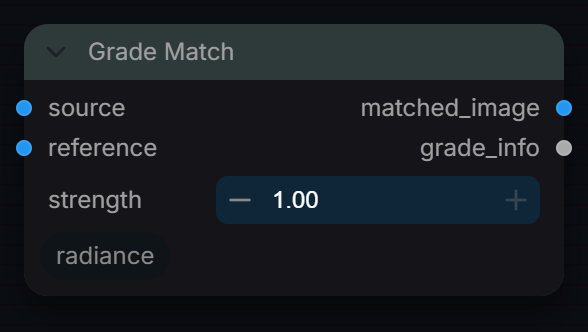
Match source image color statistics to a reference image using LAB mean/std matching.
Inputs
| Input | Type | Default | Range or choices | What it does |
|---|---|---|---|---|
source |
IMAGE | Image to be matched. | ||
reference |
IMAGE | Target image. | ||
strength |
float | 1 | 0 to 1, step 0.05 | Mix of the derived gain and offset against neutral (0 = no change, 1 = full match). The match is an approximation built from LAB mean and standard deviation. |
Outputs
| Output | Type |
|---|---|
matched_image |
IMAGE |
grade_info |
STRING |
HDR Color Convert
RadianceHDRColorConvert
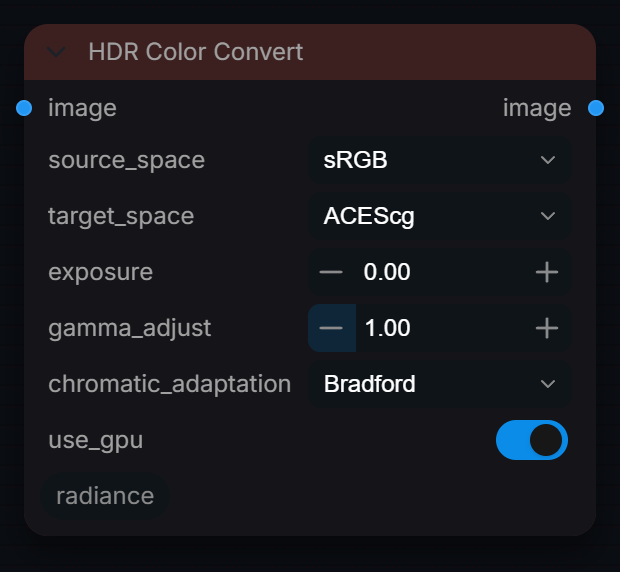
GPU-accelerated color space conversion (sRGB, ACEScg, ACEScct, Rec.2020, DCI-P3). Uses industry-standard matrices.
Inputs
| Input | Type | Default | Range or choices | What it does |
|---|---|---|---|---|
image |
IMAGE | Image encoded as source_space. | ||
source_space |
choice | sRGB |
sRGB, Linear_sRGB, ACEScg, ACEScct, ACES2065-1, Rec709, Rec2020, DCI-P3, Display_P3, DaVinci Wide Gamut, and 2 more |
Encoding of the input. sRGB and Rec709 are decoded with the sRGB curve and ACEScct with its log curve; every other option is treated as linear with those primaries. |
target_space |
choice | ACEScg |
sRGB, Linear_sRGB, ACEScg, ACEScct, ACES2065-1, Rec709, Rec2020, DCI-P3, Display_P3, DaVinci Wide Gamut, and 2 more |
Encoding of the output. sRGB and Rec709 get the sRGB curve and ACEScct its log curve; every other option is written linear with those primaries. |
exposure (optional) |
float | 0 | -10 to 10, step 0.01 | Exposure adjustment in stops (EV) |
gamma_adjust (optional) |
float | 1 | 0.1 to 5, step 0.01 | Gamma adjustment (1.0 = no change) |
chromatic_adaptation (optional) |
choice | Bradford |
Bradford, Von Kries, XYZ Scaling, None |
Chromatic adaptation method. NOTE: the D60<->D65 adaptation is already baked into the precomputed FAST_MATRICES this node converts with (Bradford), so changing this does not currently alter the output. Kept for workflow compatibility; selecting a non-Bradford method logs a warning. |
use_gpu (optional) |
boolean | on | Run the effect on GPU via CUDA/MPS. Falls back to CPU if unavailable. |
Outputs
| Output | Type |
|---|---|
image |
IMAGE |
HueCorrect
RadianceHueCurves
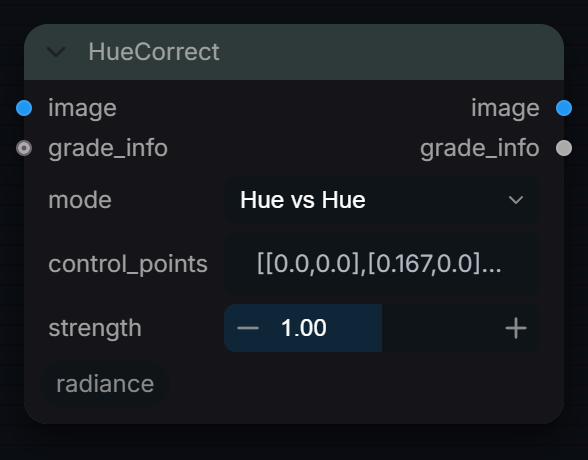
Per-hue selective colour adjustment: a piecewise-linear curve over hue shifts hue, saturation or lightness of the colours it targets. HDR values above 1.0 are scaled down for the HSL maths and restored afterwards.
Inputs
| Input | Type | Default | Range or choices | What it does |
|---|---|---|---|---|
image |
IMAGE | Image to adjust, RGB in any encoding. Pixels with luma above 1.0 are normalised for the HSL conversion and rescaled afterwards. | ||
mode |
choice | Hue vs Hue |
Hue vs Hue, Hue vs Saturation, Hue vs Luminance |
What the curve's output changes for each input hue: hue rotation, HSL saturation, or HSL lightness. |
control_points |
string | [[0.0,0.0],[0.167,0.0],[0.333,0.0],[0.5,0.0],[0.667,0.0],[0.833,0.0],[1.0,0.0]] |
JSON list of [hue, amount] points, hue 0 to 1 (0 red, 0.333 green, 0.667 blue, 1 red again). Amount is added: hue shift in turns, or a saturation or lightness delta; 0 everywhere (the default) changes nothing. | |
strength |
float | 1 | 0 to 2, step 0.01 | Multiplier on the curve's amounts. 0 = no change, 1 = as drawn, 2 = doubled. |
grade_info (optional) |
string | Upstream grade metadata. Not used for the adjustment; stored as the 'upstream' field of the grade_info output. |
Outputs
| Output | Type |
|---|---|
image |
IMAGE |
grade_info |
STRING |
LUT
RadianceLUTApply
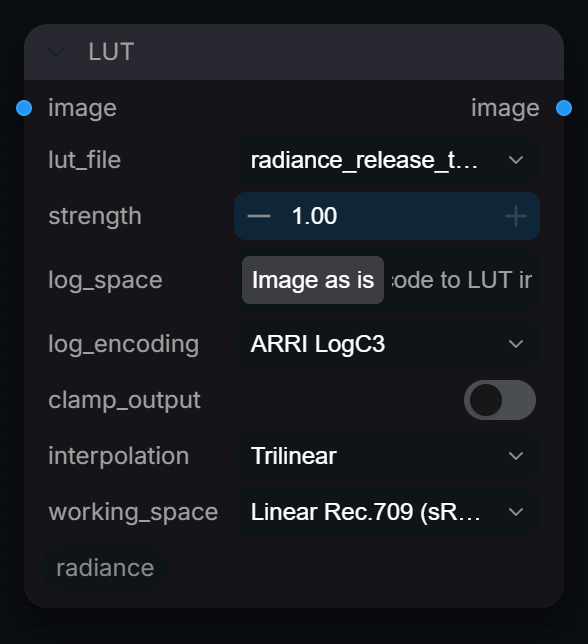
Apply a 3D LUT (.cube) with trilinear or tetrahedral interpolation. Encodes a scene-linear image into the LUT's input (LogC, S-Log3, ACEScct...) when asked, and keeps HDR (unclamped) output.
Inputs
| Input | Type | Default | Range or choices | What it does |
|---|---|---|---|---|
image |
IMAGE | Image to transform. Values should be in the encoding the LUT expects; anything outside the LUT's DOMAIN_MIN/MAX (0 to 1 by default) is clamped to its edge before lookup. | ||
lut_file |
choice | No LUTs found |
3D .cube LUT from ComfyUI's models/luts folder. | |
strength |
float | 1 | 0 to 1, step 0.01 | Mix between the original image (0) and the full LUT result (1). |
log_space |
boolean | off | On: the image is scene-linear (in working_space) and is encoded into log_encoding, the input the LUT was built for, before the lookup. Use this for show and camera LUTs such as LogC3 to Rec.709. Off: the pixels go into the LUT unchanged, for an image already in the LUT's input space. | |
log_encoding (optional) |
choice | ARRI LogC3 |
ARRI LogC3, ARRI LogC4, Sony S-Log3, Panasonic V-Log, RED Log3G10, Canon Log 3, DaVinci Intermediate, ACEScct, sRGB, Rec.709 (BT.1886), and 6 more |
The encoding the LUT expects as input (camera log, ACEScct, sRGB, PQ...). Used when log_space is on. |
clamp_output (optional) |
boolean | off | Clamp to 0-1. Disable for HDR. | |
interpolation (optional) |
choice | Trilinear |
Trilinear, Tetrahedral |
LUT interpolation between grid points. Tetrahedral is more accurate on hue and neutral axes but slightly slower. |
working_space (optional) |
choice | Linear Rec.709 (sRGB) |
Linear Rec.709 (sRGB), ACEScg, Linear Rec.2020, Linear P3-D65, ACES2065-1 |
The linear space the image is in, used when log_space is on to reach the LUT's input primaries. |
Outputs
| Output | Type |
|---|---|
image |
IMAGE |
LUT Blend
RadianceLUTBlend
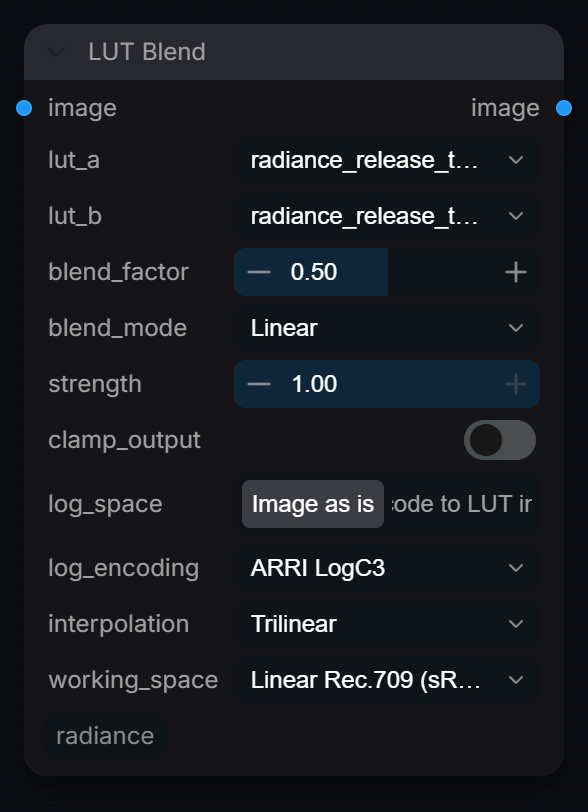
Blend two LUTs with various blend modes for creative color grading.
Inputs
| Input | Type | Default | Range or choices | What it does |
|---|---|---|---|---|
image |
IMAGE | Image to transform through both LUTs. Values outside each LUT's domain are clamped to its edge before lookup. | ||
lut_a |
choice | No LUTs found |
First .cube LUT from models/luts. It is the base look: the non-Linear modes keep its luminance or chroma. | |
lut_b |
choice | No LUTs found |
Second .cube LUT from models/luts, blended towards by blend_factor. | |
blend_factor |
float | 0.5 | 0 to 1, step 0.01 | 0.0 = LUT A only, 1.0 = LUT B only |
blend_mode |
choice | Linear |
Linear, Luminosity, Saturation, Hue |
Linear: mix the two results. Luminosity: A's colour with mixed luminance. Saturation: mixed chroma at A's luminance. Hue: mixed chroma direction with A's chroma amount and luminance. |
strength (optional) |
float | 1 | 0 to 1, step 0.01 | Mix between the original image (0) and the blended LUT result (1). |
clamp_output (optional) |
boolean | off | Clamp to 0-1. Disable for HDR. | |
log_space (optional) |
boolean | off | On: the image is scene-linear (in working_space) and is encoded into log_encoding, the input both LUTs were built for, before the lookups. Off: the pixels go into the LUTs unchanged. | |
log_encoding (optional) |
choice | ARRI LogC3 |
ARRI LogC3, ARRI LogC4, Sony S-Log3, Panasonic V-Log, RED Log3G10, Canon Log 3, DaVinci Intermediate, ACEScct, sRGB, Rec.709 (BT.1886), and 6 more |
The encoding both LUTs expect as input (camera log, ACEScct, sRGB, PQ...). Used when log_space is on. |
interpolation (optional) |
choice | Trilinear |
Trilinear, Tetrahedral |
LUT interpolation used for both lookups. Tetrahedral is more accurate but slightly slower. |
working_space (optional) |
choice | Linear Rec.709 (sRGB) |
Linear Rec.709 (sRGB), ACEScg, Linear Rec.2020, Linear P3-D65, ACES2065-1 |
The linear space the image is in, used when log_space is on to reach the LUTs' input primaries. |
Outputs
| Output | Type |
|---|---|
image |
IMAGE |
OCIO ColorSpace
RadianceColorSpaceConvert
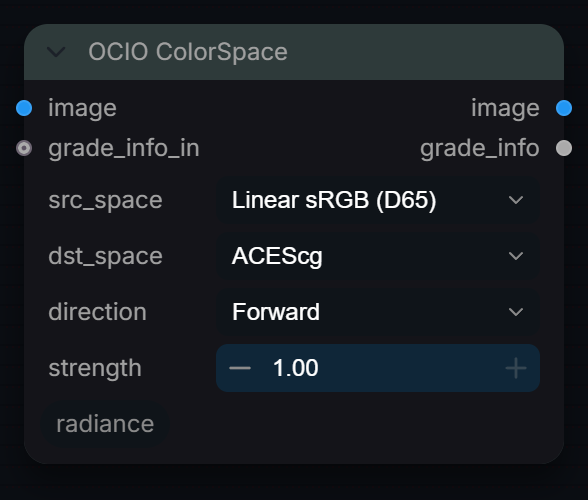
Convert pixel values between working, display and camera-log colour spaces via a Rec.709-primaries linear intermediate (OCIO for the non-log spaces when a config is loaded). Camera logs are transfer curves only, no gamut change.
Inputs
| Input | Type | Default | Range or choices | What it does |
|---|---|---|---|---|
image |
IMAGE | Image encoded in src_space (or in dst_space when direction is Inverse). | ||
src_space |
choice | Linear sRGB (D65) |
Linear sRGB (D65), ACEScg, ACEScc, ACEScct, sRGB (OETF encoded), Rec.709 (OETF encoded), Rec.709 / BT.1886, LogC3 (ARRI EI800), LogC4 (ARRI Alexa 35), F-Log2 (Fujifilm), and 6 more |
Encoding of the input. Camera-log choices decode the log curve only and keep Rec.709 primaries; ACES choices also convert AP1 primaries. |
dst_space |
choice | ACEScg |
Linear sRGB (D65), ACEScg, ACEScc, ACEScct, sRGB (OETF encoded), Rec.709 (OETF encoded), Rec.709 / BT.1886, LogC3 (ARRI EI800), LogC4 (ARRI Alexa 35), F-Log2 (Fujifilm), and 6 more |
Encoding to convert to. Camera-log choices apply the log curve only, on Rec.709 primaries. |
direction |
choice | Forward |
Forward, Inverse |
Forward converts src_space to dst_space. Inverse swaps them (dst_space to src_space). |
strength |
float | 1 | 0 to 1, step 0.01 | Mix between input and converted pixel values (0 = input, 1 = full conversion). The mix is done on the raw values of two different encodings. |
grade_info_in (optional) |
string | Optional grade_info JSON from an upstream node. Only recorded as "upstream" in this node's info output; it does not change the image. |
Outputs
| Output | Type |
|---|---|
image |
IMAGE |
grade_info |
STRING |
OCIO Context
RadianceOCIOContext
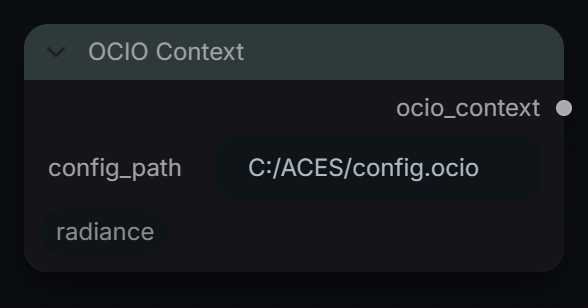
Load an OpenColorIO config into Radiance's shared OCIO manager for this session. Color Space Convert uses it for the working and display spaces; wire ocio_context into it to be sure the config is loaded first.
Inputs
| Input | Type | Default | Range or choices | What it does |
|---|---|---|---|---|
config_path |
string | C:/ACES/config.ocio |
Path to a config.ocio file. A relative path is looked for in ComfyUI's input/ then output/ folder. The loaded config replaces the session-wide one until another is loaded. |
Outputs
| Output | Type | What it is |
|---|---|---|
ocio_context |
RADIANCE_OCIO | The loaded config (path and name). Optional input of Color Space Convert. |
White Balance
RadianceWhiteBalance
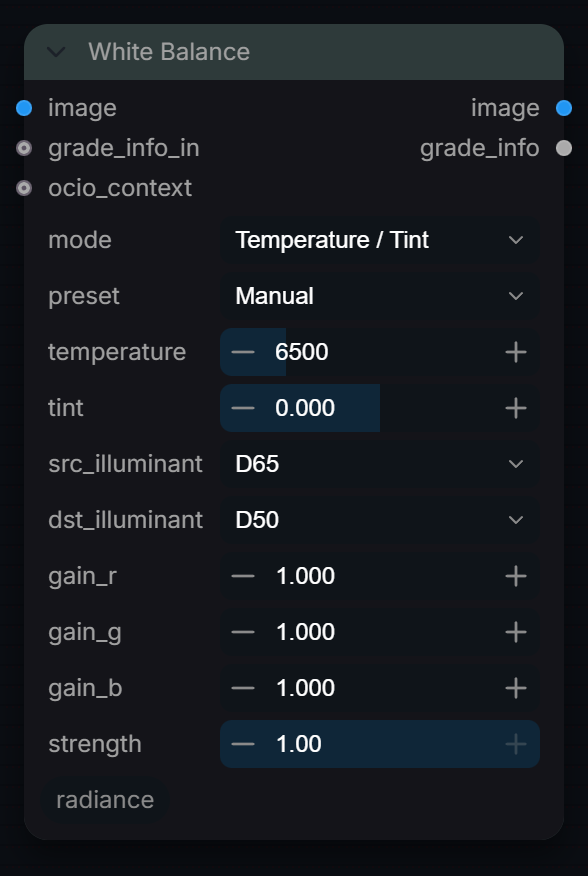
Shift white balance of a linear image by colour temperature and tint, a Bradford illuminant adaptation, or per-channel RGB gains. Use it on scene-linear plates; it does not sample a neutral from the image.
Inputs
| Input | Type | Default | Range or choices | What it does |
|---|---|---|---|---|
image |
IMAGE | RGB image to rebalance, scene-linear (Rec.709 primaries). Apply to linear data, not display-encoded sRGB. | ||
mode |
choice | Temperature / Tint |
Temperature / Tint, Illuminant Adapt, Manual RGB Gain |
Temperature / Tint: adapt from D65 to a Kelvin white plus a green/magenta tint. Illuminant Adapt: Bradford from src to dst illuminant. Manual RGB Gain: multiply channels. |
preset |
choice | Manual |
Manual, Daylight (5500K), Tungsten (3200K), Fluorescent (4200K), Flash (6000K), Shade (7500K) |
Replaces temperature with a preset Kelvin value. Only used in Temperature / Tint mode; Manual uses the temperature slider. |
temperature |
float | 6500 | 1667 to 25000, step 50 | Target white in Kelvin (Planckian locus), adapted from D65. Lower values warm the image, higher values cool it; 6500 is close to neutral. Temperature / Tint mode only. |
tint |
float | 0 | -1 to 1, step 0.005 | Green channel gain of 2^(-tint/2): positive adds magenta, negative adds green, +/-1 = half a stop. Temperature / Tint mode only. |
src_illuminant |
choice | D65 |
D50, D55, D60, D65, D75, A, B, C, E |
White point the image was balanced for (CIE standard illuminant). Illuminant Adapt mode only. |
dst_illuminant |
choice | D50 |
D50, D55, D60, D65, D75, A, B, C, E |
White point to adapt to with the Bradford transform. Illuminant Adapt mode only. |
gain_r |
float | 1 | 0 to 4, step 0.001 | Linear red multiplier, 1 = unchanged. Manual RGB Gain mode only. |
gain_g |
float | 1 | 0 to 4, step 0.001 | Linear green multiplier, 1 = unchanged. Manual RGB Gain mode only. |
gain_b |
float | 1 | 0 to 4, step 0.001 | Linear blue multiplier, 1 = unchanged. Manual RGB Gain mode only. |
strength |
float | 1 | 0 to 1, step 0.01 | Linear mix between the original (0) and the corrected image (1). |
grade_info_in (optional) |
string | Optional grade_info JSON from an upstream node. Only recorded as "upstream" in this node's info output; it does not change the image. | ||
ocio_context (optional) |
RADIANCE_OCIO | From OCIO Context. Makes sure that config is loaded (and loaded first) before this node converts. |
Outputs
| Output | Type |
|---|---|
image |
IMAGE |
grade_info |
STRING |